

The Art of Micro Interactions: Code Details That Feel Premium

The structural distinction between an amateur digital interface and a world-class enterprise platform rarely comes down to macro layouts. Both can feature clean column grids, similar color balances, and standard navigation menus. The real disparity lies in the execution of transient states—the subtle, tactile animations, reactive input fields, and instantaneous feedback loops known as micro-interactions. These micro-moments validate user behavior, reduce cognitive load, and transform a routine digital transaction into a premium, memorable brand experience.
When a visitor clicks an interactive element, inputs data into a form field, or expands a mobile drawer menu, they expect immediate physical confirmation. If the interface responds with a harsh, instantaneous layout snap or suffers from a delayed processing hitch, it triggers subconscious user resistance. This visual friction signals to your target customer that your digital infrastructure is unpolished, causing them to exit your platform early and directly inflating your acquisition costs.
To build an authoritative brand presence, digital application architecture must move past static presentation and prioritize motion engineering. Implementing premium interactive details requires a deep alignment between design systems and front-end code execution. By engineering responsive, hardware-accelerated feedback loops natively within your platform's base stylesheets, you elevate your company's perceived value and build a highly responsive environment that keeps users engaged.
The Four Structural Pillars of Interactive Motion
Every effective micro-interaction functions as a closed loop of communication between the consumer and your software application. To ensure these details feel premium rather than distracting, your technical teams must design them using a highly disciplined behavioral model.
1. The Operational Trigger
An operational trigger initiates the interactive sequence, functioning as the gatekeeper for the animation loop. Triggers can be user-initiated—such as hovering over a data card, clicking a submission button, or pulling to refresh a feed on a smartphone display. Alternatively, they can be system-initiated, where the application automatically pushes a contextual notification badge onto the viewport when a background download completes.
2. The Behavioral Rules
The rules of a micro-interaction define what occurs once the trigger is tripped, establishing the precise parameters of the interactive sequence. These parameters dictate how elements move, which layout variables change, and how data maps to the screen during the transition. For a premium experience, these rules must remain invisible to the consumer, enforcing natural physical behaviors that mimic real-world kinetic properties.
3. The Sensory Feedback
Feedback provides the direct visual, auditory, or haptic confirmation that the software has recognized the user's input. In corporate web architecture, this feedback is primarily visual, executed through subtle changes in opacity, color transitions, layout elevations, or micro-typographic shifts. The feedback must occur almost instantly to prevent users from double-clicking buttons out of confusion.
4. Loops and Evolving Modes
Loops define the structural duration and repetition behaviors of the micro-interaction, determining how the element resets over time. For example, an interactive action button might execute a brief, elegant pulse when a cursor hovers near it, but that animation should immediately cycle down to a stable state to avoid causing visual clutter or user distraction.
Performance Overhead: Why Custom Code Outperforms Visual Engines
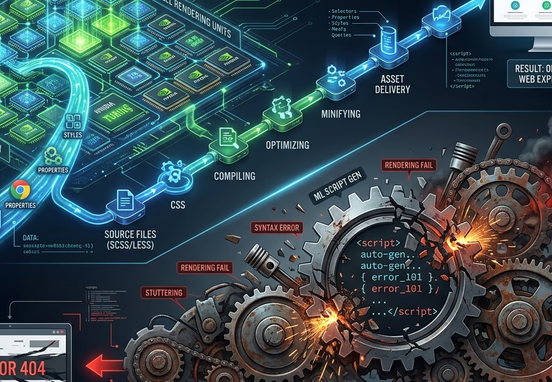
Many growing companies fall into the trap of using mass-market theme setups and drag-and-drop page engines to build out their visual interfaces. While these tools allow non-technical teams to add animations quickly, they do so by loading heavy, uncoordinated background JavaScript plugins and massive external animation frameworks on every page load. This code weight slows down your site's rendering speed, hurting your search engine positions.
To ensure your interactive states render smoothly at 60 frames per second even on lower-powered mobile devices, your platform must eliminate third-party animation extensions completely. Relying on an enterprise-grade clean, hand-coded web architecture over page builders ensures your interactions run natively in the browser without processing heavy scripts. This clean coding method keeps your platform fast, secure, and highly competitive, avoiding the optimization bottlenecks highlighted in our breakdown of how design-first tools perform under strict speed tests.
=========================================
      INTERACTIVE RENDERING FLOWS
=========================================

[PATH A: PAGE BUILDER ENGINE]
  +-----------------------+
  |  Page Builder Engine  |
  +-----------+-----------+
              |
              v
  +-----------------------+
  | Load Heavy Scripts    |
  +-----------+-----------+
              |
              v
  +-----------------------+
  | Main Thread Lockup    |
  +-----------+-----------+
              |
              v
  +-----------------------+
  | Rendering Stutter &   |
  | High User Drop-offs   |
  +-----------------------+

[PATH B: CUSTOM CODED CSS]
  +-----------------------+
  |   Custom Coded CSS    |
  +-----------+-----------+
              |
              v
  +-----------------------+
  | GPU Accelerated Path  |
  +-----------+-----------+
              |
              v
  +-----------------------+
  | Composite Layer Paint |
  +-----------+-----------+
              |
              v
  +-----------------------+
  | Fluid 60fps & Premium |
  | UX (Core Web Vitals)  |
  +-----------------------+
When custom animations bypass heavy script processing and run directly on the device's graphics hardware, browser rendering lag drops to zero. This technical optimization directly prevents the layout shifts and loading drops common to unoptimized templates, keeping your core performance signals remarkably positive. Resolving these performance bugs is essential for protecting your site's ranking potential, a reality analyzed in our guide on Core Web Vitals and page speed vulnerabilities, which outlines how infrastructure latency kills local business revenue.
Structural Comparison: Execution Methods and Technical Profiles
To maximize the efficiency of your web investments, your technical leadership must understand how choice of code architecture dictates long-term performance and maintenance parameters.
| Interactive Technical Metric | Automated Page Builder Implementations | Premium Custom-Coded CSS Implementations |
|---|---|---|
| Browser Rendering Engine | Relies on heavy JavaScript engines that block the main thread | Runs natively on the GPU using composite CSS layers |
| Asset Payload Impact | Adds hundreds of kilobytes of unused animation scripts | Zero extra overhead; written directly into base stylesheets |
| Cross-Device Fluidity | Prone to erratic stutters and layout bugs on mobile screens | Consistently smooth across all smartphone screen widths |
| Long-Term System Safety | High risk; third-party plugins require constant security patches | Absolute stability; zero external software dependencies |
| Crawl Engine Compatibility | Heavy script wrappers block search bots from reading code | Clean semantic markup allows instant crawl path indexing |
The Mathematics of Premium Motion: Easing Patterns and Timing
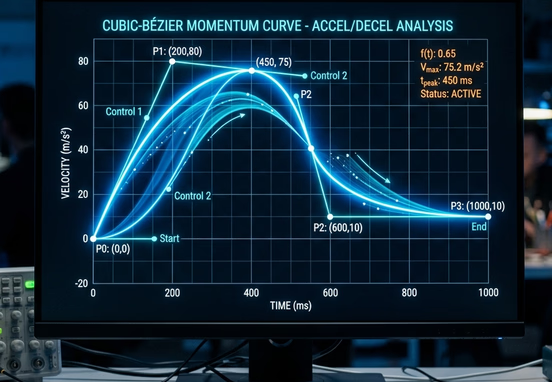
The difference between a cheap-looking animation and a premium interactive state comes down to the mathematical timing curves that govern the movement. In nature, physical objects never start moving at full velocity instantly, nor do they come to a sudden, rigid stop. Linear animations—where an element moves at a completely constant speed across a screen—feel artificial, robotic, and unpolished to the human eye.
To create an interface that feels intuitive and high-end, your development teams must implement custom cubic-bezier easing functions. These mathematical curves allow interactive elements to accelerate rapidly upon user input and decelerate smoothly as they reach their final position. This mimics natural physical momentum, reducing visual friction and making the entire interface feel highly responsive.
To see how a custom-coded framework deploys high-performance, fluid interactive elements, look at how an expert configures a premium card interface transition. The engineer writes clean, hardware-accelerated CSS variables that handle easing without using a single line of JavaScript code:
==============================================================
              PREMIUM CARD INTERACTION LIFECYCLE
==============================================================

  +-------------------------------------------------------+
  |                 DEFAULT INTERFACE STATE               |
  |  - Element: .corporate-service-card                   |
  |  - Elevation: translateY(0)                           |
  |  - Shadow: Subtle blur (0 4px 6px -1px rgba(0,0,0,5%))|
  |  - Optimization Layer: pre-allocated via will-change  |
  +-------------------------------------------+-----------+
                          |
                          | [Event Trigger: Hover]
                          v
  +-------------------------------------------------------+
  |              TRANSITION ENGINES INTERPOLATE           |
  |  - Duration: 250ms Speed Window                       |
  |  - Curve: cubic-bezier(0.16, 1, 0.3, 1)               |
  |  - Hardware Command: Native GPU Rasterization Layer   |
  +-------------------------------------------+-----------+
                          |
                          | [Kinetic Acceleration Flow]
                          v
  +-------------------------------------------------------+
  |                  PREMIUM TARGET STATE                 |
  |  - Elevation: Shifted via translateY(-6px)           |
  |  - Shadow: Deep Ambient (0 20px 25px -5px rgba(...))  |
  |  - Aesthetics: Transition to Accent Color (#0d9488)   |
  +-------------------------------------------------------+
This disciplined code implementation ensures that your interactive assets scale smoothly across all mobile devices, eliminating visual bugs and ensuring a premium user experience. Relying on unoptimized visual engines or bloated layouts creates an ongoing cycle of system bugs and high overhead fees. Many expanding operations fall into this trap by using unoptimized frameworks, resulting in the compounding hidden costs of DIY platforms and templates that stall corporate growth and break layout stability.
Conversion Engineering: Lowering Customer Acquisition Costs
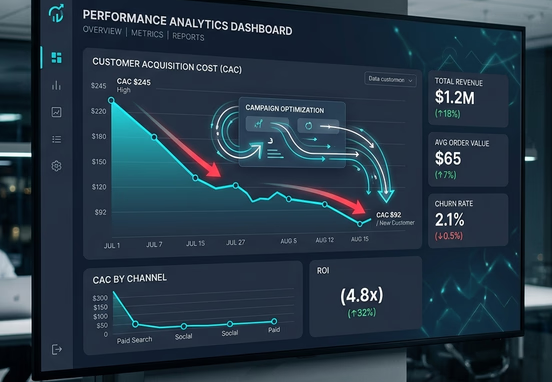
Ensuring your transactional layouts move with absolute fluidity directly increases your business performance metrics. When an interactive pipeline feels responsive, users stay focused and experience significantly less friction as they complete key actions. This visual polish builds deep brand authority, encouraging visitors to move through your sales pipelines efficiently.
By eliminating interface latency and implementing intuitive interaction loops, your brand creates a comfortable environment that maximizes user interactions. Investing in specialized user experiences is a proven strategy for improving marketing returns and scaling conversions, as detailed in our analysis of how great user experience lowers customer acquisition costs.
+------------------------+      +--------------------------+
| Tactile Feedback Loops | ---► | Lower Cognitive Friction |
+------------------------+      +------------+-------------+
                                             |
                                             v
+------------------------+      +--------------------------+
| Improved Lead Form     | ◄--- | Higher Session Retention |
| Completion Performance |      +--------------------------+
+-----------+------------+
            |
            v
+------------------------+
|    Lower Overall CAC    |
+------------------------+
Every interactive element on your site must actively support your primary value propositions. Combining smooth interactive animations with high-converting website copy architecture ensures your landing elements capture user attention and drive transactions effortlessly. This calculated combination turns standard web pages into highly effective conversion channels.
Operational Motion Duration Guideline: To maintain an elite user state, desktop micro-interactions should complete their animations within 150 to 250 milliseconds. Mobile animations must move faster, concluding within 100 to 150 milliseconds to account for faster thumb gestures and prevent the interface from feeling sluggish over standard wireless data networks.
For a web asset to deliver elite performance, every element must support a focused conversion strategy. This clarity is especially critical for single-page promotions and high-intent sales funnels. Integrating clean functional code loops inside high-converting landing page layouts ensures that psychological design principles and technical execution work together perfectly to lower bounce rates and boost your overall campaign conversion volumes.
Actionable Blueprint for Premium Interaction Deployment
Building a cohesive, responsive digital presence requires an actionable optimization plan to audit and enhance your site's transient states.
- Streamline Contact Input Fields: Inject subtle visual focus indicators that expand smoothly when a text row is selected, giving users clear confirmation of their current cursor placement.
- Optimize Form Feedback Signals: Reframe standard confirmation messages with custom inline micro-animations that validate correct data entries instantly, preventing data entry confusion.
- Engineer Interactive Navigation Menus: Replace rigid dropdown boxes with custom, fluid drawer panels that glide onto the screen seamlessly without layout jitter.
- Deploy Smooth Loading Previews: Transition from generic loading spinners to custom skeletal layouts that preview content skeletons, keeping users engaged while data loads.
Choosing to launch an enterprise asset on amateur foundations creates serious technical limitations that block long-term growth. These technical issues share close structural similarities with the systemic failures discovered when companies cut corners during initial system builds. To avoid these common technical roadblocks, review our analysis of the hidden dangers of letting a relative build your business site, which outlines how amateur-tier technical execution ruins commercial scaling.
Investing in your digital presence from the start ensures your platforms remain secure, fast, and highly scalable. Securing expert software engineering guarantees your primary channels are built to protect data integrity and maximize conversions. By deploying highly optimized, custom-engineered web design and development services, your organization eliminates unexpected technical debt and builds a resilient digital footprint that drives sustainable, long-term market growth.