

Custom Website vs Weebly: Why Template Software Destroys Local SEO Rankings

Many local business owners fall into the same trap. You need a website, so you look for the fastest, cheapest option available. Software platforms like Weebly promise a complete website in an afternoon for the price of a few cups of coffee. They show you beautiful templates, tell you that no coding skills are required, and give you a simple drag-and-drop screen.
It sounds like a perfect deal. But for a local business trying to rank on the first page of Google, this convenience comes with a massive hidden cost.
When you use a template builder, you are renting space on a generic platform. You do not own the underlying framework. More importantly, these systems are built for mass appeal, not for high performance. They are designed to let anyone throw elements onto a screen without breaking the page. To make that possible, the software relies on a massive, heavy foundation of hidden code.
To Google, your website looks like a cluttered, slow mess. While your site might look decent to the human eye, search engine robots see a digital roadblock. For local businesses relying on search traffic to get phone calls, bookings, and foot traffic, this structural failure is devastating.
What Is Local SEO and Why Does It Matter to Your Business?
Before looking at why template software fails, you need to understand how local search engine optimization (SEO) actually works. Traditional SEO focuses on ranking across the entire internet. Local SEO focuses on capturing customers in your specific geographic area.
When someone searches for "plumber near me" or "roofing contractor in [City Name]," Google uses a highly specific set of rules to decide which businesses show up at the top.
- Proximity: How close is your business to the person searching?
- Relevance: Does your website clearly state exactly what you do and where you do it?
- Prominence: Is your business well-known, fast, trusted, and easy for search engines to read?
Google wants to give its users the absolute best experience. If your website takes too long to load, confuses the search engine robots, or fails to display correctly on a mobile phone, Google will push your listing down.
In local business, ranking in the top three spots (the "Local Pack") means survival. If your website is buried on page two or three because of the software you used to build it, your competitors will take all your leads.
Reason 1: The Invisible Anchor—Bloated Code and Slow Load Times
The biggest problem with drag-and-drop template builders is something you cannot see without looking at the source code. It is called code bloat.
When a professional developer builds a custom website, they write clean lines of code designed to do exactly what your website needs—nothing more, nothing less.
When you use Weebly, the platform has to prepare for every single scenario. The template must be ready in case you want to add a store, a video gallery, a calendar, or a pop-up box. Even if you do not use those features, the heavy code required to run them is still loaded in the background of your website.
Why Code Bloat Kills Local Rankings
The Digital Grocery Cart Analogy: Imagine going to the grocery store with a tiny list of three items, but you are forced to push a massive, heavy industrial flatbed cart instead of a small basket. That is what a template website does to a web browser. It forces the browser to move a massive weight just to show a simple paragraph of text.
- Slower Loading Speeds: Because the browser has to sort through thousands of lines of useless code, your website takes longer to load.
- High Bounce Rates: Local searchers are impatient. If a local service site takes more than three seconds to load on a mobile phone, over half of those users will hit the back button and click on a competitor.
- Google Speed Penalties: Google openly penalizes slow websites. Speed is a direct ranking factor. If your template software limits your speed, it automatically limits your rank.
Reason 2: The Rigid Box—Zero Flexibility for Technical SEO and Schema Markup
To rank well in your local area, you must give Google's robots clear, structured clues about your business. This is done through something called Schema Markup (or structured data). Think of Schema as a digital business card written in a language that search engine computers understand perfectly.
It tells Google exactly:
- The name of your business.
- The exact physical address of your storefront or service area.
- Your local phone number.
- Your operating hours.
- The specific services you offer.
The Template Limitation
Template builders give you very limited access to the backend code where this structured data needs to live. While you might be able to add basic titles and descriptions, you cannot implement advanced, hyper-local schema setups.
- No Custom Fields: You cannot easily inject deep local organizational code into specific pages.
- Inability to Target Neighborhoods: If you serve multiple suburbs or towns, you need custom data paths for each area. Template builders force you into a one-size-fits-all structure.
- Misunderstood Information: Without clean structured data, Google has to guess what your site is about. If Google has to guess, it will rank a competitor who makes the information obvious.
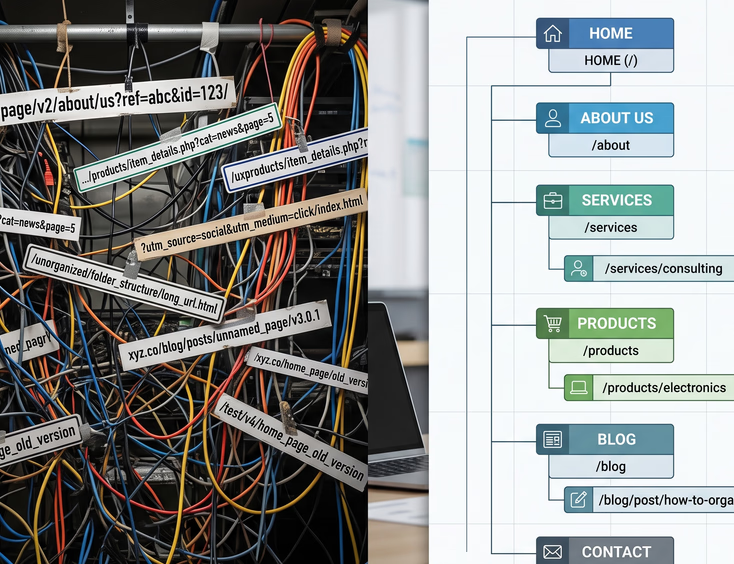
Reason 3: Messy URL Structures and Poor Site Architecture
A clean website is easy for both humans and search engines to navigate. The way your pages are organized is called site architecture. The web addresses of those pages are called URLs.
For local SEO, your URLs need to be clean, short, and keyword-friendly. For example, a perfect local URL looks like this: [yourbusiness.com/services/roof-repair](https://yourbusiness.com/services/roof-repair)
How Template Systems Create Chaos
Weebly and similar platforms often generate messy, automated URLs that look like this: [yourbusiness.com/store/p1/site-page-12345/product-id-abc](https://yourbusiness.com/store/p1/site-page-12345/product-id-abc)
- Confusing to Search Engines: When a robot sees a URL filled with random numbers and forced folder structures, it struggles to understand the hierarchy of your website.
- Lack of Geo-Targeting: A custom site allows you to build specific local landing pages easily, such as
[yourbusiness.com/phoenix-plumbing-services](https://yourbusiness.com/phoenix-plumbing-services). Template platforms often make it incredibly difficult to alter the core folder structures, preventing you from building targeted local hubs. - Broken Redirects: If you ever try to change a page name in a template builder, the system often fails to handle the transition smoothly. This leads to broken links (404 errors), which signal to Google that your website is unmaintained.
Reason 4: Mobile Performance Penalties and Core Web Vitals
Most local searches happen on mobile devices. People look for local services while driving, sitting at work, or dealing with an immediate home emergency. Because of this, Google uses Mobile-First Indexing. This means Google ranks your website based almost entirely on how well it performs on a smartphone, not a desktop computer.
Google measures mobile performance using a strict set of metrics called Core Web Vitals. These metrics track how fast your page loads, how quickly it becomes interactive, and whether the content jumps around on the screen while loading.
Where Templates Fail the Mobile Test
- Responsive Scaling Issues: Template platforms use automated systems to shrink desktop designs down to mobile sizes. This often results in text overlapping, images being cut off, or buttons being too close together for a human finger to tap.
- Visual Instability (CLS): Have you ever tried to click a button on a website, only for the page to suddenly shift, causing you to click the wrong thing? That is called Cumulative Layout Shift. Template platforms are notorious for this because their heavy design elements load out of order.
- Extreme Mobile Slowdowns: While a Weebly site might load in four seconds on a fast office desktop with fiber internet, it can easily take twelve seconds to load on an older smartphone connected to a weak local cellular network.
Reason 5: The Shared Server Trap—Hosting Neighborhoods
When you build a custom website with a professional agency, you have total control over where your website lives. You can choose high-speed, dedicated cloud hosting that is optimized for your target market's location.
When you use a cheap template builder, your website is hosted on a massive, shared server alongside hundreds of thousands of other random websites. You are essentially living in a massive, overcrowded apartment building.
The Consequences of Bad Digital Neighbors
- IP Address Pollution: If other websites sharing your server engage in spammy practices, illegal activities, or mass email operations, the entire server’s IP address can get blacklisted by search engines. Your local business site gets punished simply by association.
- Resource Throttling: If another website on your shared server experiences a massive surge in traffic, it will steal the server’s processing power. Your website will suddenly slow down to a crawl or crash completely during peak business hours.
- Geographic Misalignment: Local SEO thrives when your website server is physically close to your customers. Template platforms host sites in massive, centralized data centers that could be thousands of miles away from your local service area, adding unnecessary delays to every page load.

The Custom Alternative: Building a Local Lead-Generation Machine
Choosing a custom website built by an experienced development agency is an investment in your business’s infrastructure. A custom site is built from scratch with one primary goal: converting local searchers into paying clients.
The Custom Advantage Breakdown
- Zero Bloat, Maximum Speed: Custom sites are built using precise code. Every element has a purpose. This results in near-instant load times, keeping mobile users on your page and keeping Google happy.
- Perfect Local Schema: Developers manually code your local business data into the foundation of your site. Google reads your address, services, and local reviews instantly, boosting your chances of hitting the Local Pack.
- Unlimited Growth Potential: As your business expands to new cities or offers new services, your website can grow with you. You are never locked into a rigid layout or forced to pay for premium feature tiers.
- Absolute Ownership: You own every single file, line of code, and piece of content. You are never at the mercy of a platform changing its algorithm, raising its monthly fees, or shutting down its services.
Face-to-Face Comparison: Custom Sites vs. Weebly Templates
To see the stark contrast between these two options, look at how they perform across critical local business metrics:
| Performance Metric | Custom Website Build | Weebly Template Software |
|---|---|---|
| Average Mobile Load Time | Under 2 Seconds (Excellent) | 6 to 12+ Seconds (Poor) |
| Code Efficiency | 100% Clean, Minimalist Code | Heavily Bloated, Multi-Purpose Code |
| Local Schema Integration | Advanced, Manual, Error-Free | Very Limited or Completely Absent |
| URL Customization | Total Freedom for Local Keywords | Restricted, Messy System-Generated Paths |
| Hosting Quality | High-Speed, Dedicated Local Servers | Shared, Centralized Crowded Servers |
| Mobile User Experience | Tailored Specifically for Handhelds | Automated, Often Clunky Scaling |
| Long-Term ROI | High (Drives Organic Local Leads) | Low (Requires Heavy Paid Ads to Compensate) |
The Hidden Cost of "Free" or "Cheap"
Many small business owners look at the initial price tag. They see a template builder for $20 a month and a custom agency build for a few thousand dollars, and they assume the cheaper option saves them money.
This is a classic business math error. You must calculate the opportunity cost.
If your competitor invests in a custom website that ranks in the top three spots for your highest-value keywords, they might generate fifty new phone calls every month. If your template website is stuck on page three, you generate zero calls.
You aren't saving money if your website fails to bring in customers. You are losing thousands of dollars in booked jobs every single month just to save a few bucks on development costs.

Technical Barriers: What Happens Under the Hood
To understand why template software ruins your chances, let us look at the actual technical mechanics that occur when a search engine attempts to grade your platform-built site.
The Rendering Pipeline Bottleneck
When a Google bot visits your website, it performs a process called rendering. It downloads the code, reads it, and builds a visual map of the page to confirm it is safe and useful for searchers.
Template systems rely heavily on complex, chained JavaScript files to make their drag-and-drop editors work. When the Google bot arrives, it hits these scripts and is forced to stop and wait. This is known as render-blocking. Because Google handles billions of pages a day, its bots only spend a fraction of a second on your site. This is called your crawl budget.
If your crawl budget is wasted waiting for bloated template scripts to untangle themselves, the robot will leave before indexing your most important service pages.
Canonical and Duplicate Content Errors
Local businesses often need to create specific pages for different cities they serve (e.g., "Handyman in Springfield," "Handyman in Middletown"). Template builders use duplication systems to let you copy pages easily.
However, these builders rarely handle background tags correctly. They often forget to apply correct canonical tags. A canonical tag is a piece of code that tells Google which version of a page is the original.
Without it, Google sees multiple pages with similar service text as duplicate content. Instead of ranking all of your location pages, Google flags your site as low-quality or manipulative, dropping your visibility across all locations.
The Illusion of Built-In SEO Tools
Platform builders love to advertise their "Built-In SEO Tools." They show you simple check-boxes, green lights, and spaces to type in your page titles. They lead you to believe that if you fill out these boxes, your site is fully optimized.
This is a marketing trick designed to simplify a complex process.
Those built-in tools only handle basic, surface-level tasks. They let you change text that appears in the browser tab, and they let you write a short description for search results. That is it.
They do not fix the broken foundational code. They do not optimize your image file compression weights automatically. They do not clean up your server response times, and they certainly do not build a localized site schema.
Using those tools to fix bad local rankings is like putting a fresh coat of paint on a car that has no engine. It looks nice sitting in the driveway, but it is not going to take you anywhere.
Google Maps and The Local Pack Connection
Your website does not exist in a vacuum. For local businesses, your website is directly tied to your Google Business Profile (formerly Google My Business). This is the profile that powers your placement on Google Maps and in the local 3-pack search results.
One of the most important signals Google uses to verify your business location is consistency between your Google Business Profile and your website.
The Data Disconnect
If Google's bots cannot cleanly crawl your website because of template errors, they cannot verify that the business name, address, and phone number (NAP) match your maps profile exactly.
- Loss of Map Rankings: If there is any digital confusion or if the code delays the bot from reading your contact info, your Google Maps ranking will plunge.
- Review Value Devaluation: Your customer reviews mention specific local keywords (like "best furnace repair in [Town]"). Google scans your website to see if your site structure confirms that expertise. If your site structure is hidden behind layers of template code, you lose the SEO value of those hard-earned reviews.
The True Value of Clean, Professional Code
When you step away from automated builders, your website undergoes a dramatic transformation. Professional developers focus on semantic HTML. This means every piece of text, every image, and every structural section is explicitly labeled for what it is.
What Happens to Your Traffic with a Custom Build?
- Instant Indexing: Google reads your updates immediately. No bloated code or script walls blocking search bots.
- Higher Conversion Rates: Fast mobile load times eliminate bounce rates. Prospects stay, navigate easily, and take action.
- Long-Term Rankings: Clean code does not degrade. Secure a top spot without fighting the constant, breaking updates of a template site.
Your website is your digital front door. Build it with a heavy, unmanageable template, and you lock customers out. Stop handing market share to your competitors. Investing in a performance-driven custom website is the most effective way to dominate search and turn traffic into predictable revenue.
Ready to Leave Weebly?
You shouldn't have to watch your business outgrow your website just because a rigid drag-and-drop box refuses to move.
Get Your Custom Website Today