

Custom Website vs Framer: Why Design-First Tools Still Fail Crucial Performance Tests
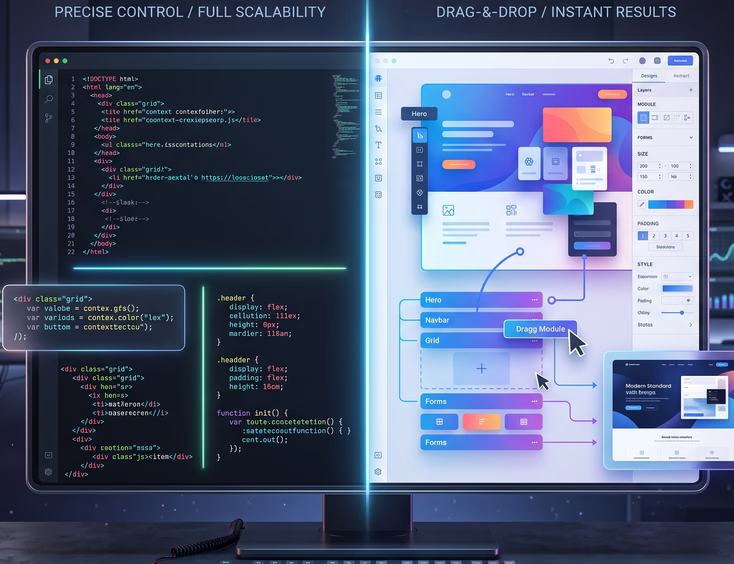
The promise of the modern web is simple: if you can draw it, you can build it. Platforms like Framer have completely transformed how businesses think about web design. They bridge the gap between design software like Figma and the live web, allowing designers to publish fully functional, visually stunning websites without writing a single line of code.
For marketing teams and design agencies, this feels like a superpower. You no longer have to pass static designs to a developer, wait weeks for a prototype, and argue over missing pixels. You simply design, click publish, and your site is live.
But beneath the beautiful animations and pixel-perfect layouts lies a hidden problem. When you use a tool that prioritizes design above everything else, the underlying code suffers.
While visual builders are excellent for quick prototypes and simple landing pages, they consistently struggle when subjected to rigorous performance, speed, and search engine optimization (SEO) tests.
Drawing a Website vs. Engineering a Website
To understand why design-first tools fail performance tests, you have to understand the fundamental difference between drawing a web page and engineering one.
The Designer’s Canvas
When you design a page in Framer, you are working on a visual canvas. You drag boxes, adjust margins, stack elements, and apply complex scroll animations. The software gives you total freedom to place elements wherever you want.
The Machine’s Reality
Computers do not see your design. They read code. When you hit "Publish" on a design-first tool, an automated program has to translate your visual layout into HTML, CSS, and JavaScript.
Because a computer program is making the decisions rather than a human developer, it makes compromises. It cannot think abstractly. It simply writes generic code that ensures the design looks exactly like your canvas, regardless of how messy or heavy that code needs to be.
The Core Reality: Visual web builders prioritize what the user sees over how the browser processes the data. Custom development prioritizes both.
The Performance Metrics That Actually Matter
Before diving into why visual tools fall short, we need to define how modern websites are judged. Google uses a set of specific metrics called Core Web Vitals to measure user experience. If your site scores poorly here, your search engine rankings drop, and your ad costs go up.
1. Largest Contentful Paint (LCP)
- What it means: How fast does the main content of your page load?
- The layman's terms: This measures how long a visitor has to stare at a blank or half-loaded screen before they can see the biggest image or text block on the page.
- The target: Under 2.5 seconds.
2. Interaction to Next Paint (INP)
- What it means: How responsive is your website when a user clicks a button or taps a menu?
- The layman's terms: When a visitor clicks something, does the site react instantly, or is there a frustrating delay while the website processes the request?
- The target: Under 200 milliseconds.
3. Cumulative Layout Shift (CLS)
- What it means: Does the content move around unexpectedly while loading?
- The layman's terms: Have you ever tried to click a link, but right before your finger hit the screen, an image loaded and pushed the link down, causing you to click the wrong thing? That is layout shift.
- The target: Less than 0.1.

Why Framer and Design-First Tools Fail the Test
When you put a custom-coded website head-to-head against a Framer website in a speed test, the custom site almost always wins. Here is the breakdown of why design-first tools struggle with these crucial tests.
1. The Nightmare of "DOM Bloat"
The Document Object Model (DOM) is the structural skeleton of a web page. Every piece of text, every image, and every structural box forms a branch on this tree.
- How custom code works: A human developer writes clean, minimal structure. If they need to display a sentence inside a box, they write one line of code for the box and one line for the text.
- How Framer works: To ensure your visual layout stays perfectly aligned across mobile, tablet, and desktop screens, the automatic code generator wraps your elements in layers of invisible boxes.
- The consequence: A simple paragraph might be buried inside ten layers of nested containers. This is called DOM bloat. The browser has to read through thousands of lines of unnecessary structural code just to display a basic layout, which severely slows down the processing speed.
2. The One-Size-Fits-All JavaScript Problem
JavaScript is the code that makes websites interactive. It drives the pop-ups, sliders, and complex animations.
- Design-first platforms rely on a massive, standardized library of JavaScript to make their visual features work.
- Even if your specific webpage only uses one basic fade-in animation, the platform often forces the user's browser to download the entire animation toolkit.
- This results in "unused JavaScript." The browser spends time downloading and parsing code that your website doesn't even use, killing your performance scores before the user even sees the page.
3. Layout Shifts Driven by Advanced Animations
Framer is famous for making complex animations incredibly easy to build. You can create 3D rotations, parallax scrolling, and intricate hover effects with a few clicks.
- These animations look beautiful, but they often rely on heavy browser processing.
- If an animation triggers before the rest of the page layout is calculated, it causes the page to jump and shudder during loading.
- This triggers severe penalties in the Cumulative Layout Shift (CLS) metric, signaling to Google that your website offers a frustrating, unstable user experience.
4. Poor Handling of Text and Web Fonts
To make a site look unique, designers use custom web fonts. Visual builders make it easy to load five different font styles onto a single page.
- Every font style requires a separate file download.
- Design-first platforms often load these fonts in a way that blocks the rest of the page from appearing until the font files are fully downloaded.
- Visitors are left looking at a blank screen or watching the text violently switch from a generic system font to your custom font two seconds after the page loads.
+-------------------------------------------------------------------------+
|                         HOW LAZY CODE SLOWS SITES                       |
+-------------------------------------------------------------------------+
|                                                                         |
|  [ Visual Builder ] ----> Generates Generic Code ----> Heavy Payload    |
|                                                              (Slow)     |
|                                                                         |
|  [ Custom Developer ] --> Writes Precise Code   ----> Light Payload     |
|                                                              (Fast)     |
+-------------------------------------------------------------------------+
The Custom Development Advantage: Built for Speed
Custom web development approaches building from the opposite direction. Instead of starting with a visual drawing and forcing a computer to generate code, custom development starts with clean code and styles it to match the vision.
Clean, Lightweight Code
A custom developer uses semantic HTML and modern CSS frameworks like Tailwind. They write only the exact lines of code required to display your specific project. There are no generic background frameworks, no hidden tracking scripts from the platform provider, and no unused design files clogging up the system.
Intelligent Asset Optimization
Images and videos are the heaviest parts of any website. Custom development environments utilize advanced automated pipelines to optimize assets dynamically:
- Next-Gen Formats: Images are instantly converted into modern formats like WebP or AVIF, which keep images looking sharp while cutting file sizes in half.
- Exact Sizing: Instead of loading one giant image and shrinking it with code to fit a mobile phone, custom sites serve a perfectly sized, smaller image file directly to mobile users.
- Smart Loading: Non-essential images at the bottom of the page are completely ignored by the browser until the user scrolls down to see them.
Total Hosting and Server Control
When you use a platform like Framer, you are locked into their specific hosting servers. If their servers experience a slowdown, your business website experiences a slowdown.
With custom code, your website can be deployed across global Edge Networks and Content Delivery Networks (CDNs) like Cloudflare or Vercel. Your website code is distributed to hundreds of servers around the world. When a customer clicks your link, your site loads from a server located in their city, dropping data transit times down to milliseconds.
Head-to-Head Comparison Matrix
| Feature | Design-First Tools (e.g., Framer) | Custom Website Development |
|---|---|---|
| Initial Build Speed | Extremely Fast (Days) | Moderate to Slow (Weeks/Months) |
| Code Cleanliness | Automatic, cluttered, nested | Handcrafted, minimal, optimized |
| Core Web Vitals Performance | Struggle out of the box; hard to optimize | Built to pass; highly tunable |
| Animation Handling | Easy to build, heavy on browser processing | Harder to build, written for hardware speed |
| SEO Flexibility | Basic meta tags, structured data limitations | Absolute control over architecture and schema |
| Platform Lock-In | High (You cannot easily export code elsewhere) | None (Your code can move to any server) |
| Maintenance Over Time | Easy visual updates, high platform updates | Requires developer maintenance, highly stable |

The Hidden Business Costs of Bad Performance Scores
It is easy to dismiss performance tests as tech-nerd obsession. But web speed directly influences your business's bottom line. When your website fails crucial performance tests, your entire digital marketing strategy suffers silently.
The Bounce Rate Penalty
Human attention spans are shorter than ever. If your website takes more than three seconds to load, over half of your mobile visitors will abandon the site before it finishes loading. You are paying marketing dollars to drive traffic to your site, only for users to leave out of pure frustration.
Lower Ad Efficiency
Platforms like Google Ads and Meta Ads track the user experience of the links you promote. If you send paid traffic to a slow, unoptimized website with low Core Web Vitals scores, these platforms penalize you. They will charge you more money per click, making your digital advertising campaigns significantly less profitable.
Damaged Search Engine Visibility
Google uses page experience as a direct ranking factor. If two businesses have identical content, but Business A has a custom website that loads in one second, while Business B has a design-first website that loads in four seconds, Google will consistently rank Business A higher on search results.
Direct Business Impact: You can spend thousands of dollars on beautiful animations and graphics, but if your performance scores are low, fewer customers will ever actually see them.
The Technical Debt of No-Code Platforms
Choosing a web framework is a long-term business decision. When you rely heavily on design-first platforms, you build up what software engineers call "technical debt." This is the future cost you will have to pay for taking shortcuts today.
        THE ACCUMULATION OF TECHNICAL DEBT

Timeline       Design-First Tool         Custom Code
---------     -------------------     ------------------
Month 1       [ Launch Fast ]         [ Still Coding ]
              * Looking great         * Careful setup
              * Cheap start           * Higher initial cost

Month 12      [ Slowdowns Begin ]     [ Running Smoothly ]
              * Complex updates       * Scales perfectly
              * Bloated plugins       * Blazing fast
              * Low SEO ranks         * Dominating SEO

Month 24      [ The Wall ]            [ Continuous Growth ]
              * Total rewrite needed  * Easily upgraded
              * Expensive migration   * Zero platform fees
The Wall of Scalability
As your company grows, your website needs to grow with it. You might need to integrate a custom user login system, connect to an enterprise customer relationship management (CRM) tool, or build complex dynamic filtering for product catalogs.
Design-first platforms are built to handle static pages, portfolios, and basic content layout. Once you try to scale into complex functionality, you hit an invisible wall. You either have to rely on messy third-party plugins that slow down your site even further, or you are forced to scrap the entire project and rewrite it from scratch using real code.
The Risk of Platform Lock-In
When your entire website is built inside a visual software ecosystem, your digital presence belongs to that ecosystem. You cannot easily pack up your design and move it to a cheaper or more secure hosting provider. If the platform changes its pricing model, alters its feature set, or suffers a system-wide outage, your business is completely helpless.

Knowing When to Use Which Tool
This analysis does not mean design-first platforms like Framer are useless. They are highly valuable tools when deployed in the correct business context. The key is understanding when a visual tool is sufficient, and when your business requires a custom-engineered solution.
When Framer is the Right Choice
- Early-Stage Startups: When you need an initial web presence within 48 hours to validate an idea.
- Marketing Landing Pages: Short-term promotional pages built to test a specific product offer before launching it at scale.
- Design Portfolios: Personal projects where visual presentation matters infinitely more than global database scaling or strict enterprise SEO performance.
- Prototypes: Creating high-fidelity, interactive mockups to show investors how a future software product will look and behave.
When Custom Development is Non-Negotiable
- E-commerce Brands: Where slow page loads directly reduce conversion rates and shopping cart completions.
- Enterprise Tech and SaaS Platforms: Where data security, integration with complex backend systems, and perfect accessibility compliance are mandatory.
- High-Traffic Content Hubs: Web platforms that rely entirely on organic search rankings to generate millions of page views per month.
- Core Corporate Websites: The primary digital asset for an established company that needs to serve a diverse global audience across varying mobile network speeds.
The Engineering Strategy for Maximum Web Performance
When a professional development agency designs and engineers a custom website, they implement strict performance frameworks that automated software builders simply cannot recreate.
+------------------------------------------------------------------------+
|                      CUSTOM PERFORMANCE PIPELINE                       |
+------------------------------------------------------------------------+
|                                                                        |
|  [ Semantic HTML ] -> Minimal layout depth, light parsing for browser  |
|                                                                        |
|  [ Modern CSS ]    -> Scoped styling, zero redundant layout rules      |
|                                                                        |
|  [ Edge Delivery ] -> Cached global assets served close to the user    |
|                                                                        |
+------------------------------------------------------------------------+
| RESULT: Instant load speeds, 100/100 Core Web Vitals scores            |
+------------------------------------------------------------------------+
1. Stripping the Extra Packaging
Custom engineers look at code like shipping weight. Every kilobyte removed means a faster delivery. By avoiding the generic layout layers built into visual systems, custom code minimizes the time your visitor's phone spends reading data instructions.
2. Critical Asset Prioritization
Instead of loading everything simultaneously, custom architecture breaks down page elements sequentially:
- The Above-The-Fold View: The absolute first thing a user sees is loaded instantly with minimal styling.
- Interactive Elements: The JavaScript required for navigation buttons is downloaded in a tiny packet while the user reads the header.
- Below-The-Fold Assets: Heavy illustrations, footer layouts, and deep content sections are fetched quietly in the background only when the user scrolls downward.
3. Absolute Code Autonomy
By owning the pure code base, your development team can tweak every configuration setting. If an external service like an analytical pixel or customer chat bubble causes a slight delay, the developer can rewrite the connection script to prevent it from blocking the main website performance.
Redefining True Web Quality
A website is not a digital brochure. It is a high-performance software engine built to acquire customers, dominate search engines, and process transactions seamlessly.
Visual-first platforms like Framer offer rapid design speeds, but they make critical compromises under the hood. The resulting code bloat, layout shifts, unoptimized assets, and platform dependencies leave your business highly vulnerable to Google's strict performance updates.
True digital quality requires engineering, not shortcuts. Your site must look exceptional, but it must be built cleanly from the ground up. Stop settling for visual drag-and-drop frameworks. Deploying a cleanly engineered, custom website architecture gives you a fast, permanent, and future-proof asset built to control your market for years.
Ready to Leave Framer?
You shouldn't have to play digital Tetris just to keep your mobile layout from breaking every single afternoon.
Get Your Custom Website Today