

Custom Website vs HubSpot CMS: How to Escape the Enterprise SaaS Lock-In Trap

Every growing business hits a point where their website feels like a mismatched patchwork of random plugins, slow landing pages, and disconnected tools. It is frustrating, messy, and hard to manage. Then, a slick software sales pitch promises the ultimate cure-all: Put everything in one place. Your emails, your customer data, your sales pipelines, and your entire website, all running under a single dashboard.
This is how most companies end up moving their website to HubSpot CMS.
On paper, it sounds like a dream. You do not have to worry about web hosting, security patches, or hiring an expensive developer just to change a line of text on your homepage. The marketing team can spin up new landing pages in minutes using drag-and-drop tools. Everything feels cohesive, clean, and beautifully integrated.
But this convenience comes with a heavy catch that sales reps rarely mention. When you build your website on a closed, proprietary system, you are not buying a digital asset. You are renting space on someone else's land. Over time, that rent goes up, the walls close in, and moving away starts to feel completely impossible. This is the enterprise software-as-a-service (SaaS) lock-in trap.
Decoding the SaaS Lock-In Trap
To understand why this trap is so dangerous, you have to look at what happens beneath the surface when your website lives inside a platform like HubSpot.
Proprietary Code: The HubL Problem
When you build a standard, custom website using common web languages like HTML, CSS, and JavaScript, your code is universal. Any professional web developer in the world can open those files, understand what is happening, and make updates.
HubSpot does not use standard, open web code. Instead, it relies heavily on its own proprietary templating language called HubL (HubSpot Markup Language).
The Reality Check: HubL only works inside HubSpot's eco-system. If you ever decide you want to move your website to another platform, you cannot simply download your website files and upload them somewhere else. The code will not run. To leave, you have to completely rebuild your website's front-end from scratch.
Data Hostage Situations
Your website is more than just text and images. It is an archive of blog posts, landing page variations, lead capture forms, and user permissions. In an open custom system, you own the database. You can export it, back it up, and migrate it whenever you want.
Inside a closed CMS, your content is deeply tangled up with their proprietary database architecture. Exporting a blog feed might give you a messy spreadsheet of unformatted text, but you will lose your page layouts, your custom modules, and your historical asset tracking. The platform makes it incredibly easy to bring your data in, but intentionally painful to take it out.
Head-to-Head Comparison: Custom Web vs. HubSpot CMS
To get a clear picture of how these two approaches stack up over the long term, let us break down the core differences in a direct, side-by-side comparison.
| Feature / Factor | Custom-Built Website | HubSpot Content Hub (CMS) |
|---|---|---|
| Code Ownership | 100% yours. You own every line of code. | Proprietary. Tied to HubSpot’s platform. |
| Monthly Software Fees | $0 platform fees (only standard hosting costs). | High recurring fees that scale up as you grow. |
| Developer Options | Millions of global developers can work on it. | Limited pool of specialized HubSpot developers. |
| Design Freedom | Infinite. Built entirely around your brand. | Restricted by theme limits and layout structures. |
| Site Speed & Bloat | Fully optimized. Clean, lightweight code. | Heavy. Loaded with global tracking scripts. |
| Portability | Move to any server or host in minutes. | Non-portable. Rebuild required to leave. |
| SEO Flexibility | Total control over server architecture and code. | Good baseline SEO, but capped advanced control. |
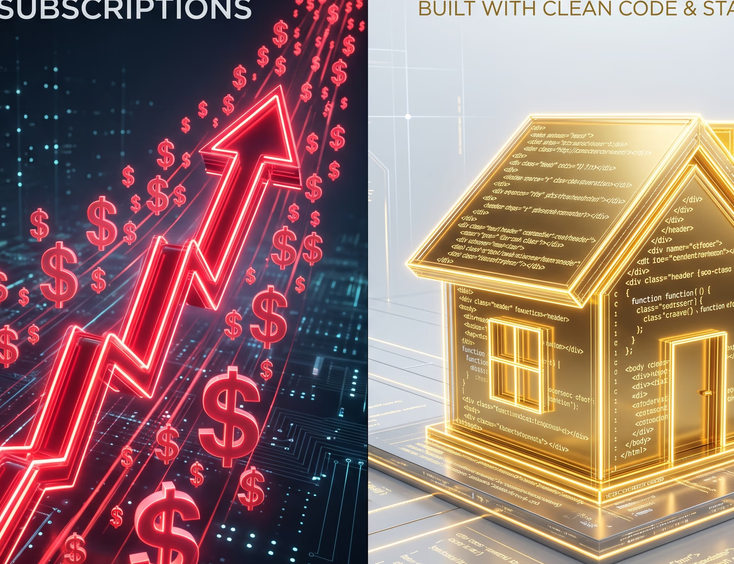
The Real Cost Breakdown: Subscriptions vs. Ownership
Many business owners choose a platform like HubSpot because the initial setup cost seems predictable compared to hiring a web agency for a deep, custom build. However, this is a classic case of miscalculating short-term savings versus long-term business expenses.
The Escalator Pricing Strategy
HubSpot’s pricing model is built like an escalator. It starts at a reasonable entry point for small teams, but as your company grows, the system automatically pulls you into higher, more expensive tiers.
[Starter Tier: Basic Needs]
       │
       ▼
[Professional Tier: Growing Fast + Automation]
       │
       ▼
[Enterprise Tier: Custom Needs + Advanced Security] --> Premium Pricing Locked In
If you need advanced features like multi-language websites, custom database objects, or sophisticated content partitioning for different teams, you are forced into the Enterprise tier. This tier carries a massive, recurring monthly fee that never goes away.
The Contact List Tax
The biggest financial trap lies in how HubSpot bundles its products. Even if you only want to use their system to host your website, your overall billing is often tied to the total number of contacts in your database.
If your marketing team runs a successful campaign and your contact list swells from 10,000 to 50,000 names, your entire platform price skyrockets. You are essentially paying a tax on your own business growth, even if your website infrastructure needs have not changed by a single kilobyte.
Custom Websites: A Capital Asset
A custom website requires a larger upfront investment because you are paying for professional strategy, custom user experience design, and bespoke engineering. But once that website is built, it is a business asset that you own outright.
Your ongoing monthly costs are limited to standard, highly competitive web hosting and minor support maintenance. There are no software seats to buy, no contact limits to worry about, and no surprise price hikes at the end of your contract year.
Performance, Speed, and the Bloat Factor
In modern web design, speed is everything. If your page takes longer than three seconds to load, a massive chunk of your mobile traffic will click away before they even see your headline. Search engines also penalize slow-loading sites, driving down your search rankings.
Why Closed Systems Struggle with Bloat
When you use an all-in-one platform, your website has to carry the structural weight of the entire software suite. Even a simple text page often loads heavy background scripts for tracking tools, chat widgets, analytics engines, and marketing automation triggers.
Because you do not have direct control over the underlying server infrastructure or the root source code, your ability to optimize performance is severely capped. You cannot change how the server handles file caching, and you cannot easily eliminate unnecessary script files that the platform forces onto your pages.
The Lean Precision of Custom Code
With a custom website, your developers build exactly what you need and absolutely nothing else.
- No Unused Code: There are no hidden tracking systems or giant style frameworks slowing down your pages in the background.
- Modern Coding Techniques: Developers can use cutting-edge engineering standards to make your site load almost instantly.
- Total Server Mastery: You choose your own hosting environment, meaning you can tweak server settings, leverage advanced global delivery networks, and optimize file delivery down to the millisecond.
The Design Ceiling: Why Your Site Looks Like Everyone Else’s
Have you ever noticed that a huge portion of B2B SaaS websites look identical? They use the same layouts, the same blocky sections, the same hero graphics, and the same form designs. This is not a coincidence; it is a direct byproduct of template-driven content systems.
+--------------------------------------------------+
|    Logo  Link  Link                  [Button]    |
+--------------------------------------------------+
|                                                  |
|     HEADING THAT LOOKS LIKE EVERY OTHER SITE     |
|    Subheading with generic value proposition.    |
|                                                  |
|              [Call to Action]                    |
|                                                  |
+--------------------------------------------------+
|   [Icon] Feature 1   [Icon] Feature 2   [Icon]   |
+--------------------------------------------------+
The Theme Straightjacket
To make a platform usable for non-technical marketers, it has to rely on structured themes and rigid modules. While you can customize colors, fonts, and images, the structural skeleton of the page remains fixed.
If your brand strategy requires a unique interactive experience, a highly specific product filtering system, or an unconventional layout that breaks the traditional grid, you will quickly hit a wall. To get around these template limits, you have to write heavy custom overrides that clog the system and defeat the whole purpose of using a drag-and-drop tool in the first place.
Tailored Experiences Drive Conversions
A custom website starts with a blank digital canvas. The user journey is designed specifically around your target customer's psychology, your unique value proposition, and your specific business goals.
You do not have to compromise your brand vision to fit into a pre-made template grid. Every interaction, animation, and layout step can be crafted to set you completely apart from your competitors.
Decoupling: The Ultimate Hybrid Strategy
Escaping the lock-in trap does not mean you have to throw away HubSpot entirely. Their CRM, email marketing engine, and sales pipelines are incredibly powerful tools that genuine businesses rely on every single day.
The real secret to digital freedom is decoupling—separating your marketing software from your actual website infrastructure.
+------------------------------------+
|          CUSTOM WEBSITE            |
|  (Fast, Secure, 100% Owned Code)   |
+-----------------+------------------+
                │
                │ Secure API Link
                ▼
+------------------------------------+
|         HUBSPOT ECOSYSTEM          |
|  (CRM, Sales pipelines, Email)     |
+------------------------------------+
Keep the Tools, Own the House
By decoupling, you build your core website on an open, independent platform or a custom modern framework. Then, you connect your HubSpot marketing tools behind the scenes using clean APIs and secure forms.
This approach gives you the absolute best of both worlds:
- Your marketing team still gets all their leads, tracking data, and customer insights fed directly into HubSpot's CRM.
- Your business retains 100% ownership of the website code, absolute design freedom, top-tier page speeds, and total protection from sudden platform price hikes.
If you ever decide to switch your CRM or email provider in the future, you do not have to rebuild your website. You simply change the API connection details, and your site keeps running smoothly without missing a single beat.
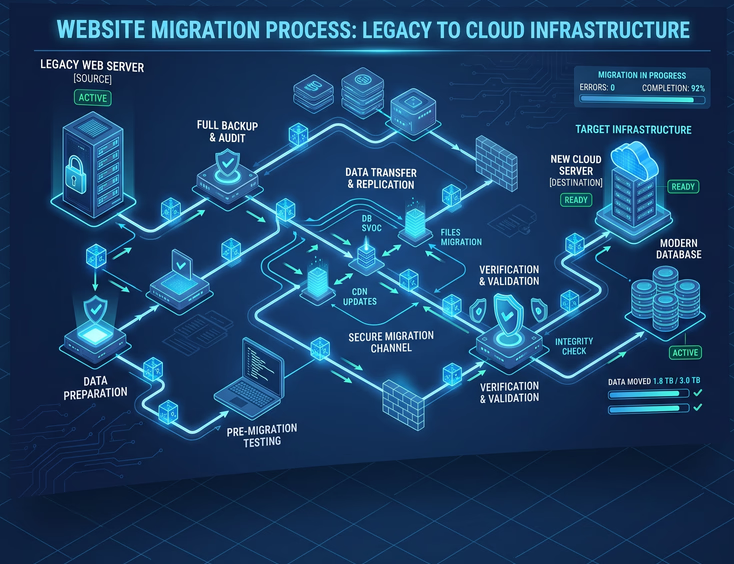
The Step-by-Step Migration Blueprint
If you are already caught in the lock-in trap and want to reclaim ownership of your digital presence, you need a highly strategic, careful exit plan. You cannot just flip a switch. Moving a live website requires precision to protect your search engine rankings and preserve your active lead generation streams.
Phase 1: The Content and Asset Audit
Before writing a single line of new code, map out every single asset on your current website.
- Compile Your URLs: Extract a complete list of every live page, blog post, and landing page.
- Identify Hidden Media: Document where your images, downloadable PDFs, and media files are hosted.
- Track Interactive Elements: Make a detailed list of every lead capture form, pop-up tool, live chat box, and external tracking pixel currently active on your site.
Phase 2: Preserving Your SEO Equity
The biggest fear of migrating a website is losing your organic Google traffic. If you change your site structure without a solid plan, your search rankings can crater overnight.
The Golden Rule of Migration: Keep your URL handles identical wherever possible. If a page lives at
[yoursite.com/our-services](https://yoursite.com/our-services)on your old setup, it should live at[yoursite.com/our-services](https://yoursite.com/our-services)on your new custom build.
If you must change a URL path, you must create a permanent 301 redirect immediately. This tells search engines exactly where the old page moved, cleanly transferring your search ranking value to the new site.
Phase 3: The Data Extraction Process
Because you cannot copy HubL code, focus entirely on extracting your raw data. Export your blog post histories into clean formats like XML or CSV. Copy your core page copy out into organized documents. Download all your original, high-resolution media files directly from your file manager so you have a complete local backup of your visual assets.
Phase 4: Building the Modern Open Frontend
With your content safely backed up, your web development team can begin engineering your new custom platform. They will build a lightweight, ultra-fast frontend using clean web development frameworks.
During this phase, they will recreate your core brand layouts, optimize user pathways, and build simple, intuitive content editing tools. This ensures your marketing team can still update the site easily without needing deep code knowledge.
Phase 5: Hooking Up the Technical Plumbing
Once the new custom architecture is built, connect your marketing tools. Embed clean HubSpot tracking codes and link your online forms directly to the HubSpot CRM using standard webhooks or simple scripts.
Test every single form thoroughly to ensure that lead information, attribution data, and contact properties flow perfectly into your marketing dashboard without any data drops.
Phase 6: The Controlled Launch
When everything is fully tested, update your domain nameservers (DNS) to point away from the closed host and toward your new, independent custom server.
Monitor your site analytics and search engine logs closely for the first forty-eight hours to catch any broken links, form errors, or missing assets immediately.

Making the Choice: When to Stay, When to Escape
Let us be completely fair: closed all-in-one content systems are not inherently evil. They serve a real purpose for specific types of companies at specific moments in their business lifecycle. You have to evaluate exactly where your company stands today and where you want it to be three to five years down the road.
When HubSpot CMS Actually Makes Sense
- Early-Stage Startups: If you have a tiny team, no internal technical support, and need to launch basic pages quickly to test a brand new market idea.
- Short-Term Priorities: If speed-to-market for basic marketing experiments matters vastly more to you than unique brand design, site performance, or long-term operational costs.
- All-In Small Teams: If your team is small enough that you will stay well within the basic tier price points for a long time, and you do not mind working within structural design limits.
When You Absolutely Need to Escape
- Scale and Growth Modes: If your website is a primary driver of revenue and your business requires advanced, non-standard digital experiences to win customers.
- Rising Pricing Pressure: If your monthly software subscription bills are cutting deeply into your marketing margins, or you are facing massive tier upgrades just to unlock basic features.
- Performance Bottlenecks: If your digital marketing campaigns are actively suffering because your page speeds are slow, mobile rendering is clunky, or your technical SEO changes are restricted by the platform.
- Strategic Asset Focus: If you treat your brand as a core competitive advantage and believe your website code should be a highly valuable capital asset owned entirely by your business.
True Digital Independence
Your website is the front door, the main lobby, and the primary engine of your business. Handing it over to a closed, proprietary ecosystem is an easy shortcut that quickly becomes a restrictive, expensive trap.
Reclaim the keys to your digital property. Moving to an independent, custom-engineered web infrastructure gives you the absolute freedom to deliver elite site performance, craft unforgettable user experiences, and scale without platform limitations.
You can still leverage the world’s best marketing automation tools—but you do it on your own terms, powered by your own code, on your own ground.
Ready to Leave HubSpot?
Tired of watching your monthly bill skyrocket into a second rent payment just to unlock basic design features?
Get Your Custom Website Today