

Custom Website vs WordPress: Why Clean Code Beats Theme & Plugin Bloat
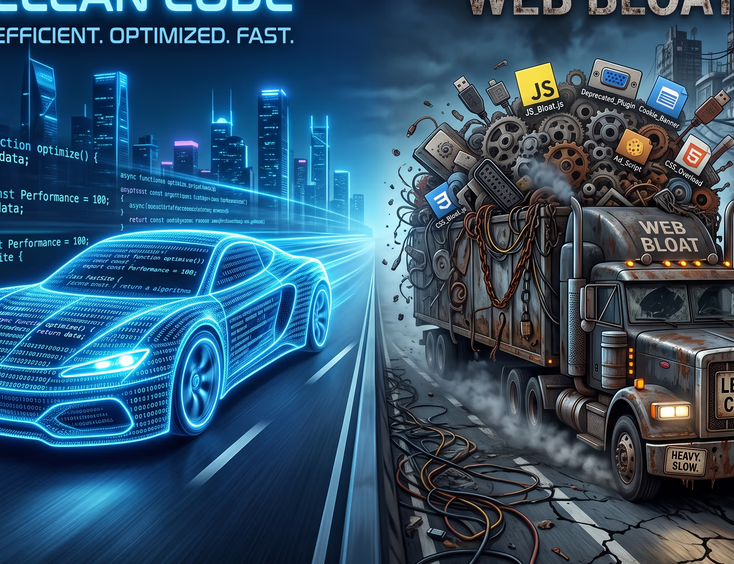
To understand why your website's underlying code matters, think of your website like a house.
When you build a custom website, you hire an architect and a builder. They ask how you live, how many rooms you need, and how you want the traffic to flow. Every brick, wire, and pipe is placed with a specific purpose. There is no wasted space or unused rooms.
WordPress operates differently. It is a pre-built apartment complex designed to accommodate every possible type of tenant. To make this complex work for a bakery, a law firm, a clothing store, and a personal blogger all at once, it must include features for all of them out of the box.
- Custom Sites: Built with clean, lightweight languages like HTML, CSS, JavaScript, and modern frameworks. The developer writes only the code required to make your specific business goals happen.
- WordPress Sites: Built on a standardized database structure using PHP. It requires a core system, a visual theme, and multiple add-ons (plugins) to match basic modern business requirements.
When you use WordPress, your website carries around the digital plumbing required to run unrelated businesses, even if you never turn those features on. That unused structure weighs down your server, slows down your loading times, and complicates your digital foundation.
The Anatomy of WordPress Bloat
In the world of web development, bloat refers to any piece of code that exists on your website but serves no functional purpose for the user viewing it. WordPress relies heavily on themes and plugins to give non-technical users the ability to change layouts without touching code. While convenient, the mechanical reality behind the screen tells a different story.
The Problem with Page Builders
Many WordPress sites rely on drag-and-drop page builders like Elementor or Divi. These tools let you move boxes around visually, but to make that possible, the software generates massive amounts of nested code. Where a custom developer writes a single line of code to display a headline, a page builder might wrap that same headline in ten layers of digital packaging, creating a heavy "code soup."
Unused Theme Features
When you purchase a pre-made WordPress theme, it often boasts dozens of layouts, multiple headers, and hundreds of custom animations. You might only use one layout and two animations. However, the file containing all fifty layouts still loads every single time a customer visits your homepage. The browser must read through thousands of lines of unnecessary styling rules before showing your customer your actual contact information or product catalog.
Speed, Performance, and the "Hidden Tax" of Plugins
Web speed is a fundamental business metric. If your website takes longer than three seconds to load, over half of your visitors will abandon it before they ever see what you offer. Plugins are the primary reason WordPress sites slow down over time. Every time you want to add a feature—a contact form, a social media feed, or an image gallery—the standard solution is to install another plugin.
- Multiple Requests: Every plugin introduces its own stylesheets and scripts. When a user clicks your link, their browser makes dozens of separate requests to your server to fetch all these individual pieces.
- Database Clutter: Plugins constantly read and write data to your website’s database. Many plugins run slow, repetitive database queries that hog your server’s processing memory.
- Asset Loading: A contact form plugin is only needed on your "Contact Us" page. Yet, by default, most WordPress plugins load their code across every single page of your website, including your homepage.
A custom-coded website bypasses this entire mess. If you need a contact form, the developer writes a lightweight script applied exclusively to the contact page. There are no extra requests, no background database clutter, and no unnecessary asset loading. The site stays lean and fast.
Security: Why More Moving Parts Mean More Break-Ins
Every piece of code on your website is a potential door. The more doors your website has, the harder it is to lock them all securely. This is the core vulnerability of a plugin-heavy ecosystem.
WordPress powers a massive portion of the internet. Because it is so popular, it is the primary target for automated hacking bots globally. Hackers build automated scripts that scan millions of websites looking for known vulnerabilities in popular plugins and themes.
The Chain of Trust
When you use a custom website, you trust the developer who wrote your code. When you build a WordPress site with twenty plugins, you trust twenty entirely different, unrelated third-party developers from all over the world.
- Abandoned Projects: Many plugins are created by solo developers as side projects. Over time, these developers lose interest. When a new security vulnerability is discovered in an abandoned plugin, it will never be patched, leaving your business exposed.
- Supply Chain Attacks: Malicious actors sometimes buy popular, abandoned plugins from their creators. They push out an update containing hidden malicious code designed to steal customer data or inject spam links.
With a custom website, your attack surface is tiny. There are no third-party plugin directories for hackers to scan, no generic login URLs like /wp-admin that bots target with brute-force attacks, and no unpatched third-party code sitting on your server.

Search Engine Optimization (SEO): What Google Actually Sees
Google does not look at your website the way a human customer does. A human sees images and layout; Google’s web crawler sees nothing but raw source code. Google ranks websites based on user experience through metrics called Core Web Vitals, measuring how fast your page loads, how quickly it becomes interactive, and how visually stable it remains.
Code-to-Content Ratio
Google prefers pages where the text content is easy to find within the code. In a bloated WordPress site, the core text might make up only a tiny fraction of the page’s total file size, while the remaining part is a messy web of theme layouts and scripts. A custom site flips this ratio, allowing Google's bots to crawl and index your text instantly without digging through digital garbage.
Structural Performance Drops
- Largest Contentful Paint (LCP): This measures how long it takes for your main content to appear. Theme bloat delaying image loading damages this score.
- Interaction to Next Paint (INP): This measures responsiveness when clicking a button. Heavy background JavaScript from tracking and feature plugins causes noticeable lag.
- Cumulative Layout Shift (CLS): This measures visual stability. It is common in WordPress sites where multiple plugins load styles at different times, causing elements to jump around.
Custom websites excel at Core Web Vitals because developers control how and when assets load, ensuring critical styles load first and text appears instantly.
The Maintenance Trap: Updates, Breaks, and White Screens
A website is software that lives in a changing digital environment. Servers get updated, browsers change, and web standards evolve. This means every website requires maintenance, but the nature of that maintenance differs wildly between custom and WordPress builds.
The WordPress maintenance ecosystem is built on a fragile house of cards. To keep your site secure, you must regularly update the core WordPress software, your theme, and every single plugin.
The Dependency Nightmare
Imagine you have plugins for your image gallery, SEO, and contact forms. The core WordPress system rolls out a major security update. You click "Update," and suddenly your website goes completely blank—a scenario known as the "White Screen of Death."
The author of your image gallery plugin has not updated their code to be compatible with the new WordPress version. The systems clash, causing your entire website to crash. You are stuck deactivating plugins via FTP to figure out which tool broke your business asset, while customers cannot access your services.
The Custom Alternative
Custom websites do not have conflicting third-party dependencies. They run on standard server environments using clean, native web code. When server environments update, standard web code continues to work perfectly. While custom sites benefit from occasional health checks, they do not require weekly babying or the perpetual fear that a simple software update will destroy your storefront.

Design Liberty vs. Rigid Templates
Your brand is unique, and your website should reflect that identity. When your website looks identical to your local competitors, you become a commodity in the eyes of your prospects. WordPress sites are almost always built around templates. Even when using a page builder, you work within the invisible boundaries of what that specific software tool allows.
Overcoming Layout Constraints
If you want to place an element in an unusual spot, or create a unique navigation experience that fits your exact customer journey, you will often run into a wall with WordPress. To achieve a highly specific design feature, you have two choices:
- Settle for a compromised version of your vision that fits the template's constraints.
- Install yet another plugin or write complex custom code over top of a heavy theme, compounding your speed and security issues.
The Custom Approach to User Experience
With custom development, the design phase happens independently of code constraints. Designers create the absolute best visual and functional experience for your audience using wireframes and prototypes.
Once that design is perfected, the developer writes code specifically to bring that exact vision to life. You do not have to compromise on font placements, image alignments, or interactive elements. Your website functions exactly how your business needs it to, offering a distinct competitive advantage.
Financial Reality: Short-Term Savings vs. Long-Term Expenses
When businesses look to build a website, the upfront price tag is often the primary point of comparison. On paper, WordPress looks cheaper in the short term. Anyone can install a theme, click a few buttons, and launch a basic site. But looking only at the initial setup cost is a dangerous financial mistake for a growing company.
The True Cost of WordPress Over Time
- Premium Licensing Fees: Many great plugins require annual subscription fees to receive critical security updates and technical support. These recurring costs accumulate quickly.
- Professional Management Costs: Because WordPress sites require constant updates and are prone to breaking, businesses often pay monthly maintenance retainers to agencies just to keep the site online.
- Emergency Repair Bills: When an update breaks your site on a Friday evening during a major marketing campaign, hiring a developer at emergency rates to fix it can cost thousands of dollars.
- Lost Revenue: If a slow website causes even a small percentage of visitors to leave without buying, that represents a massive recurring loss in revenue over the lifespan of your site.
The Investment Value of Custom Code
A custom website requires a higher upfront investment because you pay for dedicated engineering hours and precision craftsmanship. However, once built, its ongoing running costs are remarkably low. It requires standard, inexpensive hosting, minimal maintenance hours, and zero recurring plugin licensing fees. More importantly, it performs at peak efficiency every single day, converting a higher percentage of traffic into paying customers.

The Scalability Wall and Platform Independence
Your website should be built for where your business is going, not just where it sits today. A digital platform that works perfectly when you handle ten leads a week might fall apart when you scale up to handling hundreds of transactions an hour. WordPress sites frequently hit a "scalability wall" because the underlying architecture is generic, meaning traffic spikes require massive server resources.
Handling Traffic Surges
When a sudden influx of visitors hits a bloated WordPress site, the server must process an enormous amount of heavy PHP code and run complex database queries for every user. This quickly exhausts the server's CPU and memory, causing the site to load slowly or crash entirely. Custom websites handle traffic surges with ease because the code is clean and direct, placing almost no strain on the hosting server.
Data Ownership and True Technical Independence
With a custom website, you own your code entirely. It is your proprietary asset.
- Hosting Freedom: You can move your custom code to any standard web server instantly. You are never locked into specialized WordPress-only hosting providers.
- Asset Valuation: Proprietary, clean code is an intellectual property asset that adds real, tangible value to your company if you decide to sell the business. Investors look much more favorably on proprietary technical assets than on generic setups slapped together with third-party components.
Making the Right Choice for Your Business
To make the right choice for your digital presence, you must honestly evaluate your business goals, your budget structure, and the long-term role your website plays in your revenue generation.
When WordPress Makes Sense
WordPress remains a functional tool for specific use cases. It is an excellent choice for:
- Early-stage startups testing an idea with limited initial funding.
- Local service businesses that only need a basic informational site with standard layouts.
- Independent bloggers whose primary focus is publishing high volumes of written content.
When Custom Code Is Essential
Custom development isn't a luxury; it is an operational necessity when your website is the core engine of your revenue. You must invest in custom code if:
- Your brand identity and user experience must completely crush the competition, not blend into a sea of templates.
- Your business relies on organic search traffic and demands absolute peak SEO performance.
- You need to process complex interactions, manage custom databases, or sync seamlessly with proprietary internal systems.
- Data security, user privacy, and strict regulatory compliance are non-negotiable in your industry.
Choosing clean code over theme and plugin bloat is a strategic commitment to stability, cost control, and elite user experiences. By investing in a tailored web infrastructure engineered precisely for your business operations, you eliminate the hidden taxes of slow loading times, security vulnerabilities, and broken update loops. Give your brand the technical power it needs to dominate.
Ready to Leave WordPress?
You shouldn't have to cross your fingers and hope your website doesn't crash every time you hit update.
Get Your Custom Website Today