

Custom Web Development vs Squarespace: Engineering a Better User Experience
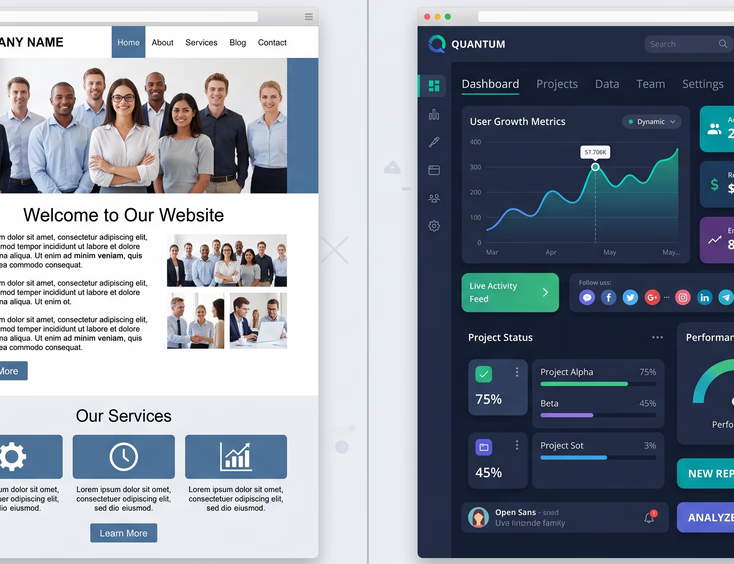
When you are building an online presence for your business, it is easy to get seduced by beautiful imagery. Squarespace has built a multi-million dollar brand on this exact premise. Their advertisements show stunning, minimalist websites for artisanal coffee shops, boutique hotels, and high-end design agencies. Out of the box, Squarespace looks incredible.
But there is a massive difference between a website that looks like a pretty painting and a website that acts like an efficient salesperson.
In the world of web design, this difference is called User Experience (UX).
Squarespace is built to give you a quick, visually pleasing starting point. Custom web development, on the other hand, is built to engineer a specific behavioral journey for your customers. When you are trying to scale a small or medium-sized business, you cannot afford to have a website that is just a digital brochure. You need a platform designed to convert passive browsers into active buyers.
Let’s look under the hood of both options to see how they truly impact the experience of your users, your search engine rankings, and your business growth.
1. The Core Paradox: Beautiful Templates vs. Strategic User Experience
When you use Squarespace, you start by choosing a template. These templates are designed by world-class designers, which is why they look so appealing at first glance. However, templates are designed for hypothetical businesses with hypothetical customers.
The Template Trap
Templates rely on a rigid layout structure. They dictate exactly where your images go, where your text goes, and how your navigation menu behaves.
- The Problem: Your business is not hypothetical. You have specific services, unique selling propositions, and a distinct target audience.
- The Result: When you try to force your real-world business information into a pre-made template, the design begins to break down. You might have a headline that is three words too long, causing it to wrap weirdly on mobile. Or you might have a services list that requires five columns, but the template only supports three.
- The Compromise: To make the template work, you end up changing your messaging or removing important business information just to keep the website looking clean. You are letting the software dictate your business strategy, rather than your business strategy dictating the software.
The Engineered UX Approach
Custom web development reverses this process entirely. Instead of starting with a visual design, a custom project starts with user research and strategy.
- Information Architecture: We map out exactly what information your customer needs to see, and in what order, to make a buying decision.
- Wireframing: We build black-and-white blueprints of your pages based on user behavior data. We place buttons, text, and images where they will naturally attract the human eye.
- Custom Layouts: Only after the strategy is locked in do we write the code to bring the design to life. The technology conforms to your business goals, not the other way around.
2. Visual Identity & The "Cookie-Cutter" Problem
In a crowded digital marketplace, brand recognition is everything. If your business looks exactly like your competitors, your only point of differentiation becomes your price. This leads to a race to the bottom.
+--------------------------------------------------------------------------+
|                         THE BRAND DILUTION SPECTRUM                      |
+--------------------------------------------------------------------------+
|                                                                          |
|  [ SQUARESPACE TEMPLATE ]                                                |
|   * Standard Grid System (Fluid Engine)                                  |
|   * Common Font Pairings & Layouts                                       |
|   * Recognizable "Squarespace Aesthetic"                                 |
|   Result: Your premium business looks like ten other local competitors.  |
|                                                                          |
|  [ CUSTOM WEB DEVELOPMENT ]                                              |
|   * Infinite Grid & Layout Freedom                                       |
|   * Unique Interactive Brand Assets                                      |
|   * Tailored Visual Storytelling                                         |
|   Result: A distinct digital ecosystem that commands premium pricing.    |
|                                                                          |
+--------------------------------------------------------------------------+
Recognizable Patterns
Squarespace websites use a proprietary layout engine called "Fluid Engine." While it is highly flexible for a drag-and-drop tool, it still operates within a fixed set of design rules and grid alignments.
Web-savvy consumers can spot a Squarespace website from a mile away. They recognize the standard header layouts, the specific ways images hover and zoom, and the familiar checkout flows.
When your brand is wrapped in a generic template envelope, it loses its premium feel. You look like a small-scale operation, even if you are an established, high-performing business.
Bespoke Digital Design
With custom development, there are no structural boundaries. If your brand relies on a highly interactive, storytelling experience, custom code can deliver it.
- Custom Interactions: Elements can slide, morph, and change dynamically as the user scrolls, creating a sense of depth and luxury.
- Unique Typography & Assets: You are not limited to the standard Google or Adobe font packages bundled with website builders. Your developers can integrate proprietary fonts, bespoke vector animations, and unique layouts that cannot be replicated by standard drag-and-drop engines.
- Tailored Micro-interactions: Every button press, form submission, and menu toggle can be designed to provide satisfying, custom visual feedback to the user, making the site feel alive and highly polished.
3. The Performance Gap: Weight, Speed, and User Frustration
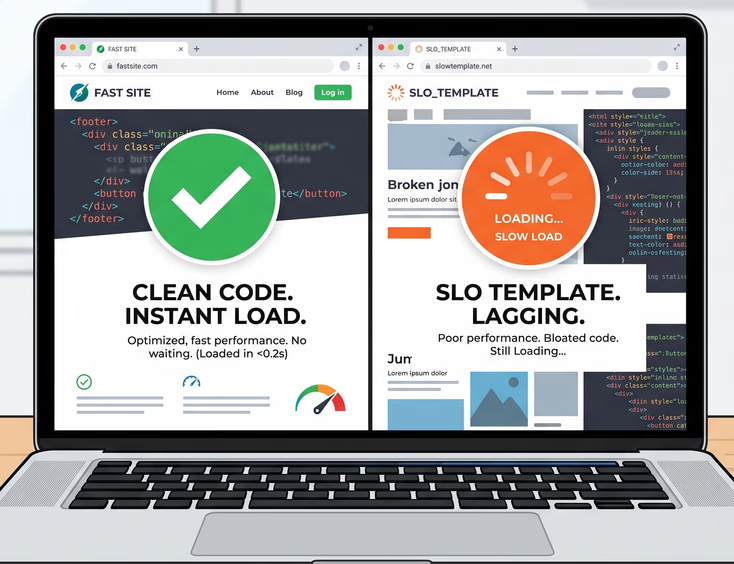
User experience is not just about what a site looks like; it is about how it feels to use. If a website takes more than three seconds to load, over half of your visitors will abandon it. They do not care how beautiful the graphics are if they cannot see them.
Squarespace sites carry a lot of invisible weight. Because the platform has to accommodate millions of users with different design needs, every Squarespace site loads with a large library of styling instructions (CSS) and interactive scripts (JavaScript) that your specific website might not even use.
The Loading Lifecycle: Squarespace vs. Custom Code
Let's look at what happens when a user clicks a link to your website:
| Phase of Load | Squarespace Site | Custom Coded Site |
|---|---|---|
| 1. Server Response | The browser requests the page from Squarespace's shared servers, which handle millions of other sites. Response times can fluctuate depending on global platform traffic. | The browser requests the page from a dedicated, optimized cloud server (like AWS or Vercel) nearest to the user. Response is near-instant. |
| 2. Asset Download | The browser is forced to download the entire Squarespace platform framework, including template libraries and layout engines. | The browser only downloads the exact, lightweight HTML, CSS, and JS files written specifically for that single page. |
| 3. Page Rendering | The browser has to parse through heavy, complex layout scripts before it can display the text and images correctly. | The clean, semantic code allows the browser to instantly display the layout, preventing frustrating "layout shifts." |
| 4. Interactive State | The user has to wait for all background tracking and platform scripts to load before they can reliably click buttons or use forms. | The page is interactive almost immediately, providing a smooth, snappy user experience. |
When you build a custom website, performance optimization is built into the foundation. Developers compress images, write clean code, use modern file formats, and leverage Global Content Delivery Networks (CDNs) to ensure your website loads in the blink of an eye, anywhere in the world.
4. Navigation and the Frictionless Path to Purchase
Think of your website as a physical retail store. If a customer walks in and cannot find the dressing rooms, the checkout counter, or the price tags, they will walk out.
On a website, your navigation menu, search bar, and internal links act as the store layout. Squarespace provides standard navigation options, but they are highly rigid.
Navigational Friction on Squarespace
- Simple Hierarchies Only: Squarespace struggles with complex navigation. If your business has multiple service categories, sub-services, case studies, and resources, a standard Squarespace drop-down menu quickly becomes cluttered, confusing, and unusable on mobile devices.
- Basic Search Functions: The built-in search functionality on Squarespace is basic. It cannot handle complex filtering, auto-suggestions, or smart categorization. If a user cannot find a specific product or blog post within two clicks, they are gone.
Engineered Navigational Paths
With custom web development, we construct intuitive, multi-tiered navigation systems tailored to your specific user groups.
What is a "User Persona"? A persona is a semi-fictional representation of your ideal customer. A custom site can offer different navigation paths for different personas. For example, a B2B service website might have a prominent "For Enterprise" path and a separate "For Small Business" path, ensuring both audiences find relevant information instantly.
- Smart "Mega-Menus": For companies with extensive offerings, custom mega-menus can organize services, resources, and contact links with clear visual hierarchy, icons, and featured promotional content directly inside the menu.
- Advanced Search & Filtering: We can implement instant search engines (like Algolia or Elasticsearch) that offer real-time search suggestions, auto-correct typos, and allow users to filter down thousands of items in milliseconds.
- Intent-Based Call to Actions (CTAs): Instead of a generic "Contact Us" button at the top of every page, a custom site can dynamically swap out buttons based on what page the user is viewing, ensuring the next step is always contextually relevant.
5. E-Commerce and Operations: Beyond the Standard Checkout
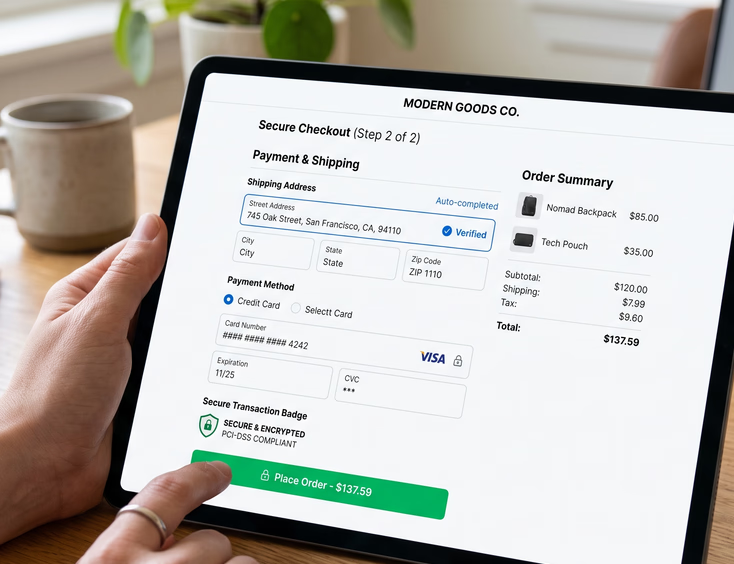
If you sell products, digital goods, or services online, your checkout process is the most critical part of your digital ecosystem. A confusing or clunky checkout experience leads to shopping cart abandonment.
+-------------------------------------------------------------------------+
|                        CHECKOUT UX ROADS: A COMPARISON                  |
+-------------------------------------------------------------------------+
|                                                                         |
|  [ SQUARESPACE CHECKOUT ]                                               |
|   - Hosted on a generic squarespace.com domain                          |
|   - Fixed layout structure (limited trust badge placement)              |
|   - Standard shipping & payment options only                            |
|   - Limited post-purchase upsell customizability                        |
|                                                                         |
|  [ CUSTOM CHECKOUT ]                                                    |
|   + Fully integrated on your own secure domain                          |
|   + Form fields optimized to minimize typing friction                   |
|   + Customized, conditional upsell offers based on cart items           |
|   + Direct, custom hooks to local shipping carriers & custom ERPs       |
|                                                                         |
+-------------------------------------------------------------------------+
While Squarespace’s commerce system is highly convenient for simple stores, it is a closed loop. You are forced to use their checkout structure, which means you cannot optimize the user journey where it matters most: at the point of sale.
The Custom Checkout Advantage
A custom-developed checkout process is designed to eliminate every single point of friction.
- Single-Page Checkout: Instead of forcing users through multiple loading screens (Shipping -> Billing -> Review), a custom site can consolidate these fields into a highly optimized, single-page interface.
- Auto-Address Complete: Integrating Google Maps APIs allows users to start typing their address and have it auto-fill instantly, preventing typos and reducing checkout time by up to 40%.
- Flexible Payment Methods: You can easily integrate regional payment gateways, buy-now-pay-later services (like Klarna or Afterpay), or complex subscription models that standard platforms do not support natively.
- Dynamic Upsells: Custom code allows you to analyze what is in a customer’s cart and display highly targeted, relevant add-on products right before they click "pay," instantly boosting your Average Order Value (AOV).
6. Accessibility (ADA Compliance) and Inclusive Design
Web accessibility means ensuring that your website can be used by everyone, including people with visual, auditory, motor, or cognitive disabilities.
In many countries, including the United States, web accessibility is not just a polite best practice—it is a legal requirement under the Americans with Disabilities Act (ADA). Non-compliant websites face real, costly lawsuits from digital accessibility advocates.
Where Squarespace Falls Short
While Squarespace builds basic accessibility features into their platform, they cannot guarantee compliance.
- The Drag-and-Drop Risk: Because Squarespace allows non-technical users to drag and drop elements anywhere, it is incredibly easy to accidentally break accessibility rules. You might place light text over a light background, violating contrast guidelines.
- Incorrect Heading Structures: Squarespace users often use headings (H1, H2, H3) based on how large the font looks, rather than its structural hierarchy. This completely confuses screen readers used by visually impaired visitors.
- Interactive Element Issues: Complex template elements, like lightboxes, pop-ups, and custom sliders, are often not accessible via keyboard navigation, locking out users who cannot use a mouse.
Designing for Accessibility From Day One
A professional custom development team treats accessibility as a foundational pillar, not an afterthought. We write Semantic HTML and use ARIA (Accessible Rich Internet Applications) labels to ensure your website is fully readable by screen readers and navigable by keyboard-only users.
- Contrast Assurance: We run color palettes through rigorous mathematical contrast checks before writing a single line of code.
- Keyboard-Only Traversal: We test every link, button, and form to ensure a user can seamlessly navigate the entire site using only the "Tab" key.
- Responsive Scaling: We ensure text can be scaled up to 200% by browser settings without breaking the layout or causing text to overlap.
By building an inclusive site, you protect your business from legal liabilities while opening up your services to a massive, often overlooked segment of the market.
7. Operational Efficiencies: Syncing Your Web Presence with Your Daily Workflow
Your website does not exist in a vacuum. To be a true business asset, it must work hand-in-hand with your internal systems.
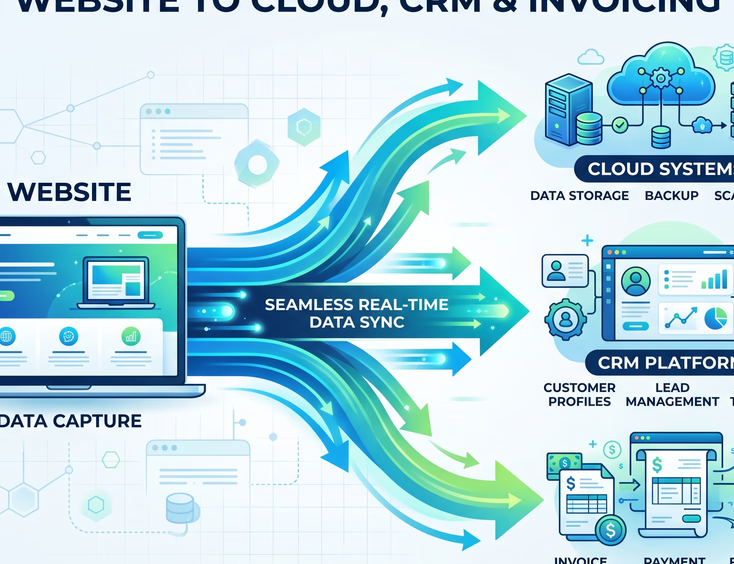
If your staff has to manually copy data from your website forms and paste it into your CRM, your inventory manager, or your accounting software, you are wasting valuable hours and introducing human error into your pipeline.
The Limits of Squarespace Extensions
Squarespace offers a list of curated integrations (called "Squarespace Extensions"). While these work well for common tools like Mailchimp or Quickbooks, they are highly rigid.
- If you use a specialized industry CRM (such as a custom medical portal, a unique real estate listing manager, or a proprietary construction estimating software), Squarespace cannot talk to it.
- You are forced to use middleman services like Zapier, which can get expensive, add latency to your data transfers, and break without warning if either platform changes its API structure.
Built-to-Order System Architecture
Custom web development allows your site to become a seamless extension of your physical operations.
+--------------------------------------------------------------------------+
|                      CUSTOM WORKFLOW AUTOMATION PIPELINE                 |
+--------------------------------------------------------------------------+
|                                                                          |
|  [ User Actions on Website ]                                             |
|         │                                                                |
|         ▼ (Secure Custom API Integration)                                |
|  [ Custom Middleware / Central Hub ]                                     |
|         ├──► Updates Salesforce/HubSpot (Sales CRM)                      |
|         ├──► Books Appointment in Custom Calendar (Operations)           |
|         └──► Generates Invoice in Xero/QuickBooks (Accounting)           |
|                                                                          |
+--------------------------------------------------------------------------+
With this model, there is no manual data entry. Your website acts as an automated operations manager, allowing your small team to handle the output of a much larger corporation.
8. Total Cost of Ownership and Long-Term Value Creation
To truly evaluate Custom Web Development vs. Squarespace, you must look beyond the initial invoice. You must compare the long-term ROI and asset value of both options over a 3-to-5-year window.
Let's break down how the costs and benefits stack up in a direct comparison:
| Evaluation Metric | Squarespace Platform | Custom Developed Platform |
|---|---|---|
| Upfront Cost | 🟢 Very Low (Typically under $1,500 if DIY or using basic freelancers). | 🔴 Moderate to High (Requires professional design, engineering, and testing). |
| Ongoing Monthly Fees | 🟡 Low base fee, but increases quickly as you add commerce features and third-party extensions. | 🟢 Extremely Low (Standard, optimized cloud hosting without platform markups). |
| Design Control | 🔴 Restricted (You must stay within the template's grid and layout rules). | 🟢 Absolute (Any layout, interaction, or animation can be engineered). |
| Scalability | 🔴 Hard Limit (You will eventually hit a wall when you need deep customization). | 🟢 Infinite (The codebase can grow, change, and expand alongside your company). |
| Data & Code Ownership | 🔴 Zero (You cannot download your code; you are locked into Squarespace forever). | 🟢 100% Yours (The custom codebase is an intellectual property asset of your business). |
| SEO Flexibility | 🟡 Standard (Basic meta tags, but limited structural code optimization). | 🟢 Complete (Advanced schema, dynamic landing pages, clean code optimization). |
The Real Cost of "Cheap"
While Squarespace is an excellent tool for a startup testing a business concept, it can become an expensive liability as you scale.
If your website's slow load times cause even 5% of your visitors to leave, or if your template's layout limits prevent you from building an optimized landing page for an ad campaign, you are losing money every single day. Over a three-year period, those lost conversions will easily dwarf the cost of hiring a professional web development agency to build a custom solution.
Furthermore, a custom website is a valuable piece of intellectual property. If you ever plan to raise capital, merge, or sell your business, having a proprietary, highly optimized digital platform adds tangible value to your company’s valuation. A Squarespace site, which can be duplicated in an afternoon, holds no actual asset value.
9. The Verdict: When to Walk Away from Templates
The choice between these two platforms comes down to one fundamental question: Is your website a cost center or a revenue generator?
If your website is simply a place to display your operating hours, your phone number, and a couple of photos of your team, Squarespace is more than enough. It is a cost-effective, easy-to-use option for businesses that do not rely on their website to generate actual business.
However, if your website is the primary touchpoint for your clients, the engine that generates your leads, the storefront that processes your sales, or the hub that connects your business software, you cannot afford to build it on a template.
By investing in custom web development, you are not just buying a design; you are engineering a high-performance business tool designed to outpace your competitors, delight your customers, and scale alongside your ambitions without ever hitting a technical ceiling.
Stop Fitting Your Brand Into a Cookie-Cutter Template
Don't settle for rigid templates. Let’s build a stunning custom website designed to convert your exact audience.
Build Your Bespoke Experience