

4 Messy Spreadsheet Habits to Eliminate for Flawless Online Data Imports

Manual spreadsheet data manipulation represents the single greatest vector for runtime exceptions inside online data import engines. While desktop accounting teams, inventory managers, and operations personnel view spreadsheets as highly flexible canvas documents for visual display, web automation pipelines treat them as rigid, multidimensional data matrices. When a user introduces unstructured visual design choices into a file meant for automated parsing, the underlying programmatic serialization layers break down, triggering system-wide sync failures, memory lockups, or corrupted relational database rows.
Building a sustainable data pipeline requires aligning your internal data manipulation workflows with modern programmatic ingestion standards. When database layers read external data packages, they expect uniform streams that conform perfectly to strict schema definitions. Eliminating casual, visually oriented spreadsheet habits ensures that your data loads complete with sub-second speeds, entirely bypassing the technical debt and manual auditing cycles associated with unvalidated batch uploads.
Organizations that scale their internal business platforms eventually outgrow manual file management habits entirely. Companies processing high-velocity product transformations realize that their technical layers require absolute system-to-system synchronization. Learning how to sync physical inventory with custom digital storefronts serves as a vital structural guide for converting erratic desktop files into direct, event-driven automated infrastructure loops.
Habit 1: Merged Cells and Structural Grid Distortions
Merged cells are a primary cause of structural failure within automated import frameworks. In desktop applications like Excel or Google Sheets, merging cells provides an easy way to label multi-column sections or group multi-row headers visually. However, beneath the visual interface, a merged block fundamentally destroys the index geometry of the underlying data grid.
When an open-source CSV tokenizer or an enterprise parser (such as a stream-based node engine) reads a spreadsheet row, it translates individual cells into a continuous array of indexed tokens. When the parser encounters a merged cell cluster, it reads the data payload exclusively within the very first upper-left coordinate index of that group. Every adjacent cell absorbed by the visual merge is processed as a null, blank, or completely shifted index parameter.
How Index Shifting Destabilizes Downstream Mapping
This index distortion causes severe parsing errors during database migrations. If your import logic expects column three to consistently represent a numeric item price, but a merged header shifts the column array boundaries to the left, the import script will attempt to read a text string into a float database column. This mismatch triggers immediate database type-casting exceptions that reject the entire upload package.
| Spreadsheet Element | Brittle Visual Layout Pattern | Sustainable Database Matrix Pattern |
|---|---|---|
| Header Row Architecture | Multi-level stacked rows with merged category blocks spanning multiple columns. | A single, immutable row containing unique, lowercase alphanumeric key strings. |
| Row Identity Configuration | Single merged value cell spanning five rows to group an order batch together. | Flat database normalization; the tracking ID is repeated explicitly across all five rows. |
| Empty Field Representation | Completely skipped grid spaces or whitespace characters to separate records visually. | Standard empty string indicators, complete omission, or explicit NULL values. |
| Totalization Summaries | Injected summary rows with formulas embedded directly into the middle of data streams. | Pure raw record arrays; summary statistics are computed downstream via SQL query logic. |

Habit 2: Polymorphic Data Fields and Untyped Columns
Another destructive habit is mixing data types within a single column. Relational databases like PostgreSQL, MySQL, and Microsoft SQL Server require columns to enforce strict data typing rules. A column defined as an integer can only contain pure numerical characters, while a column mapped as a timestamp requires a specific calendar format.
Human spreadsheet users frequently pollute these strict parameters by inserting contextual text notes directly into numeric or financial cells. Typing values like "$145.00 (Pending)", "Contact Vendor for Price", or entering placeholder text strings such as "N/A" or "TBD" into a numeric inventory table immediately corrupts the data column. When the serialization engine attempts to cast that string payload into a numeric memory stack, the runtime engine fails.
The flowchart below illustrates how an automated, custom ingestion pipeline evaluates incoming row strings, detects type pollution via validation checks, and applies automated regex stripping to save structural files:
[Ingest Uploaded Spreadsheet Row Stream]
                   │
                   ▼
     [Tokenize Column Array Values]
                   │
                   ▼
  [Evaluate Field Value: "transaction_fee"]
                   │
         ┌─────────┴─────────┐
         ▼ (Pure Numeric)    ▼ (Polluted Alphanumeric String)
  [Cast to Integer Cents]    [Trigger Automated Regex Stripper Layer]
         │                                       │
         │                                       ▼
         │                         [Strip Symbols, Commas, and Text]
         │                                       │
         │                        ┌──────────────┴──────────────┐
         │                        ▼ (Numeric Remaining)         ▼ (Irreducible Text Strings)
         │               [Cast to Integer Cents]       [Halt Processing Thread Safely]
         │                        │                                     │
         ▼                        ▼                                     ▼
   [Execute Verified Database Write Operation]          [Isolate Row String to Error Vault]
   [Release Relational Row Locks Safely]                [Generate Real-Time Audit Log Alert]
Preventing Currency String Corruption
To protect your internal systems from type-casting drops, your application logic must handle currency parameters as pure numbers rather than formatted strings. Storing values with currency symbols, commas, or period formatting markers forces parsers to execute heavy string-stripping routines that slow down data pipelines. Enforcing strict numerical formatting rules across your team's tracking assets allows you to easily lower your cost per transaction using custom system pipelines, maximizing import speeds.
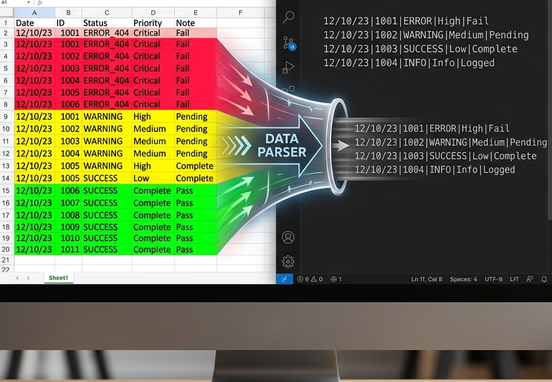
Habit 3: Visual Metadata and the Color-Coding Trap
Operations managers frequently use color-coding to convey operational priorities or account status changes within spreadsheets. An employee might highlight a row in red to flag a past-due account, use yellow to denote an order currently in transit, or format text in green to indicate a cleared payment profile. While these color systems are intuitive for human review, they are invisible to standard web data parsers.
When a spreadsheet file is serialized into a standard CSV stream or a JSON payload for API transmission, the cell fill parameters, font weights, and border style values are stripped away entirely. The data pipeline reads only the raw text strings contained inside the grid cells. If your business workflows rely on cell background metrics to route orders or handle customer approvals, the import engine will process the colored rows identically, resulting in critical processing blind spots.
Explicit Status Enumeration as a Structural Fix
Resolving this blind spot requires translating all visual metadata into explicit status columns that contain standardized alphanumeric strings. For example, rather than shading a customer row red to halt an active shipment, your data grid must include an explicit column named shipping_status restricted to predefined values like active, paused, or on_hold. This normalization model enables your web parsers to route information reliably through downstream workflows.
- Define Strict String Constants: Restrict your status columns to lowercase, underscore-separated alphanumeric text flags to keep parsing simple.
- Eliminate Visual Style Dependencies: Strip background colors, italics, and conditional formatting maps from files before initiating imports.
- Deploy Pre-Validation Hook Scripts: Use client-side script validation checks to scan the data for unrecognized text values before transmitting the data payload.
- Enforce Column Isolation Boundaries: Ensure your tracking columns correspond to a singular attribute, completely separating notes from operational variables.

Habit 4: Ambiguous Date Structures and Regional Formatting Drift
Ambiguous date formatting represents a major source of string-to-timestamp parsing errors across corporate web applications. Different geographical regions follow conflicting calendar logging conventions. For example, a date string written as "04/05/2026" is interpreted by a United States system as April 5th, 2026, while an enterprise server configured in the United Kingdom reads the identical string as May 4th, 2026.
When a data parser encounters a localized date string without an explicit regional context, it resolves the timestamp using the host server's default configuration settings. If an overseas vendor uploads a spreadsheet compiled under European formatting rules into a US-hosted cloud system, your system will swap months and days for the first twelve days of every month, causing silent, massive transactional data drift.
System Integration Tip
Always enforce the universal ISO 8601 extended calendar standard (
YYYY-MM-DD) across all data-gathering forms and file import templates. Standardizing your data inputs to this format completely removes regional interpretation errors, ensuring that every connected software node interprets temporal metadata identically.
Ensuring your date formats conform to rigid global specifications provides your development teams with the structural clarity needed to manage multi-tiered automated data networks. Building your core system interactions around clean, standardized inputs allows you to leverage highly dependable trigger-action logic to coordinate continuous data processing updates across your enterprise without risking timing errors.
Deploying Enterprise Pre-Import Sanitization Guardrails
To protect your production environment from the formatting traps of manual files, your integration architecture must deploy a strict, multi-stage automated validation pipeline at the point of ingestion. A bulletproof ingestion framework treats incoming spreadsheets as unverified user inputs, routing files through isolated validation rules before allowing any data writes to touch your primary database tables.
If a file fails validation—such as containing missing column headers or misaligned cell structures—the validation engine must isolate the broken file immediately. Implementing a defensive system architecture driven by the multi-million dollar leak: how to detect system errors and automate data validation provides your engineering teams with the technical blueprint needed to capture validation exceptions, log error coordinates, and protect your primary production networks from data corruption.
Furthermore, because high-volume data operations are vulnerable to unexpected network drops or connection drops during intensive batch processing runs, your system must feature robust runtime boundaries. Deploying specialized error controls based on the bulletproof web pipeline: how custom error controls and smart fallbacks prevent system blackouts provides the fallback frameworks needed to securely store raw payloads within message queues, manage database timeouts gracefully, and maintain system uptime during complex import operations.
Moving away from fragile, multi-hop middleware aggregators or visual tools gives your security teams direct control over these validation pipelines. Transitioning to custom, direct-to-destination server-side architectures allows scaling enterprises to eliminate usage-based software taxes, maximize processing velocity, and retain absolute data ownership. Organizations that realize their platforms are outgrowing basic visual tools can successfully future-proof their operations by actively bypassing the Zapier tax to secure total platform independence.
Hardening System Infrastructure for Perfect Data Imports
Eliminating messy spreadsheet habits and modernizing your enterprise data ingestion routines is an operational necessity for any scaling company focused on protecting its platform stability and data integrity. By removing merged cells, enforcing strict type boundaries, migrating visual indicators into string fields, and standardizing date columns to universal formats, you insulate your business platforms from software errors and secure complete control over your operational records.
Designing, securing, and maintaining these advanced, direct-to-destination data pipelines requires specialized backend systems engineering, strict relational database coordination, and deep architectural mapping. Partnering with professional software architects ensures your migration from manual tracking habits to automated code loops is executed smoothly without disrupting active business workflows.
For corporations focused on taking absolute ownership of their digital infrastructure and maximizing operational performance, utilizing professional custom workflow and systems automation services provides the technical expertise needed to deploy secure, high-performance data pipelines that eliminate data processing bottlenecks, safeguard sensitive information assets, and protect long-term digital growth.