

The Automated Lead Engine: How to Enrich, Route, and Onboard Web Leads via Dynamic Form Logic

Most business websites treat lead generation as a passive collection mechanism. A user fills out a flat form, the data drops into an email inbox, and a human operator manually parses the details to determine the next operational steps. This structural delay creates immediate friction, allows high-value prospects to cool down, and caps operational scalability. When an internal response takes hours or days, the likelihood of closing an account drops exponentially, making manual lead management an expensive organizational bottleneck.
By transforming static entry points into an automated lead engine, organizations can instantly qualify, enrich, route, and onboard prospects without manual intervention. This system relies on dynamic form logic and programmatically linked back-office APIs to turn raw web inputs into structured, actionable enterprise records. The transition eliminates human triage entirely, driving faster engagement cycles and superior resource allocation across sales teams.
The Core Limitations of Static Web Capture
Static forms force companies into an inefficient compromise between data volume and user experience. To route a lead correctly to the appropriate department, internal sales operations require comprehensive data points: company size, industry vertical, current technical stack, budget allocations, and explicit pain points. However, forcing a website visitor to fill out a dozen native input boxes during their initial interaction drastically reduces front-end completion rates.
Conversely, reducing the web capture form to three basic fields—name, email, and message—leaves your internal sales team operating blind. Representatives waste hours manually researching companies via search engines or hosting unqualified discovery calls with low-intent leads who do not fit the company's ideal customer profile. This binary choice between low conversion rates and blind outreach stunts growth.
An intelligent alternative leverages modern web development methodologies to minimize user friction while maximizing backend data density. Through conditional logic, front-end inputs dynamically adjust based on user actions, collecting only the essential data points needed at any given stage of the interaction while background scripts retrieve the rest.
Structuring Dynamic Form Logic for Maximum Conversion
Dynamic form logic alters the interface in real time based on active user behavior. If a visitor selects "Enterprise" under a company size field, the form can instantly reveal deeper procurement questions. If they select "Bootstrapped Startup," the form can skip corporate governance queries entirely and redirect them to streamlined self-service options. This structural adaptation keeps fields relevant, avoids overwhelming the prospect, and acts as an automated triage protocol happening directly within the browser window.
The Mechanics of Progressive and Conditional Fields
Conditional visibility relies on clear parent-child relationships established within your website's front-end application state. When a parent field receives a specific input value, a state change occurs, instructing the browser DOM to render or conceal specific child fields seamlessly.
- Field Tiering: Group questions by data priority, keeping the initial view strictly limited to high-impact triggers like corporate email and primary goals.
- Input Validation: Implement real-time validation patterns to block generic domains if your primary commercial model focuses strictly on business-to-business accounts.
- State Memory: Use local session state to retain successfully completed fields if a user accidentally refreshes, preventing repetitive data entry frustration.
- Dynamic Micro-Copy: Change sub-labels or placeholder helper text based on previous selections to provide a tailored, highly specific user experience.
Technical Comparison of Form Architectures
Below is an operational breakdown comparing traditional web forms against a dynamically optimized logic engine.
| Architectural Component | Static Web Forms | Dynamic Logic Engines |
|---|---|---|
| User Friction | High; long fields intimidate users | Low; fields adjust programmatically |
| Data Completeness | Poor; missing critical corporate metrics | High; enforced via background APIs |
| Routing Speed | Delayed; dependent on manual triage | Instantaneous; calculated via script |
| CRM Integration | Simple string injection only | Structured, deeply verified object mapping |
| Error Rate | High; manual entry errors go unnoticed | Low; validated instantly at the input layer |

Real-Time Data Enrichment Protocols
You do not need to ask website users for data that public registries and lookup tools already know. Data enrichment protocols allow web engines to fetch deep operational profiles using only a single input point: the user's business email domain name. The moment a prospect enters an address, an asynchronous API request can fire in the background, querying data clearinghouses to pull company revenue, employee headcounts, physical locations, and tech stack components before the user even clicks the submit button.
Operational Tip: Always execute enrichment scripts asynchronously. If an external enrichment API encounters latency or fails completely, your core form submission must remain unaffected, defaulting back to native user inputs without breaking the user experience.
This background validation pipeline ensures that your sales team receives enriched data objects immediately, saving hours of manual preparation. For teams seeking to scale these operations cleanly across their entire enterprise architecture, deploying comprehensive custom workflow and systems automation services ensures that external enrichment endpoints stay fully synchronized with internal infrastructure without creating front-end performance bottlenecks.
Programmatic Lead Routing Rules
Once the form captures and enriches a lead record, the automation engine evaluates the payload against strict corporate routing rules. Instead of dumping every submission into a generic shared inbox, the system routes the data object directly to specific team members or processing departments. This automated triage eliminates the manual bottleneck entirely, ensuring that high-value opportunities receive immediate attention from the correct internal stakeholders.
Designing Value-Based Branching Logic
Routing engines utilize nested if-then conditional strings to parse lead objects. The system reads the enriched data metrics and categorizes the lead according to internal operational thresholds.
- Tier Assessment: The system analyzes company size and projected budget metrics to flag enterprise accounts vs. mid-market prospects.
- Geographic Sorting: Data keys parse physical addresses or IP origins to assign the lead record to regional account executives automatically.
- Capacity Balancing: Round-robin allocation logic checks live employee availability to distribute leads evenly across active team members.
- Priority Escalation: High-value enterprise triggers instantly fire high-priority notification payloads to executive leadership communication channels.
This structural alignment ensures that your high-intent prospects move seamlessly through the pipeline. To fully understand how front-end routing impacts your broader commercial ecosystem, consider how this piece connects to closing the marketing-to-sales loop with automatic lead attribution, ensuring every dynamically routed record retains its original channel origin.
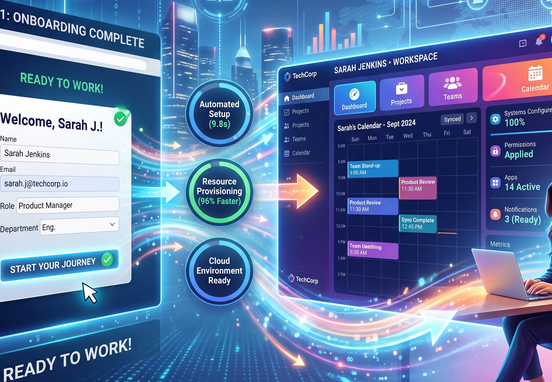
Executing Instant Self-Service Onboarding
For mid-market and product-led leads, human conversation is often an unnecessary bottleneck. An optimized engine transforms the submission confirmation page into a dynamic, self-service launchpad. Instead of a generic message promising a response within 48 hours, the system renders personalized next steps instantly, embedding calendar links synced to the exact representative assigned during routing, or launching an automated setup sequence.
Automating Early Customer Milestones
If the system classifies a user as a self-service or trial tier client, the onboarding workflows should fire programmatically within seconds of form submission.
- Workspace Creation: Provision digital tenant spaces, databases, or project workspaces using automated cloud infrastructure scripts.
- Contextual Asset Delivery: Deliver tailored documentation, guides, or API access keys matching the exact use case selected inside the form logic.
- Notification Loops: Alert internal customer success monitors via secure chat apps if specific high-intent milestones are missed during initial configuration.
When designing these automated customer communication paths, teams must map the architecture extensively beforehand. Taking time for mapping automated emails before custom coding begins guarantees that transaction messages do not collide or trigger out of order during real-time onboarding runs.

Defensive Architecture for Lead Logic Failures
Automated logic chains contain multiple moving parts, including external APIs, webhook payloads, and cloud database connections. A truly robust system requires built-in defensive configurations to protect data integrity when an element goes offline. If an enrichment API times out, or if your primary CRM platform suffers a temporary service disruption, your web pipeline must handle the error without losing the prospect's data or displaying a broken screen to the end user.
Fallback States and Dead Letter Queues
Your form processor should include strict exception handling rules. When an outbound API call fails, the local logic engine should immediately write the raw lead payload to an isolated, highly available database cache or queue system. Once normal operations resume, an automated retry mechanism replays the cached payloads to update the CRM and trigger routing pathways retrospectively. This configuration ensures zero data loss during high-volume traffic spikes or unexpected platform outages.
The Operational Benefits of Structural Redundancy
Building redundancy directly into your system ensures continuous operational capability.
| Failure Vector | Potential Impact | Automated Mitigation Strategy |
|---|---|---|
| Enrichment API Outage | Empty data fields, broken routing | Default to basic form strings; tag record as "Unenriched" |
| CRM Database Latency | Lost lead records, dropped notifications | Buffer payload in cloud queue; auto-retry every 300 seconds |
| Webhook Payload Drop | Incomplete downstream workflows | Run nocturnal reconciliation scripts to match logs |
| Form Validation Failure | Loss of user submission data | Cache data locally in browser session storage |
While completely autonomous processing dramatically lowers operational overhead, certain critical steps still benefit from human oversight. For example, understanding why automated email workflows require a human approval step can safeguard your system from accidentally sending high-value custom contracts or sensitive onboarding payloads before internal teams verify account validity.
Transitioning from Web Selection to Automated Pricing Models
For professional services and enterprise software solutions, the ultimate evolution of a dynamic form engine involves the immediate delivery of commercial pricing frameworks. When a user selects specific modules, user counts, or operational tiers, the platform can process these inputs to formulate custom financial estimations. Instead of scheduling a multi-week scoping process, your dynamic front-end logic passes highly structured technical parameters straight to an internal documents rendering microservice.
This automated architecture can automatically generate custom estimate PDFs from web selections, delivering a personalized, line-item proposal directly to the prospect's inbox or browser screen within minutes of their initial engagement.
Measuring System Performance and Bottlenecks
An automated lead engine is not a set-it-and-forget-it installation. It requires continuous tracking to ensure that conditional logic paths do not inadvertently block legitimate enterprise prospects or introduce friction points. Monitor drop-off points specifically on fields where conditional visibility triggers. If users consistently abandon the form immediately after a specific child field displays, the question may be overly intrusive or complex, signaling a need for further optimization.
Regularly auditing transaction logs, checking API response latencies, and verifying data synchronization across your entire technology stack will keep your automated pipeline highly efficient. This ongoing maintenance ensures a frictionless bridge between initial web interest and structured user onboarding, maximizing your return on marketing investments.