

Why Automated Email Workflows Require a Human Approval Step
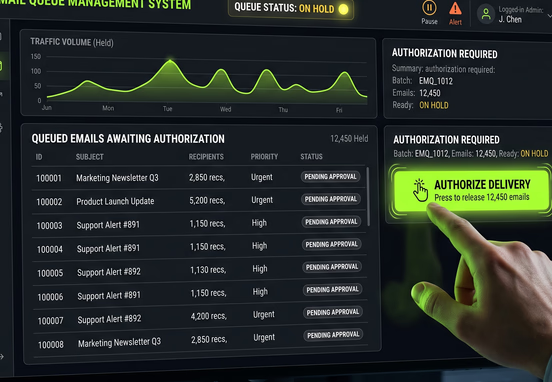
Enterprise automation offers an alluring promise: eliminate human effort, remove operational delays, and allow systems to run autonomously at scale. When applied to customer communications, this typically manifests as automated email workflows triggered by specific user actions or database changes. However, removing human oversight completely from high-stakes digital messaging creates an incredibly brittle operational posture that exposes an enterprise to severe reputational, legal, and financial risks.
Purely autonomous communication networks operate with absolute literalism. They read raw database strings and execute pre-compiled templates exactly as programmed, completely blind to context, market changes, or subtle data errors. When an edge case inevitably breaks your underlying system logic, an unmonitored automation path will blast erratic, insensitive, or financially damaging communications directly to clients without warning.
The Hidden Failures of Pure System Literalism
Software executes instructions flawlessly, but it lacks the capacity for situational awareness or critical judgment. If a database script experiences a synchronization lag or a user inputs corrupted data that slips past basic front-end validation filters, an automated email system will wrap those corrupted outputs into a beautifully formatted transactional email and broadcast it instantly.
For instance, consider an automated billing system that miscalculates an account balance due to a currency conversion glitch, or an automated account management workflow that triggers a "payment overdue" notification to an enterprise account while a manual contract extension is being finalized by your legal team. The system executes the action because the database parameters matched the trigger logic, completely unaware of the real-world relationships at play.
To avoid these programmatic public relations crises, engineering teams must recognize that communication logic cannot be treated identically to standard database storage migrations. Before deploying any customer-facing messaging loops, technical teams should spend time mapping automated emails before custom coding begins, ensuring that every possible trigger state, fallback variant, and human interception point is explicitly documented at the architectural level.
The Anatomy of an Autonomous Messaging Crisis
When an email automation loop goes wrong, the damage accumulates exponentially due to the speed of modern cloud infrastructure. A broken loop can distribute thousands of invalid messages within minutes, overloading your customer support infrastructure and causing long-term damage to your domain's email deliverability reputation.
If major email providers detect a sudden surge of recipients marking your automated messages as spam or junk due to systemic messaging errors, your corporate domain can be blacklisted. Once blacklisted, even critical, manual, one-to-one business communications from your executive and sales teams will fail to reach client inboxes.
[System Event Trigger] ➔ [Data Corruption/Anomaly] ➔ [Autonomous Email Dispatch] ➔ [Client Receives Broken/Erroneous Message] ➔ [Domain Blacklisting & Brand Reputational Damage]
A defensive software architecture isolates these messaging pipelines from direct, unmonitored execution paths. When designing complex integrations between core applications and outbound mail servers, engineers protect operations by building a bulletproof web pipeline with custom error controls. This architectural discipline ensures that unexpected system behaviors trip an automated circuit breaker, halting outbound communication lines before erroneous data compromises customer relationships.
Structural Blueprint of a Human-in-the-Loop Gateway
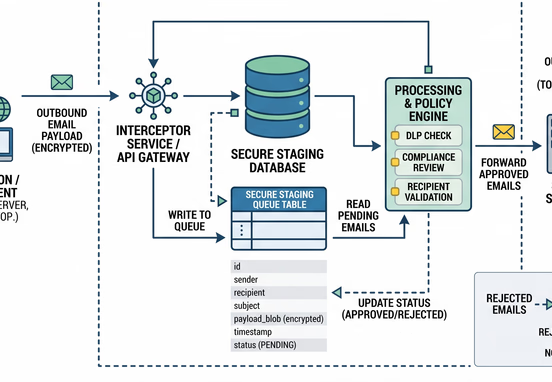
Preventing autonomous delivery failures requires introducing a Human-in-the-Loop (HITL) framework into your communication pipelines. Rather than allowing your core application code to transmit data payloads directly to external transactional mail providers, the integration engine diverts the compiled email object into a specialized internal approval state.
This structural pause splits the communication pipeline into two distinct phases: programmatic generation and manual verification. The email is generated, personalized, and structured entirely by automation logic, but its status inside the database remains flagged as pending. It cannot leave your servers until an authorized internal operator explicitly executes a release command.
How an Staging Queue Operates Internally
To implement this architectural safeguard, your application database must maintain an isolated table specifically engineered to store pending communication payloads.
- Payload Staging: The system serializes the complete email message object—including recipient metadata, subject lines, and compiled HTML body content—and stores it securely within an internal database queue.
- State Control: The tracking record receives a strict status property set to
awaiting_review, blocking any automated background cron jobs from pulling the record for network transmission. - Notification Despatch: An internal system webhook fires a lightweight notification payload to a secure operational monitoring channel, alerting administrative staff that a high-stakes communication requires manual inspection.
- Manual Execution: An operator reviews the compiled content inside a private internal dashboard, clicking a verified release button that changes the status property to
approved, which safely unlocks the record for immediate delivery.
Building out these secure transactional queues requires a deep understanding of multi-tiered enterprise architecture. When scaling operations, utilizing professional workflow and systems automation services allows companies to construct these internal staging states and administrative review screens without introducing processing lag or database lockups into their customer-facing production systems.

Comparative Analysis: Autonomous vs. Human-Approved Delivery
Choosing where to draw the boundary between absolute automation and manual intervention depends heavily on transaction volumes and the financial stakes associated with each message type.
| Operational Vector | Fully Autonomous Workflows | Human-in-the-Loop Frameworks |
|---|---|---|
| Execution Latency | Near-zero; milliseconds from trigger to inbox. | Variable; dependent on manual operator review schedules. |
| Risk Profile | Maximum; errors are pushed directly to clients. | Minimal; human oversight intercepts anomalies. |
| Operational Costs | Low; runs continuously without human labor. | Moderate; requires dedicated internal review time. |
| Handling Data Deviations | Fails completely; processes corrupt inputs literally. | High resilience; operators flag and correct data errors. |
| Ideal Deployment | Low-stakes alerts; password resets; basic updates. | High-stakes quotes; enterprise onboarding; billing fixes. |

High-Risk Triggers Requiring Mandatory Interception
Not every automated message on a corporate website requires a human gatekeeper. Low-stakes transactional notifications, such as self-service password reset links or immediate multi-factor authentication tokens, must process automatically within seconds to maintain standard user functionality. However, high-value commercial milestones require mandatory human review.
A prime example involves systems that run downstream from highly optimized automated lead engines. While front-end logic can qualify and route prospects flawlessly, launching an automated post-submission email containing complex project estimations or specialized onboarding documentation should always pass through an internal review step to double-check that background data enrichment fields aligned accurately with the client's actual profile.
Operational Tip: Establish clear business rules based on financial thresholds. Any automated email containing pricing calculations, custom discount quotes, or contract terms exceeding a specific valuation should be programmatically locked in an approval state until verified by a manager.
Injecting human oversight at these critical checkpoints protects organizations against major financial vulnerabilities. Implementing these internal safety gates is an essential practice for detecting system errors and automating data validation, closing structural gaps before an automated system accidentally transmits incorrect financial quotes or sensitive internal corporate documentation to outside parties.
Step-by-Step Implementation of a Modern Hold-and-Release System
Building an enterprise-grade hold-and-release communication framework requires a structured data flow that balances system safety with internal operational efficiency.
- Event Capture: A core business event triggers inside the application codebase, such as an enterprise customer account reaching its milestone renewal period.
- Object Compilation: The application queries the database, retrieves relevant customer metrics, and runs the data through localized email templates to generate the exact message payload.
- Queue Interception: Instead of sending the compiled email straight to an SMTP server, the system inserts the complete data payload into a secure
email_approval_queuetable with a status ofheld. - Administrative Notification: A system webhook triggers an immediate notification to internal staff via a dedicated workspace app, displaying the recipient's name, the email topic, and a direct link to the internal review interface.
- Operational Inspection: The internal operator opens the secure administrative review screen, evaluates the text for context and data accuracy, and can modify text fields directly if minor adjustments are required.
- Secure Release Execution: The operator clicks an action button, firing a cryptographically signed request to the server that updates the queue status to
ready_for_dispatch. - Network Delivery: A specialized background service worker detects the status update, pulls the approved record from the table, and passes the clean payload to your transactional email service provider for instant delivery.
Designing Intuitive Approval Interfaces
To prevent your human-in-the-loop architecture from becoming an operational roadblock, the internal review interface must be built for speed and clarity. If an administrator has to navigate through complex database layers or read raw JSON strings to verify an email's validity, your internal workflows will stall under heavy volumes.
The review dashboard should provide a side-by-side split screen view: one side displaying the formatted email preview exactly as the customer will see it, and the other displaying the raw database variables used to compile those inputs. Providing clear, simple action buttons alongside structured data summaries allows team members to verify and release pending communications within seconds, keeping your operational pipelines moving safely and efficiently.
Achieving Balance in Corporate Automation
Deploying automation across your digital infrastructure does not mean removing human intelligence from your commercial operations; it means using automation to handle repetitive execution while reserving human judgment for quality control. By building secure human approval steps into high-stakes email workflows, you protect your brand's reputation, maintain absolute control over enterprise data, and ensure that your automated pipelines always support your broader customer relationship goals.