

Automated HR Workflows: How to Onboard New Hires and Revoke App Access Upon Exit
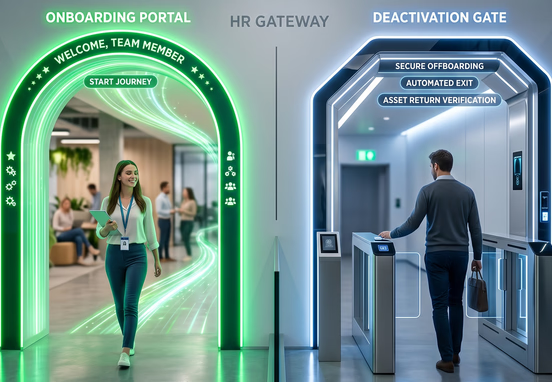
Manual human resource lifecycle management introduces extreme security friction and operational vulnerabilities into expanding corporate infrastructures. When an organization scales past its initial operational baselines, managing employee transitions manually becomes an unsustainable administrative burden. HR managers and IT administrators end up wasting valuable development hours bouncing between disparate SaaS applications to create email accounts, assign software licenses, and configure access profiles. This fragmented operational structure frequently results in major coordination delays, directly reducing a new employee's early productivity.
The security risks scale even faster during the offboarding phase. When an employee exits an organization, a manual deactivation checklist creates a dangerous delay between their official departure time and the actual cancellation of their system access. If a single account manager forgets to revoke access to a shared database or a legacy deployment server, an ex-employee could retain access to proprietary intellectual property for weeks. This visibility gap exposes organizations to regulatory non-compliance, unauthorized data access, and accidental leaks that can severely damage corporate credibility.
Transitioning to code-driven, automated identity workflows replaces these unreliable human checklists with strict, deterministic system rules. By connecting an applicant tracking system (ATS) or primary human resource information system (HRIS) straight to your identity providers, your business ensures that onboarding and offboarding tasks occur instantly. This technical guide outlines the architecture required to build automated HR pipelines that provision system access securely and eliminate security risks the moment an employee departs.
Designing the Ingestion Layer for Employee Onboarding
An enterprise-grade HR automation pipeline requires a unified event broker that triggers automatically whenever an employee's organizational status updates. Relying on manual slack messages or email notices to notify IT of a new hire introduces data gaps. Instead, the workflow should execute the moment a candidate moves to a "Hired" state within your primary HR database or external recruitment software.
When this state change registers, the HR platform triggers an outbound webhook containing a structured JSON payload. This payload acts as the single source of truth for all downstream microservices, delivering essential data variables like department classifications, regional codes, and employment types. Isolating this ingestion endpoint ensures that incoming hire records are parsed asynchronously, preventing processing bottlenecks even during heavy corporate restructuring periods.
To ensure long-term stability across your infrastructure, the system must validate the payload schema against strict formatting guidelines before passing data to any external APIs. The JSON structure below demonstrates how a primary onboarding event payload can be formatted to drive automated provisioning services.
+------------------------+
|  Status: "Hired" State |
+------------------------+
            |
            v
+------------------------+
| Trigger Outbound JSON  |
|       Webhook          |
+------------------------+
            |
            v
+------------------------+
|   Ingestion Endpoint   |
| (Asynchronous Parsing) |
+------------------------+
            |
            v
+------------------------+
| Validate Schema Format |
+------------------------+
            |
      +-----+-----+
      |           |
  (If Valid) (If Invalid)
      |           |
      v           v
+-----------+ +-----------+
| Parse &   | | Log Error |
| Map Attr. | |  & Abort  |
+-----------+ +-----------+
      |
      v
+-----------+
| Downstream|
| Provision |
+-----------+
Parsing this transactional footprint enables the backend network to evaluate user attributes immediately. This automated step ensures that your internal directories map data parameters flawlessly without requiring an engineer to manually input names or handle application setup fields.
Provisioning Access through Role-Based Access Controls
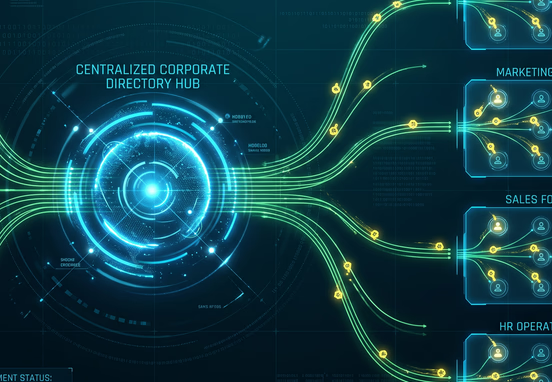
Once your onboarding payload passes structural validation, the automation orchestrator must determine what data networks and tools the new user can access. Hardcoding individual user permissions directly inside individual applications creates an unmanageable security web that breaks down as teams grow. Instead, organizations must manage identity setup using centralized directory connections and strict grouping rules.
When the system processes an incoming payload, it maps the user's department and role tier to predefined permission profiles. For instance, a new engineer might automatically receive access to specific code repositories, error logging dashboards, and sandboxed servers, while a marketing manager receives access to design assets and analytics tools. Managing access layers systematically is critical for defending an enterprise landscape, demonstrating why utilizing role-based system permissions keeping sensitive data safe at scale is the standard framework for keeping corporate databases insulated from unauthorized exposure.
Automated Provisioning Execution Sequence
- Workspace Generation: The orchestrator contacts your identity provider API to build a new corporate identity, forcing password Resets upon initial login.
- Directory Syncing: The system pushes the identity string to pre-mapped communication channels, ensuring the user instantly populates target team directories.
- Software Provisioning: Asynchronous script nodes call external software endpoints to create seat allocations, avoiding manual license distributions.

The Offboarding Off-Switch: Revoking Identity Networks Upon Exit
While automated onboarding is essential for productivity, automated offboarding is critical for corporate security. The moment an employment relationship terminates, the enterprise network must eliminate all entry points to prevent data leaks. Leaving legacy identities active across your tech stack creates significant vulnerabilities, giving ex-employees ongoing access to your internal client environments and proprietary structures.
To handle departures safely, your infrastructure can repurpose the core automation logic used to manage client exits. Adapting the architectural frameworks outlined in the hands-free goodbye how to automate your client offboarding process allows your internal IT systems to run comprehensive access revorations instantly. This ensures that personal access keys and shared credentials are split from departing staff members without delay.
Furthermore, an unmanaged offboarding framework leads directly to orphaned software seats. This occurs when an employee departs but their active license keeps billing the company month after month. This administrative tracking gap creates ongoing operational leaks, showing how shadow IT costs enterprises millions in hidden software fees simply because the business lacks a single, centralized way to track and disable its active licenses.
The script block below illustrates how an automated deactivation hub can ingest an exit command and iterate across multiple integration endpoints to terminate active authentication tokens instantly.
+------------------------+
|  Ingest Exit Command   |
+------------------------+
            |
            v
+------------------------+
| Initialize Termination |
|     Status Object      |
+------------------------+
            |
            v
+------------------------+ ◄-----------+
|  Loop applicationStack |             |
+------------------------+             |
            |                          |
            v                          |
+------------------------+             |
|  POST Deactivate API   |             |
+------------------------+             |
            |                          |
      +-----+-----+                    |
      |           |                    |
  (Success)   (Failure)                |
      |           |                    |
      v           v                    |
+-----------+ +-----------+            |
| Push Succ | | Log Crit  |            |
| Status    | | Error     |            |
+-----------+ +-----------+            |
      |           |                    |
      +-----+-----+                    |
            |                          |
     (Next Iteration) -----------------+
            |
   (Stack Exhausted)
            |
            v
+------------------------+
| Set Status 'COMPLETED' |
+------------------------+
            |
            v
+------------------------+
| Return Status Response |
+------------------------+
By utilizing asynchronous loops to disconnect active sessions, your network cuts off external security risks within seconds of an HR system update. This automated execution completely eliminates the human delays that often leave corporate networks exposed during employee departures.
Architectural Lifecycles: Evaluating Identity Management Models
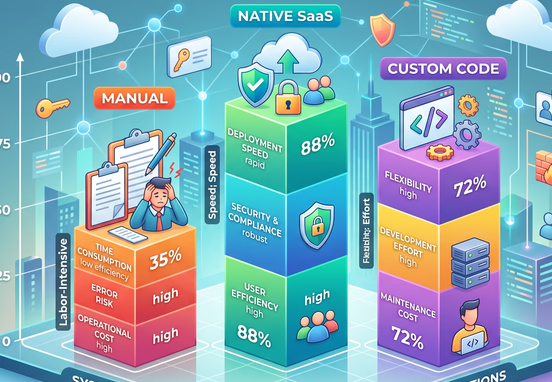
Organizations must evaluate how different technical architectures handle provisioning latency, data compliance, and long-term operating costs before building an automated pipeline.
| Operational Performance Vector | Manual Administration | SaaS-Native Native Links | Custom Custom Workflow Logic |
|---|---|---|---|
| Identity Latency Window | Hours to days depending on IT task backlogs | Variable, prone to sync errors across app ecosystems | Real-time execution via direct server webhooks |
| License Waste Control | Weak; relies on irregular manual reviews | Moderate; limited to supported plugin setups | Absolute; reclaims or deletes seats instantly via API |
| Audit Log Accuracy | High risk of missing or unrecorded history | Fragmented logs scattered across multiple apps | Centralized, unalterable ledger entries for every event |
| System Flexibility | Dependent entirely on human capability | Restricted by third-party plugin boundaries | Limitless customization to match your business rules |
Building your workflows around custom code layers allows your engineering team to avoid the functional limits of out-of-the-box software integrations. This architecture enables you to construct specialized conditional routes that perfectly match your internal security policies.
Hardening Corporate Landscapes with Automated Audit Trails
For modern companies dealing with strict compliance frameworks like SOC2, ISO 27001, or HIPAA, simply revoking system access is only half the battle. Your business must also be able to prove to external compliance auditors exactly when, why, and how that access was granted or removed. If your IT team cannot provide clear records showing their security actions, your organization risks failing its security certifications.
An automated HR pipeline resolves this regulatory headache by creating detailed, unalterable system logs for every onboarding and offboarding event. Every time an API call updates a user status, creates a workspace, or deactivates an access key, the system saves a permanent record straight to your master database.
Tip: Connect your automated HR pipelines directly to an isolated database cluster that is completely separate from your primary development environments. This separation ensures your corporate access history remains secure and untampered with, providing your compliance team with a highly reliable source of truth during annual security reviews.
Maintaining structured record loops across all internal applications protects your company from compliance penalties. Investing in these automated tracking tools demonstrates exactly how automated audit trails keep a growing business audit-ready, transforming your backend logging from a tedious manual chore into a major competitive asset.
Future-Proofing Identity Infrastructure Against Scaling Variations
A resilient corporate workflow must be built to adapt to shifting business structures. As your enterprise teams expand globally, your internal network must be agile enough to handle complex regional contract variances, localized security rules, and custom application access paths without requiring a complete code rewrite.
Building your business around custom systems development gives you the long-term flexibility needed to scale your operations safely. By choosing a dedicated workflow and systems automation service, your company can replace fragmented administrative checklists with a highly stable, integrated digital architecture designed for secure, sustainable corporate growth.
Structuring your internal systems this way removes the operational friction that frequently slows down growing companies. Instead of wasting critical development hours manually managing user seats, chasing lost software licenses, and fixing access errors, your leadership team can scale the business with absolute confidence, fully backed by an automated identity pipeline that protects your data every single day.