

Demystifying Analytics Data: Tracking Organic Visitors, Heatmaps, and Analytics Pixel Setup

Data-driven decision-making is the cornerstone of scaling a modern digital enterprise. However, many founders and marketing executives operate their web applications under a cloud of analytical misdirection, relying on superficial vanity metrics like raw page views or total monthly sessions. These surface-level numbers create a false sense of operational security while masking underlying drop-offs within your actual transactional funnels. To build a genuinely high-performing enterprise platform, your leadership team must move past shallow statistics and construct a precise, infrastructure-level tracking ecosystem that uncovers true consumer conversion behavior.
When your digital presence fails to accurately map user intent, your marketing acquisition pipelines operate in the dark. Ad spend is wasted on low-value traffic, underperforming landing templates go uncorrected, and search optimization efforts stall due to lack of granular execution insights. Transitioning to a professional tracking framework requires a structured deployment of organic performance tracking, behavioral heatmaps, and secure analytics pixel configurations. This operational setup insulates your brand from guesswork, ensuring every design change and content revision directly maximizes your overall conversion metrics.
Resolving these blind spots means directly managing your tracking configurations instead of relying on default, out-of-the-box software settings. Implementing clean, optimized scripts guarantees that your behavioral data flows accurately while maintaining absolute browser rendering performance. This technical alignment allows you to pinpoint exact user experience bottlenecks, streamline lead pathways, and scale your digital equity safely over multi-year operational horizons.
Decoding Organic Traffic: Distinguishing Intent from Noise
Organic search traffic represents the highest-intent customer acquisition source available to an expanding corporation. Unlike paid traffic networks that cease delivery the moment your capital inputs stop, organic visitors land on your platform because your informational assets match their explicit queries. However, raw organic visitor counts are deceptive if your tracking models fail to segregate informational researchers from transactional buyers.
To extract actionable insights from your search metrics, your technical teams must integrate your root server analytics with advanced search indexing consoles. This alignment lets you track the exact progression from query impression to click execution and eventual page transaction. By analyzing user landing sequences and tracking engagement durations across specific service paths, you can isolate exactly which content layers drive commercial conversions versus those that merely attract irrelevant traffic traffic.
- Isolate Landing Page Entry Points: Identify the exact URL blocks that serve as primary entry vectors for organic traffic, checking for immediate bounce indicators.
- Map Query Impressions to Conversion Value: Cross-reference search console query terms with on-page conversion events to identify high-yield keywords.
- Evaluate Content Scroll Depths: Measure how far down organic readers traverse your informational assets to determine if value propositions are properly placed.
- Analyze Secondary Page Excursions: Track whether organic landers exit after reading a single article or transition smoothly into commercial service pages.
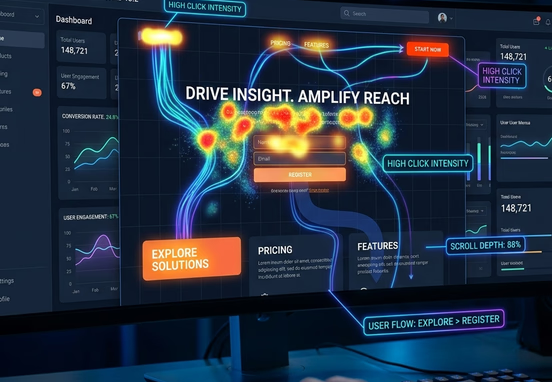
The Visual Layer: Deploying Heatmaps and Session Recordings
Quantitative tracking tools state what actions are occurring across your web interface, but they fail to explain why users behave in that manner. To fill this diagnostic gap, your optimization workflows must implement a visual behavioral layer through click heatmaps, scroll maps, and anonymous user session recordings. These behavioral tools capture real-time mouse tracking and mobile tap behaviors, turning user friction into obvious visual evidence.
Scroll map displays show the exact percentage of visitors who scroll past specific layout boundaries. If your data reveals that seventy percent of your mobile traffic abandons a landing layout before reaching your primary lead generation form, your conversion architecture is failing. This insight lets your teams relocate forms, adjust font sizes, or remove bloated design sections to capture user focus before engagement levels drop.
+---------------------------------------------------------------------------------+
|                          VISUAL HEATMAP TRACKING LAYER                          |
+---------------------------------------------------------------------------------+
       |                         |                        |                        |
       v                         v                        v                        v
+--------------+          +--------------+         +--------------+         +--------------+
|Click Hotspots|          | Scroll Depths|         |RageClickNodes|         |DeadClickZones|
+--------------+          +--------------+         +--------------+         +--------------+
| Pinpoints    |          | Reveals page |         | Highlights   |         | Isolates     |
| layout       |          | exit points  |         | broken links |         | static items |
| buttons with |          | where users  |         | causing user |         | that fail to |
| peak clicks. |          | lose interest|         | frustration. |         | respond.     |
+--------------+          +--------------+         +--------------+         +--------------+
Furthermore, session recordings uncover subtle interface design bugs like rage clicks—where a user taps an element repeatedly out of pure frustration. Rage clicking typically happens when an element looks like an interactive button but is actually a static design graphic, or when slow background scripts delay link activations. Eliminating these friction points directly improves your site's user experience, which lowers customer acquisition costs and boosts marketing efficiency, as detailed in our guide on how great user experience lowers customer acquisition costs.

Tracking Pixel Architecture: Setting Up Event Triggers Safely
Analytics pixels and tracking tags are the standard code paths used to sync your web application with external ad platforms and attribution engines. When a user completes a transaction or submits a form, these scripts send conversion events to ad systems like Meta or Google Ads, optimizing your ad campaigns. However, adding these tracking pixels incorrectly can introduce serious technical liabilities.
Amateur setups often use generic tracking code blocks that run on the browser's main thread during the initial page paint. This bad practice blocks asset rendering and causes severe loading lag on mobile networks. This loading lag directly lowers your search engine visibility, an issue analyzed in our guide on Core Web Vitals and page speed vulnerabilities, which explains how slow loading times and infrastructure downtime destroy local search rankings.
JavaScript Tracking Configuration Example
To prevent tracking scripts from delaying your initial layout delivery, your developers must deploy them using asynchronous execution rules or route them through optimized container systems. This engineering standard guarantees that your main marketing assets load instantly while tracking scripts initialize silently in the background.
To see how a custom-coded framework handles tracking pixels without introducing page speed lag, review this sample JavaScript script configuration designed for clean asynchronous conversion execution:
+---------------------------------------------------------------------------------+
|             ASYNCHRONOUS CORPORATE TRACKING FRAMEWORK FLOWCHART                 |
+---------------------------------------------------------------------------------+
                                         |
                                         v
+---------------------------------------------------------------------------------+
| Set CorporateAnalyticsObject & Instantiate Asynchronous Execution Queue         |
+---------------------------------------------------------------------------------+
                                         |
                                         v
+---------------------------------------------------------------------------------+
| Capture Epoch Activation Timestamp to Track Script Initialization Latency       |
+---------------------------------------------------------------------------------+
                                         |
                                         v
+---------------------------------------------------------------------------------+
| Create 'script' DOM Element & Apply Non-Blocking Rule (structuralScript.async=1)|
+---------------------------------------------------------------------------------+
                                         |
                                         v
+---------------------------------------------------------------------------------+
| Bind Secure Production SDK Distribution Source (metrics.yourcompany.com/sdk.js) |
+---------------------------------------------------------------------------------+
                                         |
                                         v
+---------------------------------------------------------------------------------+
| Inject Target Tag Node Before First Script Block to Execute Safely in Background|
+---------------------------------------------------------------------------------+
                                         |
                                         v
+---------------------------------------------------------------------------------+
| Initialize Core Account Property Token Natively ('CORP-ID-883921')             |
+---------------------------------------------------------------------------------+
                                         |
                                         v
+---------------------------------------------------------------------------------+
| Fire Root Level Asynchronous PageView Event to Complete Conversion Attribution  |
+---------------------------------------------------------------------------------+
Using clear, non-blocking code strings protects your web presence from layout glitches and prevents code errors from breaking your primary checkout or lead processes.
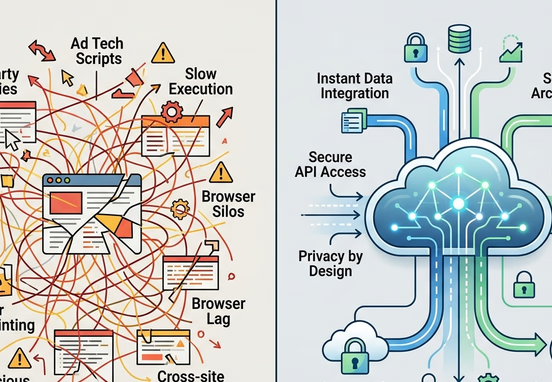
Server-Side Analytics vs. Client-Side Trackers
Modern tracking configurations are moving away from traditional browser-based client tracking toward secure server-side tracking pipelines. Client-side tracking relies entirely on the visitor's browser executing tracking scripts, which can easily be blocked by modern ad-blocking tools or browser privacy extensions. Server-side tracking moves this work to your own private server infrastructure, guaranteeing complete data accuracy and faster browser loading times.
| Tracking Infrastructure Parameter | Client-Side Browser Tracking Scripts | Server-Side Cloud Tracking Architecture |
|---|---|---|
| Data Collection Accuracy | Low; easily degraded by browser privacy tools and script blockers | Absolute; captures data directly at the server level |
| Browser Rendering Impact | High; heavy script chains slow down initial page loads | Zero; processing is handled entirely on background servers |
| Data Sovereignty Controls | Weak; user details are exposed to third-party scripts | Complete; corporate systems filter data before sharing it |
| Conversion Attribution | Prone to data drops due to short cookie lifecycles | Stable; utilizes secure server-to-server data paths |
| Security Vulnerability Profile | Vulnerable to cross-site scripting and data leaks | Highly secure; keeps external access points locked down |
Deploying an independent custom-coded codebase allows your engineering teams to implement advanced server-side data models natively, bypassing the complex workarounds common to page builder templates. Choosing a clean, hand-coded web architecture over page builders ensures your platform loads instantly, protects private data streams, and remains free from external software dependencies.
Compliance, Cookie Consent, and Data Privacy Hardening
Operating an enterprise web presence requires strict adherence to international data privacy laws like GDPR, CCPA, and advanced regional data regulations. Deploying unoptimized tracking pixels that collect and share customer data without explicit user consent introduces massive legal risks, exposing your enterprise to regulatory audits and heavy financial penalties.
Your tracking tools must hook directly into a centralized consent management system that updates tracking behaviors in real time based on user choice. If a visitor declines marketing tracking, your platform must automatically block tracking scripts from loading, protecting your organization from privacy compliance failures.
- Explicit Opt-In Requirements: Enforce strict opt-in frameworks where non-essential tracking pixels remain paused until a user grants clear consent.
- Anonymized Data Ingestion: Configure server-side scripts to scrub visitor IP addresses and private details before passing records to ad platform trackers.
- Data Access Systems: Build clear automated mechanisms to delete or share stored user history logs instantly upon official user request.
- Unified Security Hardening: Coordinate all backend analytics engines with secure transport layer standards to prevent data extraction leaks.
Operational Compliance Standard: Never deploy automated tracking pixels or behavioral recordings on private user dashboards, login portals, or checkout input paths. Tracking sensitive financial inputs or password metrics violates core compliance baselines, exposing your company to severe data liability claims.
Every high-performing corporate platform must display clear legal agreements to protect its brand equity and insulate its operations from privacy lawsuits. You cannot afford to risk customer trust by relying on generic, multi-tenant compliance shortcuts. Reviewing the strict regulatory assets required for modern web applications outlines why displaying the 4 legal documents every business website must display is an essential step for safeguarding corporate digital assets.
Investing in your tracking setup from the start ensures your platforms remain fast, secure, and fully compliant with data laws. Securing expert custom web engineering guarantees your primary channels are built to preserve data sovereignty and maximize conversions. By deploying highly optimized, performance-first web design and development services, your organization eliminates unexpected technical debt and builds a resilient digital footprint that drives sustainable, long-term commercial growth.