

How to Properly Back Up Your Business Website So You Never Lose It

Losing a business website is not merely an inconvenience; it represents an immediate operational freeze that can cripple enterprise revenue. A crashed production server, a malicious script injection, a corrupted database update, or an accidental file deletion can erase years of digital capital within seconds. If your organization depends on its online property to capture leads, process client sales, or manage confidential customer interactions, an unrecoverable data loss event causes long-lasting financial and reputational devastation.
Many business owners mistakenly assume that their web hosting provider handles all data protection duties automatically. While modern cloud environments offer baseline server snapshots, these internal backups are frequently tied directly to the exact same server hardware cluster. If the data center experiences a catastrophic hardware failure, routing infrastructure blackout, or an account billing dispute, your access to those snapshots vanishes instantly, rendering your enterprise helpless.
To insulate your digital asset from external vulnerabilities, you must establish an independent, multi-layered data protection pipeline. Data management should never be treated as a secondary technical chore; it must function as a core part of your broader website hygiene and routine maintenance updates. When an asset features a hardened redundancy strategy, recovery times drop from days to minutes, protecting your brand equity and operational cash flow.
Failing to maintain independent data records exposes your organization to severe systemic risks. An extended database outage cuts off your customer acquisition channels and causes immediate indexing drops on major search engines. When search crawlers encounter a completely offline domain, they rapidly lower its organic priority, which eventually forces teams into monitoring indexing health and fixing server errors via Search Console to reclaim lost search presence.
The Critical Separation of Files and Databases
A modern enterprise web application consists of two completely distinct data components that require separate handling protocols. Treating your platform as a single, static block of data leads to unoptimized backup files that are difficult to parse, extract, and restore during a technical crisis.
To build a reliable recovery model, your engineering team must separate your storage procedures based on how each data asset behaves. This dual-track strategy ensures that highly volatile transactional logs are captured continuously without wasting storage space on static layout code.
- The Core Structural File Layer: This component includes your compiled frontend source code, stylesheets, utility scripts, configuration manifests, and graphic iconography. These assets change only when software engineers deploy direct system updates to production.
- The Dynamic Relational Database Layer: This component is the active operational engine containing user profile tables, security access credentials, client transaction histories, lead intake forms, and historical content blocks. This data changes continuously with every active session.
- The Media Asset Storage Directory: This directory contains high-definition product imagery, uploaded document assets, and customer media files. This folder scales rapidly in absolute size and requires dedicated compression to prevent storage cost inflation.
The 3-2-1 Backup Strategy for Digital Assets
Relying on a single backup file stored in your local office or server room creates an unacceptably high point of failure. True data redundancy requires a structured distribution framework that ensures asset survival across multiple concurrent system blackouts.
Implementing the gold-standard 3-2-1 data protection framework guarantees that your operational data remains completely retrievable, even during a widespread cloud hosting provider outage.
- Maintain at Least Three Independent Copies of Data: This sequence includes your primary live production site, a secondary automated cloud snapshot, and a tertiary offline archive stored completely outside your hosting ecosystem.
- Utilize Two Distinct Media Storage Formats: Store your redundant assets across entirely different storage technologies, such as isolated cloud object storage containers and localized physical drives or secure physical arrays.
- Isolate One Complete Copy Off-Site in a Remote Location: Keep at least one verified archive completely disconnected from your main production network, using strict encryption protection rules to block lateral cyber attacks.
Securing your business data behind isolated cloud networks forms a key element of bespoke cyber security and infrastructure basics for founders. When you block unauthorized entry points into your secondary storage systems, you ensure your fallback data remains clean and ready for rapid restoration.
Comparing Backup Architectures and Environments
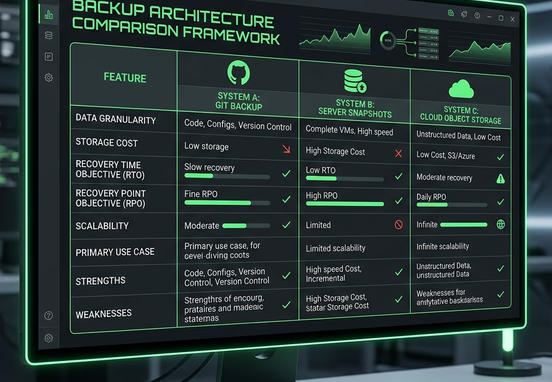
Choosing how your data assets are compiled and routed dictates your long-term restoration speed during a critical service interruption. Organizations must evaluate different backup methodologies to balance storage space costs with rapid disaster recovery capabilities.
| Backup Methodology Tier | Processing Latency Impact | Recovery Point Objective (RPO) | Security Isolation Level | Primary Commercial Use Case |
|---|---|---|---|---|
| Server-Level Automated Snapshots | Near Zero Processing Overhead | 12 to 24 Hour Windows | Low (Shares main host infrastructure) | Daily baseline infrastructure state tracking |
| Cloud Object Storage (S3/Blob) | Asynchronous Background Sync | 1 to 4 Hour Windows | High (Isolated via secure identity access) | Continuous database state tracking and media archiving |
| Git Version Control Repositories | Zero Performance Overhead | Real-Time Code Tracking | Exceptionally High (Decoupled source code) | Frontend layout styles and application logic control |
| Local Offline Cold Storage | High Manual Transport Effort | 7 to 30 Day Windows | Absolute (Completely disconnected from web) | Disaster recovery backup protection |
Relying exclusively on standard server snapshots leaves your business vulnerable to advanced security threats. If an attacker gains administrative privileges over your hosting panel, they can easily delete your live instances alongside your internal snapshots, wiping your digital presence out entirely.
Programming Automated Redundancy Configurations
To guarantee continuous operational protection, backup systems must run entirely on automated scripts rather than relying on manual human intervention. Automated cron schedules and cloud webhooks ensure your relational databases are parsed, compressed, encrypted, and distributed without anyone needing to push a button.
The following programming script model demonstrates how an enterprise-grade automation manifest schedules database exports, applies cryptographic encryption, and handles remote cloud data delivery safely:
+-------------------------------------------------------+
|        Trigger: Cron Schedule (0 */4 * * *)           |
+-------------------------------------------------------+
                            |
                            v
+-------------------------------------------------------+
|   Database Dump & GZIP Compression                    |
|   pg_dump -U enterprise_admin -> backup.sql.gz        |
+-------------------------------------------------------+
                            |
                            v
+-------------------------------------------------------+
|   Cryptographic Encryption: AES-256-GCM               |
+-------------------------------------------------------+
                            |
                            v
               [ Secure Payload Transfer ]
               /                         \
              /                           \
             v                             v
+-----------------------+       +-----------------------+
|  Primary Destination  |       | Secondary Destination |
|  s3://secure-offsite- |       | glacier://cold-       |
|  vault-2026/database/ |       | storage-archive/      |
+-----------------------+       +-----------------------+
             \                             /
              \                           /
               v                         v
+-------------------------------------------------------+
|   Apply Retention Policy Rules                        |
|   - Keep Hourly Intervals: 7 Days                     |
|   - Keep Daily Intervals: 3 Months                    |
|   - Purge Expired Archives: True                      |
+-------------------------------------------------------+
Deploying tailored data protection scripts directly into your server infrastructure removes human oversight errors from your maintenance routines. This automation guarantees that your critical business records are continuously archived, even if your internal teams are completely offline.
Avoiding Common Backup Traps and Blind Spots
Many technical managers discover errors in their backup strategy only after a system crash occurs. Running an unverified backup script without auditing the output files creates a false sense of security that can collapse under real-world pressure.
- Backing Up Corrupted Data Tables: If a database script encounters an internal parsing error and silently saves an empty file, your automated logs will record a successful run while saving zero real data.
- Storing Archives in Public Web Roots: Leaving compressed site backups inside open public directories allows automated malicious scanners to discover and download your entire codebase and user database.
- Neglecting Third-Party API Integrations: If your platform relies heavily on configuration files stored inside external vendor dashboards, your code backups will fail to restore those external functionalities during a rebuild.
Redundancy Engineering Directive: Always enforce strict write-protection rules on your secondary cloud storage vaults. Configure your remote storage buckets to utilize a Write Once, Read Many (WORM) layout policy. This security block prevents data from being modified or deleted by anyone for a designated period, providing complete protection against malicious ransomware attacks.

The Verification and Disaster Recovery Playbook
A backup strategy is only as valuable as your team's ability to restore data under real production conditions. Disaster recovery requires clear, documented step-by-step restoration drills conducted regularly to ensure your internal teams can act with speed and accuracy during a live outage.
Testing your recovery procedures under simulated stress events turns a high-panic server failure into a routine technical issue. Focus your engineering and operations teams on this continuous data validation routine:
- Conduct Regular Restoration Drills: Deploy old database archives to an isolated staging server every quarter to confirm the files can extract and compile without throwing schema errors.
- Execute Cryptographic Checksum Verifications: Run automated hashing checks on your transferred files to verify that no data corruption or truncation occurred during the cloud transmission process.
- Enforce Strict Role-Based Identity Access Control: Restrict backup download permissions to only your essential system architects, keeping unauthorized staff away from sensitive client financial records.
- Maintain Offline Documentation Playbooks: Keep clear, step-by-step recovery manuals hosted completely outside your primary server network so your developers can access restoration guides even if your central collaboration tools go dark.
How Custom Source Code Simplifies Data Recovery
The underlying technical architecture of your web presence directly impacts how easily your team can restore services after an outage. Websites built on heavy, bloated, plugin-dependent content management systems present massive challenges during a disaster recovery scenario. If a template platform crashes, your developers must reconfigure hundreds of core settings, match legacy plugin version combinations, and fix CSS layout breaks across the entire theme before the site displays correctly.
Bespoke web engineering eliminates this recovery overhead completely. When your platform is built on clean, hand-coded web architecture, your presentation styles and business rules are cleanly preserved inside lightweight Git repositories. If a server completely fails, spinning up an exact duplicate instance requires only a simple code push to a fresh server environment, bypassing the stressful debugging cycles that delay template rebuilds.
This structural flexibility turns your digital presence into a highly durable corporate asset. By removing dependency on heavy third-party plugins and convoluted template databases, you gain complete data ownership and ensure your business can weather any infrastructure failure without skipping a beat.

Securing Operational Resilience Through Redundancy
Long-term marketplace visibility belongs to organizations that treat their digital footprint as high-performance infrastructure requiring absolute structural security. Leaving your platform exposed to data loss, single-location hosting failures, and unverified backup scripts creates severe vulnerabilities that can sink your corporate growth funnels.
Investing in tailored, hand-coded source code combined with automated off-site redundancy pipelines removes the fragile dependencies, plugin conflicts, and recovery delays that quietly haunt template-built environments. When your corporate asset operates with clean independent data systems, your brand value remains perfectly protected, keeping your business running smoothly under any conditions.
Build an uncompromised, highly secure digital presence engineered with elite data protection structures by using our professional speed-first design and development services.