

Beyond the Virtual Assistant: How to Identify and Automate Core Website Administration Tasks

Founders frequently look to virtual assistants as the default solution for managing manual web administration tasks. While hiring a human assistant provides a temporary reprieve from routine data entry, it scales your organizational overhead instead of optimizing your digital infrastructure. Tasks such as moving customer data, checking form submissions, updating site records, and managing user permissions are fundamentally programmatic problems. Solving them with human labor creates an ongoing operational cost that scales linearly with your business volume.
When an administrative workflow relies on an individual logging into a backend dashboard, extracting data, and manually pasting it into another software tool, it establishes a severe operational bottleneck. Human execution is inherently restricted by working hours, fatigue, cognitive load, and context switching. To achieve true scalability, growing platforms must move past manual delegation and transition toward a model of complete system-driven execution.
The Virtual Assistant Trap: Scaling Overhead vs. Scaling Infrastructure
Human assistants are highly valuable when deployed for subjective, creative, or non-linear responsibilities like relationship building or strategic planning. However, using human labor to maintain routine, rule-based website operations creates a fragile layer of administrative drag. If a human assistant must manually verify registration forms, manage basic content scheduling, or audit user access logs, your digital ecosystem remains fundamentally manual and unoptimized.
This structural approach exposes your organization to ongoing operational risks. A single overlooked email, a mistyped data entry, or a delayed manual database backup can result in corrupted customer profiles, broken sales funnels, and immediate revenue loss. Relying entirely on manual human consistency also creates a highly fragile operational model where critical business updates completely halt the moment an employee steps away or leaves the organization.
To accurately evaluate whether your manual administrative processes are draining your profit margins, you must conduct a rigorous, objective review of your entire technology deployment. If you are uncertain how to evaluate your current setup, performing a complete software auditing 101 review can help isolate exactly which tools are functioning properly, where data silos exist, and which tasks are actively bleeding operational time.

Auditing Website Administration Workflows
Identifying which website administration tasks to transition to automated code requires a systematic analysis of your daily, weekly, and monthly business routines. Any administrative process that follows a strict, repeatable set of rules—where a specific input always yields a completely predictable output—is a primary candidate for custom software engineering. If your team can document the exact step-by-step logic a human must follow to complete an administrative task, that process can be fully translated into clean, automated code logic.
Organizations frequently overlook these optimization opportunities because individual administrative tasks feel minor when viewed in isolation. Spending ten minutes verifying a new vendor profile or five minutes updating an internal progress log feels insignificant during a standard workday. However, when multiplied across hundreds of transactions, users, or system endpoints, these micro-tasks coalesce into a massive barrier to growth. This critical operational realization is precisely what prompts expanding enterprises to learn how founders and small teams use automated systems to scale operations instead of continuously inflating their administrative headcount.
| Website Administration Task Area | Manual Human Execution Mode (Virtual Assistant Model) | Programmatic Automated Logic Engine |
|---|---|---|
| User Provisioning & Access | Assistant manually creates customer accounts, assigns access roles, and sets individual platform permissions. | Webhook-triggered system logic instantly provisions accurate profiles and deploys role-based permissions at scale. |
| Database Backup & Integrity | Assistant manually downloads database files every week and moves them to disconnected cloud storage folders. | Server-side cron jobs execute automated nightly data validation, complete system backups, and secure off-site encryption. |
| Multi-Channel Content Ingestion | Assistant manually copies copy from text files, uploads image assets, and fixes layout styling issues inside a CMS. | Headless CMS architecture distributing structured, sanitized JSON payloads across multiple web presentation engines automatically. |
| System Error Auditing | Assistant monitors individual email alerts, logs site crashes, and manually reports software bugs to a developer. | Centralized real-time operational dashboard with custom error catching, instant alerts, and smart fallback mechanics. |
| Customer Profile Offboarding | Assistant manually deletes user accounts, updates external spreadsheets, and revokes backend software licenses. | Automated event-driven scripts that securely purge authentication keys, clean database tables, and archive historical records. |

Core Administration Tasks Ready for Automation
Moving beyond basic manual virtual assistance requires targeting the core operational layers of your web infrastructure. These administrative tasks generally fall into three primary pillars: automated identity and lifecycle management, cross-platform data synchronization, and proactive system health maintenance.
1. Identity, Access, and User Lifecycle Management
Manually provisioning platform access for new clients, vendors, or internal team members consumes a massive amount of operational focus. When a new user signs up or an employee leaves the company, an administrative assistant typically must navigate multiple software dashboards to generate user credentials, configure permission levels, and send out onboarding messages. This manual process is slow, highly inefficient, and introduces severe security risks if access privileges are not immediately revoked upon an individual's departure.
By building custom system workflows into your web engine, these processes execute instantly and securely. When a checkout event occurs or an HR status updates, your website can communicate directly via secure APIs to provision the exact level of access required, distribute encrypted authentication tokens, and build personalized workspace environments without a human ever touching an administrative dashboard.
2. Multi-Platform Data Synchronization
When a web engine does not communicate directly with your back-office business applications, your enterprise data becomes heavily fragmented. Virtual assistants are frequently hired to act as human middleware to bridge this exact technical gap. They spend hours extracting customer information from web forms and manually typing those details into disconnected project management tools, accounting ledgers, or customer relationship systems.
Custom web pipelines completely eliminate this manual synchronization layer. By engineering direct API integrations, any data submitted to your web frontend instantly synchronizes across your entire software stack. This ensures that sales records, customer profiles, shipping details, and financial logs stay aligned across all departments in real time, eliminating double data entry errors and preserving data integrity.
3. Automated System Health Logging
Instead of relying on a human assistant to periodically check if your web servers are running out of storage space or if your external API integrations are actively failing, your website architecture should handle its own health monitoring. Automated background scripts can scan critical performance metrics every minute. If an anomaly or system error is detected, the codebase does not just send a generic notification; it can automatically initiate a localized fallback loop to keep your primary services active while sending comprehensive diagnostic logs to your engineering team.
Building Sustainable System Logic
Shifting away from human-dependent administrative tasks requires an absolute commitment to structured, professional software development. You cannot construct a resilient, high-performance web architecture by combining an unmanaged mess of generic no-code tools or simple visual plugins. To achieve long-term durability and avoid performance bottlenecks, your operational automations must be anchored in robust, custom-engineered code frameworks.
Every sustainable automation system is built upon a firm foundation of event-driven programming. Understanding how trigger-action logic forms the foundation of sustainable web automations is absolutely essential to engineering backend pipelines that do not crash under heavy traffic loads. This development philosophy establishes explicit system boundaries, strict conditions, and deep error-handling routines for every automated workflow.
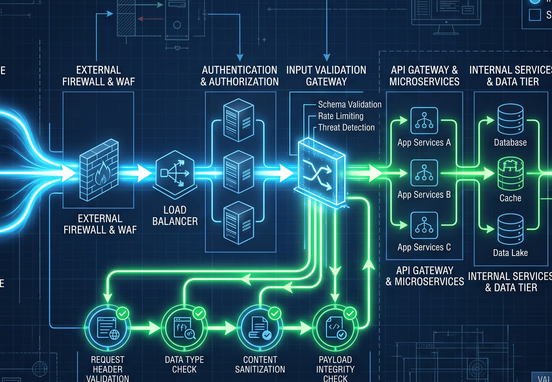
The execution of these automated web workflows follows a highly predictable, linear pipeline designed to protect your databases from corrupted info or incomplete executions. A standard automated administration flow can be mapped through the following programmatic architecture:
[Admin Event Captured] --► [Inbound Data Sanitization & Validation]
                                               |
                                               v
[System State Confirmed] ◄-- [Condition Check: Meets Automated Criteria?]
           |
           v (Yes)
[Execute Core API Operations] --► [Log Audit Trail Entry] --► [Distribute Webhook Payload]
To successfully deploy this advanced architecture across your web infrastructure, your development team must prioritize three fundamental engineering principles:
- Data Sanitization and Validation: Never allow unverified external data to pass directly into your core database engine. Every automated form submission, user profile update, or inbound API payload must be deeply inspected, cleaned, and stripped of malicious scripts or malformed characters before any backend processing takes place.
- Immutable Audit Logging: Every automated administrative action must leave a clear, unalterable digital footprint. Your system should generate a secure log file for every background operation, recording exactly when the trigger occurred, what data payload was transferred, and the precise response code returned by the receiving server.
- Graceful Exception Routing: When an external API endpoint suffers downtime or a network timeout occurs, your web system must handle the failure elegantly. Instead of completely freezing the workflow, dropping the data packet, or crashing the site frontend, the system should catch the error and route the affected transaction into an isolated queue for automated re-try attempts.
Mitigating Risks and Maintaining System Integrity
As your web application assumes greater administrative autonomy and human intervention is removed from daily data operations, security and access control become your highest priorities. Without a human reviewing every step, your underlying codebase must function as a strict, unyielding gatekeeper. Allowing unverified automated processes to modify core database tables without strict security protocols exposes your entire enterprise to immense architectural vulnerabilities.
Organizations must implement granular role-based permissions across every connected application interface. Your external automation keys and background scripts should only possess the absolute minimum level of database access required to execute their specific administrative tasks. Never utilize a master or global administrator API key for routine data synchronization or content updates.
System Integrity Tip: Regularly rotate your automated system authentication tokens and environment access keys. Implementing an automated key rotation schedule completely eliminates the risk of long-term data exposure if an individual system token is accidentally leaked, hardcoded, or compromised during an external API update.
Shifting to True Technical Autonomy
Continuing to solve programmatic website challenges with manual human labor is an expensive strategy that limits your organizational agility. Virtual assistants are incredibly valuable assets when applied to high-value customer interactions, qualitative research, and complex problem-solving. However, forcing them to act as manual data integrators to maintain your website backend is a costly misuse of talent that introduces unnecessary risk and stalls your platform's growth.
True enterprise efficiency is achieved when your website administration runs completely on autopilot, driven by secure, custom-engineered code networks that scale effortlessly with your transaction volume. By investing in resilient, automated infrastructure, you permanently decouple your daily operational capacity from manual working hours.
Building this level of structural efficiency requires a developmental partner who specializes in deep backend architecture and seamless software orchestration. If your organization is ready to eliminate manual administrative bottlenecks, optimize your digital workflows, and deploy highly resilient automation pipelines tailored specifically to your unique business logic, discover our comprehensive workflow and systems automation service. We design and code the advanced web ecosystems that allow growing businesses to achieve absolute operational scale and long-term tech autonomy.