

Web Accessibility Checklist: How Clean HTML Ensures Inclusive UX

Building a digital corporate asset that excludes portions of the population is an operational failure that limits market reach, degrades user experience, and introduces severe regulatory liabilities. Web accessibility is often treated as a final design compliance checklist or a secondary development patch applied right before launch. This reactive approach is a critical mistake that results in fragile software architecture, broken screen-reader navigation, and ongoing engineering costs.
True accessibility cannot be simulated by automated overlay widgets or generic plugins. It must be engineered directly into your core codebase from the initial phase of layout construction. When your development workflows prioritize clean, semantic source code, inclusive design emerges as a natural characteristic of your digital platform. This structural integrity guarantees that all users, regardless of physical or cognitive variations, can interact with your brand's digital storefront smoothly.
By treating digital inclusion as a foundational software standard, your enterprise builds a highly resilient application infrastructure. Clean code patterns improve your platform's compatibility with assistive devices while simultaneously enhancing search engine crawling efficiency and mobile performance metrics. Transitioning to specialized technical standards protects your digital equity and ensures your marketing funnels operate with maximum efficiency across all user segments.
Semantic HTML: The Engine of Digital Inclusion
The fundamental layer of web accessibility relies on semantic HTML. Semantic tags explicitly describe the structural meaning of your content to the browser and assistive technologies, moving far beyond mere visual placement rules. Mass-market page builders and unoptimized templates routinely ignore this standard, wrapping all elements in nested chains of non-semantic container tags that strip away the informational hierarchy. This structural bloat is a primary reason why many popular design-first tools fail vital performance tests when evaluated against clean, custom-coded alternatives.
When a screen reader parses a website built on poor code architecture, it encounters an incomprehensible wall of data. Without clear structural markers, automated voice systems cannot distinguish a primary call-to-action button from a secondary navigation line or standard paragraph text. Utilizing an engineered clean, hand-coded web architecture solves this issue by using the correct browser specifications for every interface element. This discipline allows assistive software to build an accurate mental map of your application layout instantly.
To see why automated code outputs undermine accessibility frameworks, look at how an unoptimized layout structures a main interactive element versus a professionally engineered equivalent. A visual page builder generates heavy, non-semantic element nesting:
[User Interaction] -> [div class="custom-block-21"] -> [Triggers JS onclick] -> [window.location.href='/quote/']
                             |
                             v
                 [div class="inner-text-wrapper"]
                             |
                             v
                  [span class="bold-text-style"] -> (Screen reader treats as plain text)
                                                    (No native link/button properties passed)
In stark contrast, a professional software engineer achieves the exact same visual layout while providing absolute structural clarity to assistive devices using a single line of semantic markup:
[User Interaction] -> [a href="/quote/" class="btn btn-primary"] -> [Native Browser Engine Routing] -> [Instant Destination]
                             |
                             v
                  (Screen reader automatically identifies as "Link" & exposes interactive states)
The amateur approach forces technical teams to deploy complex scripts to replicate standard link behaviors, which frequently fails on mobile browsers. The engineered approach uses native browser behaviors, ensuring absolute compatibility across all viewports without extra processing overhead. This design strategy is critical for avoiding the compounding hidden costs of DIY platforms and templates, which consistently restrict operational growth and break accessibility compliance.
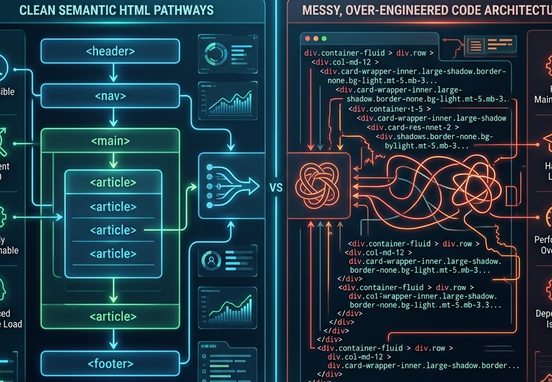
The Web Accessibility Technical Evaluation Matrix
To establish a high-performance web asset, corporate leadership must evaluate how structural code choices affect assistive technology workflows. The choice between clean semantic architecture and over-engineered scripting layers dictates your long-term maintenance overhead.
| Accessibility Vector | Non-Semantic Template Architectures | Clean Semantic HTML Frameworks |
|---|---|---|
| Screen Reader Mapping | Requires extensive ARIA overrides to build basic interactive maps | Inherits native browser communication pathways automatically |
| Keyboard Navigability | Focus states break frequently; requires custom layout patches | Tab indexing operates smoothly by default across elements |
| Code-to-Content Ratio | Heavy and inefficient; choked with layout divs and extra code | Lean and concise; prioritizes rapid asset delivery pipelines |
| Maintenance Lifecycle | Updates risk breaking custom interactive attributes | Highly stable framework; conforms to long-term web standards |
| Crawl Engine Optimization | Spiders struggle to isolate critical marketing messaging | Algorithms parse information hierarchies with absolute precision |

Core Web Accessibility Implementation Checklist
Achieving true digital inclusion requires a disciplined engineering approach across every structural element of your online presence. Use this standardized checklist to ensure your digital platform meets modern inclusive usability standards.
1. Document Structure and Content Landmark Hierarchy
- Establish a single, sequential heading pathway using logical header hierarchies that never skip levels.
- Wrap global interface zones within explicit structural landmark tags like header, nav, main, and footer elements.
- Ensure all structural containers maintain clear reading coordinates that align perfectly with your visual presentation layout.
- Provide clear bypass links at the top of every document to let keyboard users jump directly to primary text blocks easily.
2. Form Architecture and Interactive Touchpoints
- Pair every input field with an explicit, permanently visible label element using matching identification tags.
- Deploy descriptive error messages that state clearly what formatting mistakes occurred within input modules.
- Use aria-describedby attributes to connect validation rules directly to their corresponding input containers.
- Avoid using placeholder text as a replacement for structural labels, preventing data entry confusion.
3. Media Assets and Non-Text Content Verification
- Provide descriptive alt text for all informational graphics to explain their business context clearly.
- Set empty alt attributes on purely decorative elements to let screen readers skip them smoothly.
- Include complete text transcripts and synchronized closed caption tracking for all embedded video media.
- Avoid embedding text messaging directly inside flat graphic images, protecting readability across zoom settings.
4. Interactive Navigation and Structural Flexibility
- Ensure every interactive feature can be activated using standard keyboard commands without trapping focus.
- Maintain a visible focus indicator that highlights elements clearly as users tab through page paths.
- Allow users to scale text layers up to two hundred percent without breaking the responsive container boundaries.
- Eliminate all automated media playback controls to keep the interactive environment predictable.

Form Controls and Error Handling
Building accessible forms is a critical step for securing user transactions and generating leads. When a user with structural visual impairments attempts to fill out a contact option or checkout portal, they rely on precise input formatting to guide their inputs. Follow this operational sequence to construct a compliant input architecture:
- Declare the Input Container: Wrap your structural inputs inside a semantic form container, stating the correct data submission routing rules explicitly.
- Bind the Structural Label: Link your descriptive text directly to the input field using clear matching identifier attributes.
- Inject Error Validation Controls: Apply strict validation rules natively, utilizing required attributes to prevent broken entries.
- Deploy Clear Feedback Alerts: If data validation fails, update the document focus path dynamically to alert the user to the exact fields that require attention.
Ensuring your transactional elements function smoothly for all consumers directly lowers your customer acquisition costs. When an interface remains clean, predictable, and fully accessible, users experience less frustration and move through your conversion pathways more efficiently. Investing in precise user flows is an effective way to optimize marketing spend, as outlined in our study on how great user experience lowers customer acquisition costs.
Typography Calibration for Legibility Standards
Ensuring your written content remains entirely accessible requires careful selection of typography settings and character contrast layouts. Text that is too small, uses compressed line heights, or features poor color contrast makes your interface unreadable for users with low vision or cognitive differences.
To maintain professional readability standards, your design systems must use relative sizing metrics like rem or em units rather than hardcoded absolute pixel values. This engineering discipline allows font layers to adapt fluidly to user browser size overrides without overlapping text boxes. Selecting an optimized typographic presentation is an essential step for building an authoritative brand, which requires aligning your color palettes and font treatments with clear typography and font choices to support reading across all mobile and desktop viewports.
The Risk Profiles of Corporate Accessibility Non-Compliance
Operating an online storefront that fails basic accessibility compliance standards introduces severe financial and brand reputation risks. Regulatory bodies globally continue to penalize organizations that fail to accommodate users with disabilities across digital touchpoints.
- Class-Action Litigation Risks: Legal firms routinely file non-compliance lawsuits against companies whose checkouts break under screen reader navigation.
- Brand Authority Damage: Being publicly called out for discriminatory design systems damages market credibility, undermining user acquisition campaigns.
- Organic Search Demotions: Modern search ranking systems favor clean, accessible document hierarchies, dropping unoptimized sites down the index.
Every growing enterprise must protect its brand equity against these costly liabilities. For larger operations managing multiple storefront locations or complex corporate applications, this protection requires continuous technical oversight. Reviewing the explicit risks associated with digital non-compliance underscores why enterprise accessibility audits and compliance risk mitigation are mandatory requirements for protecting corporate digital assets.
Operational Compliance Mandate: Never assume your web presence is secure simply because you deployed a generic accessibility widget. True risk mitigation requires complete ownership of your code, semantic HTML structures, and manual verification using screen-reading software to guarantee genuine digital inclusion across your entire platform.
Securing expert engineering ensures your digital assets remain fast, secure, and fully accessible to all market segments. Our professional web design and development services are built to remove technical bloat and deliver highly compliant, custom software applications. Investing in premium development allows your company to bypass generic template errors, protect against regulatory risks, and build a resilient digital presence that drives sustainable, long-term market growth.