

How to Dispatch Tasks to Employees Based on Live Spreadsheet Flows

Many growing enterprises rely on cloud-based spreadsheets to manage operations, project pipelines, and incoming customer requests. While spreadsheets offer exceptional flexibility for initial data entry, they inherently lack active execution mechanisms, requiring constant manual oversight to move tasks from a cell into an employee's daily queue. Transforming these static data points into real-time operational engines requires a deliberate layer of infrastructure that continuously monitors state changes and triggers instant programmatic dispatches.
When your organization replaces manual copy-pasting with event-driven triggers, administrative overhead drops significantly, and task delivery speeds stabilize. Building this workflow successfully demands a clear understanding of data validation, payload formatting, API parameters, and conditional routing logic. By establishing a direct bridge between your cloud-hosted worksheets and team communication endpoints, you turn a simple spreadsheet into a high-performing operations hub.
The Architecture of an Automated Spreadsheet Pipeline
To move from a passive ledger to a live delivery network, businesses must construct a clear relational system between data updates, webhooks, and communication endpoints. This ecosystem relies entirely on trigger-action logic to ensure that every row mutation results in an instantaneous down-funnel event. When executed correctly, the spreadsheet ceases to be a mere reporting tool and becomes the primary source of truth for your business dispatch logistics.
Below is the operational topology of how data moves from a raw row update to an assigned and tracked corporate task:
[ Row Validation Update ]
           |
           v
[ Webhook Listener Triggered ]
           |
           v
[ Routing Engine Evaluates Skills ]
           |
           +---------------------------------+
           |                                 |
           v                                 v
[ Match Found: Assignee Set ]      [ No Match: Fallback User ]
           |                                 |
           +---------------------------------+
           |
           v
[ Dispatch to Communication API ]
           |
           v
[ Two-Way Data Sync Logs Timestamp ]
Phase 1: The Monitoring and Intake Layer
The system begins by monitoring specific columns within the worksheet rather than tracking the entire document indiscriminately. Tracking too many variables introduces performance lag and processing errors. To establish a clean integration pipeline, operations teams must eliminate messy spreadsheet habits such as merged cells, trailing spaces, or mixed data types in a single column. The intake layer uses event listeners to spot updates in predefined status columns, instantly capturing all data from that specific row as a single structured object.
Phase 2: The Parsing and Logic Evaluation Engine
Once a row update satisfies your defined validation rules, the payload shifts to an automation script or middleware processing engine. This stage evaluates the operational variables of the task, such as technical difficulty, geographic region, or current employee bandwidth. The system reads the payload arrays, matches parameters against your staff availability rosters, and maps the ideal recipient without human intervention. This layer strips out the risk of human bias or delays during the assignment phase.
Phase 3: The Notification and Feedback Loop
The finalized payload transmits directly to your team’s native operational interfaces, which may include instant messaging software, dedicated CRM platforms, or internal ticket portals. Simultaneously, the automation engine performs a two-way data sync to write back execution logs, timestamps, and delivery confirmations to the master spreadsheet. This step ensures absolute visibility for management and prevents duplicate work assignments.
Structuring Your Spreadsheet Schema for Flawless Processing
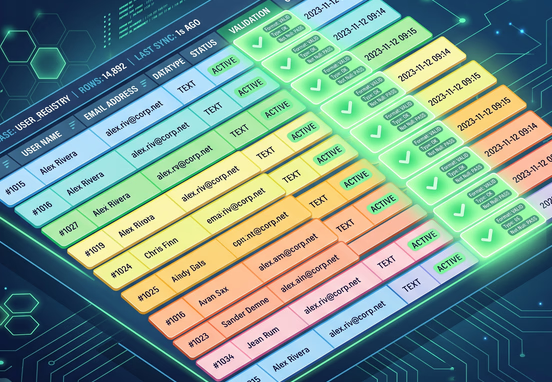
An automation engine is only as reliable as the underlying database schema it interprets. Storing unstructured narrative text inside a spreadsheet makes it impossible for automated systems to parse routing logic accurately. Your internal operational sheets must utilize distinct, locked data validation columns to protect system integrity and prevent unexpected data mutations from breaking active scripts.
| Column Name | Data Type | Automation Role | Validation Rule |
|---|---|---|---|
| Task_ID | String / UUID | Primary Key for tracking executions | Unique, non-editable code generation |
| Client_Name | Text | Contextual reference for employee | Required text, non-empty string |
| Project_Type | Dropdown | Determines the core routing logic | Strict list validation matching skills |
| Complexity_Level | Dropdown | Controls assignment escalation | Low, Medium, High constraints |
| Assigned_Agent | Email String | Defines the task delivery endpoint | Must match active staff lookup matrix |
| Dispatch_Status | Dropdown | Controls the automation trigger gate | Pending, Processing, Dispatched, Failed |
| Timestamp_Sent | DateTime | Prevents duplicate messaging loops | Formatted ISO string applied on event |
Protecting Spreadsheet Cell Integrity Against Human Input Errors
Automated engines operate with absolute literalism, meaning a single manually typed typo or an accidentally deleted cell value can halt an entire downstream pipeline. To prevent internal operators from modifying structural calculations or breaking webhook formulas, implement strict column-level write protections. Only authorize script executions and administrative user roles to write data back into status and tracking columns, keeping general staff inputs restricted to purely operational fields.
Step-by-Step Implementation of the Dispatch Logic
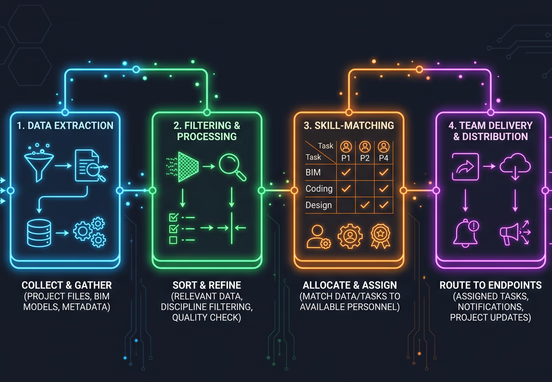
Building out the automation framework requires setting up distinct, conditional sequences that run sequentially every time a new operational row fulfills your pre-established trigger conditions.
- Isolate the Trigger Column: Configure your system to listen exclusively for changes within a dedicated control column, such as changing a status dropdown from "Draft" to "Ready for Dispatch". This localized targeting prevents accidental triggers during initial drafts.
- Execute Data Sanitization and Normalization: Before evaluating routing rules, pass the text data through a cleanup script to strip out unintended characters, normalize email formats, and convert dates to standard corporate time zones.
- Query the Employee Capacity Matrix: Check a secondary reference sheet or internal database holding real-time team workloads to determine who possesses the specialized skillset and current availability for the incoming ticket.
- Deliver Contextual Task Blocks: Package the relevant rows of data into rich, scannable notification messages that feature clear, actionable titles, embedded resource documentation links, and direct state-change buttons.
- Write Back Unique Correlation Tokens: Instantly flag the source row as processed by injecting the target delivery platform’s transaction ID alongside a precise system timestamp to seal the operational loop.
Implementing Round-Robin vs. Skill-Based Allocation Logic
When planning your routing rules, choose between sequential distribution and expertise-driven matching models. Round-robin assignment splits workloads perfectly evenly across an entire list of employees, maximizing general labor efficiency but potentially overwhelming junior team members with highly technical challenges. Skill-based distribution reads specific tag metrics within your task row and screens the staff directory for exact proficiency certifications before executing a notification dispatch.
Managing Escalations, Overflows, and Failure Points
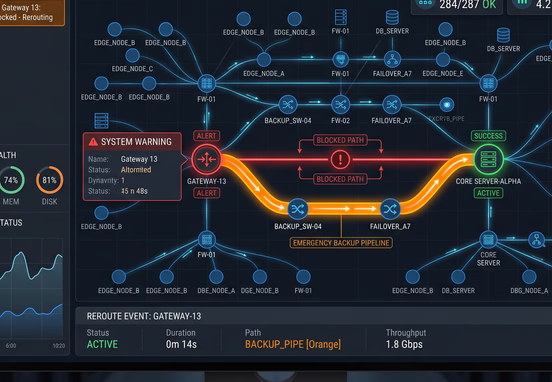
No automated flow remains perfectly functional forever without intentional fault tolerance mechanisms built directly into the system architecture. API updates, network dropouts, or unexpected data inputs can break standard trigger conditions, leaving critical operational workflows stranded in mid-transit.
- Dead-Letter Notification Loops: Establish an automated fallback route that funnels all processing errors, invalid cell formatting alerts, and routing failures into an administrative emergency channel.
- Fallback Assignee Injections: Program a generic catch-all user account or operations manager profile into your script to receive tasks when primary matching rules return zero available team members.
- Strict Mutex Locks: Prevent double-trigger errors caused by rapid data entry by building a temporary script lock that instantly sets statuses to "Processing" before firing external webhooks.
- API Rate Limit Throttling: Incorporate explicit millisecond delay buffers into your webhook distribution steps to avoid hitting the execution caps of your spreadsheet API connections during high-volume periods.
Operational Best Practice: Treat your live spreadsheet as a temporary caching layer rather than a permanent enterprise database engine. As your daily volume passes hundreds of operational rows per week, relying solely on basic plugins will incur significant resource penalties. Transitioning to dedicated custom workflow automation services ensures permanent reliability, granular security privileges, and total data control.
Transitioning from Plugins to Custom Architecture
Many teams jumpstart their automation journeys using generic visual builders or off-the-shelf integration applications to handle row listening. These choices are excellent proof-of-concept indicators for testing team adoption, but they present major scaling limitations as transaction volumes rise.
When your company scales to managing complex multi-step dependencies, cross-department handoffs, and highly sensitive customer information, you will find you have outgrown basic automation plugins. Custom web logic environments give engineering teams the freedom to use optimized code networks, advanced fallback mechanisms, and robust security walls without recurring monthly per-task costs. Moving your operational logic off a third-party framework ensures that your workflows execute perfectly every time, fully optimizing your enterprise for long-term growth.