

How to Connect a Modern Website Engine to Legacy Desktop Software

Established mid-market enterprises frequently find themselves caught in an operational tug-of-war between front-end innovation and back-office inertia. While marketing and product teams deploy modern, high-speed web frameworks to optimize user acquisition, the actual fulfillment, inventory tracking, and financial ledgers often remain anchored in legacy desktop software. These on-premise platforms—ranging from old-fashioned ERP engines and specialized local databases to localized versions of enterprise accounting software—were engineered decades ago for closed, internal corporate networks, entirely isolated from the internet.
Bridging the technical divide between a modern web framework and an on-premise desktop system requires abandoning the expectation of a clean, real-time API connection. Legacy systems lack modern endpoint listeners, run on rigid stateful operations, and are heavily protected by restrictive local corporate firewalls. Connecting these distinct generations of software requires building a secure, hybrid integration pipeline that handles data transformations, protects internal network security, and maintains ledger consistency across both environments without interrupting active operations.
Attempting to force an old desktop database to act like a modern cloud-native system will invariably cause localized system lockups, corrupted tables, and security vulnerabilities. For teams mapping out these architectural connections for the first time, establishing a clear baseline of web communications is critical. Reviewing a direct technical primer like what is an api? a jargon-free guide to web integrations helps engineers understand standard cloud-native request-response protocols before attempting to simulate or adapt those patterns for restrictive, on-premise environments.
Core Architectural Patterns for Hybrid Integration
When connecting an internet-facing website engine to an isolated desktop system, your development team must select an integration pattern that accommodates the physical limitations of the local hardware. Opening a public inbound port on a local corporate network to allow direct, external SQL queries to a production database is an extreme security hazard that must be avoided entirely. Instead, engineers utilize decoupled synchronization patterns that rely on outbound-initiated handshakes or isolated middle-tier cloud relays.
The ideal integration architecture is dictated by how data is structured within the legacy software and whether the system can support automated background services. The three primary methods for bridging these environments vary widely in processing speed, security boundaries, and developmental complexity.
| Integration Pattern | Technical Execution Mechanism | Operational Trade-offs | Ideal Use Case Strategy |
|---|---|---|---|
| File-Drop Automation | Local agent exports/imports structured files (CSV, XML, JSON) via a secure SFTP server cloud relay. | High latency (5 - 60 minutes); lowest complexity; heavily isolates local databases from the web. | Legacy inventory systems, batch financial reconciliation, and wholesale order processing loops. |
| Intermediate Cloud Staging | Web engine and local desktop agent communicate through an isolated cloud-native database or message broker queue. | Medium latency (sub-second to minutes); excellent error isolation; protects system uptime. | Multi-tier consumer booking systems, custom CRM synchronization, and client portal alignment. |
| Local API Wrapper Agent | A lightweight custom service runs on the local machine, exposing an authenticated, local API to a reverse SSH tunnel. | Near-zero latency; maximum engineering complexity; requires highly stable local internet connectivity. | High-velocity point-of-sale integrations, live dispatch networks, and real-time asset locking. |
When utilizing the file-drop pattern, developers must enforce rigid parsing boundaries to clean incoming datasets before committing them to active databases. Legacy systems frequently export formatting errors, un-escaped text variables, and broken columns that easily derail modern web frameworks. Reviewing specific data-handling strategies like 4 messy spreadsheet habits to eliminate for flawless online data imports allows your engineering teams to implement automated sanitization rules, preventing broken datasets from corrupting down-stream application environments.
Engineering the Intermediate Cloud Staging Pipeline
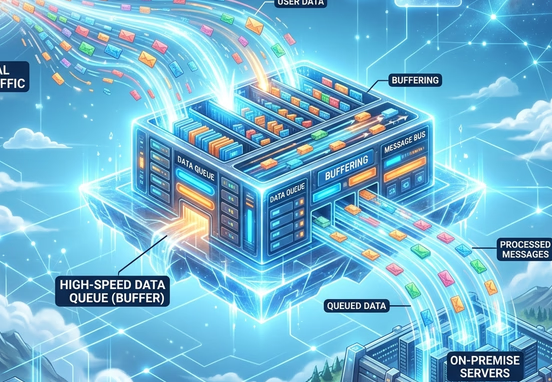
The most secure and reliable architecture for linking a modern web storefront with an on-premise desktop application involves constructing an intermediate cloud staging layer. This middle-tier environment acts as a transactional buffer, ensuring that the public-facing website and the internal desktop software never interact directly. If your local office internet drops or the desktop database enters a frozen state during an intensive reporting run, the cloud website continues to capture customer transactions without experiencing performance degradation or data drops.
The staging layer typically consists of a high-speed relational database or an asynchronous message queue hosted within a secure cloud environment. When a consumer completes an action on the web interface, the application backend writes the transactional payload to the staging layer and marks the record as queued. A lightweight daemon application installed on the local on-premise desktop server initiates an outbound network connection to the cloud staging database, extracts the queued records, transforms the data properties, and safely updates the local desktop software.
The technical workflow diagram below illustrates how an intermediate cloud relay allows data to traverse local firewall boundaries safely without exposing the internal desktop software to incoming internet exploits:
[Modern Website Engine]
          │
          ▼
(1. Generates Real-Time JSON Payload)
[Cloud Staging Relay Ledger] ◄────┐
                                  │
     (2. Local Agent Initiates)   │
     (   Outbound HTTPS Query )   │
                                  │
[Local Firewall Protection] ──────┼─────────────────────────
                                  │
                                  ▼
                    [Lightweight Local Client Agent]
                                  │
                                  ▼  (3. Transforms JSON to SQL/ODBC)
                    [Legacy Desktop Software Database]
                                  │
                                  ▼  (4. Executes On-Premise Mutation)
                    [Local ERP / Financial Ledger System]
Managing Local Data Mutations with Low-Latency Triggers
To elevate this staging architecture from slow batch processing into a responsive system that mirrors real-time performance, developers should replace scheduled time loops with event-driven notifications. When your modern website writes an actionable record to the cloud staging layer, the cloud application should instantly announce the event.
Integrating push-based communication lines via custom webhooks provides your synchronization network with the immediate data transmission required to trigger local agent executions within milliseconds, entirely bypassing the high latency and system drain associated with old-fashioned database polling routines.
Building and Hardening the Local Client Agent
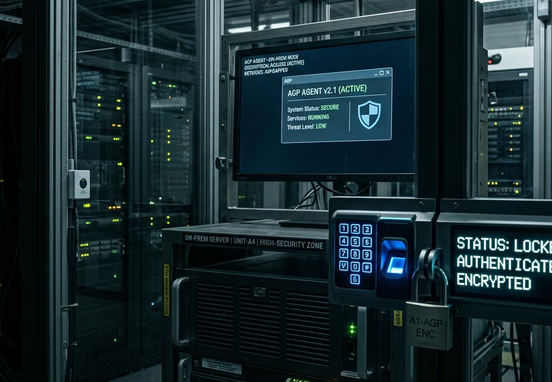
The local client agent is a proprietary background application—typically compiled as a Windows Service or a Linux daemon—installed directly on the on-premise hardware hosting the legacy desktop software. This agent serves as the intelligent translator and security sentry for your hybrid integration network. Its primary responsibilities are managing secure outbound web handshakes, parsing JSON structures into old-school database formats, and executing local programmatic validation rules.
Because the local agent interacts directly with your production desktop ledger via local ODBC (Open Database Connectivity), JDBC, or direct filesystem access, its communication paths must be heavily protected. The agent must authenticate every cloud transaction using cryptographic signature matching, ensuring malicious actors cannot manipulate the staging database to inject unauthorized data into your internal business systems.
Steps to Establish a Secure Local Connection
- Generate Cryptographic Secret Keys: Create unique, high-entropy API tokens and shared secret keys that reside strictly within the local agent's configuration files and your cloud environment variables.
- Enforce Outbound-Only Communication: Configure the local agent to pull records using outbound HTTPS requests or maintain an active, secure WebSocket connection, allowing the local firewall to remain entirely closed to incoming traffic.
- Implement Strict Field-Level Typecasting: Force the local agent to validate the exact formatting constraints required by the desktop software (e.g., maximum string lengths, strict date structures, and explicit decimal spaces) before executing local database writes.
- Incorporate Row-Level Database Locking: Configure the client agent to acquire explicit database locks on local rows during update routines to prevent concurrent desk workers from accidentally overwriting data points mid-sync.
Navigating Structural Faults, Network Drops, and Schema Clashes
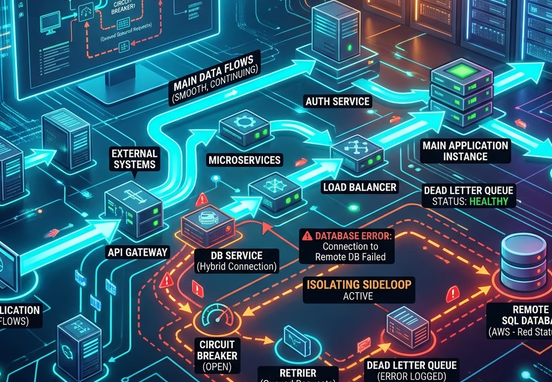
On-premise hardware is fundamentally unstable compared to isolated cloud environments. Local office buildings experience power interruptions, network drops, hardware degradation, and manual system restarts by internal employees. A robust integration pipeline must be explicitly engineered to handle these disruptions gracefully without corrupting database records or dropping customer transactions.
When the local agent encounters an error—such as a database timeout or a structural schema clash where the desktop software rejects a transaction parameter—the system must not allow the execution thread to crash. The pipeline must isolate the failed transaction, write the exception parameters to a local error log, and flag the specific record in the cloud staging layer as blocked. This approach keeps the remaining queue open, allowing your business to process subsequent orders while engineers resolve the underlying anomaly.
Developing these self-healing, defensive system boundaries requires embedding advanced error management protocols across your entire application framework. Deploying specialized code structures based on the bulletproof web pipeline: how custom error controls and smart fallbacks prevent system blackouts provides your development teams with the structural blueprint needed to isolate runtime exceptions, preserve active customer payloads within secure dead-letter queues, and execute intelligent, time-delayed retry loops automatically when local networks recover.
System Architecture Tip
Always build a comprehensive data validation layer into your cloud staging relay before data reaches the local agent. Catching missing fields, invalid characters, or structural mismatches within the cloud layer prevents the legacy desktop software from encountering unhandled fatal crashes that require manual database indexing to resolve.
Future-Proofing Hybrid Enterprise Environments
Connecting a modern website engine to legacy desktop software eliminates manual administration bottlenecks, reduces costly data duplication errors, and extends the operational life of your existing software investments. By wrapping old-desktop limitations in high-performance cloud staging layers and secure local client agents, your organization can deliver real-time digital customer experiences while protecting the absolute integrity of your internal back-office records.
As your transactional volume expands, maintaining these hybrid connections requires precise backend systems engineering, strict security compliance auditing, and continuous database performance tuning. Transitioning away from fragmented, manual data management allows your enterprise to convert legacy systems into a streamlined engine that scales seamlessly alongside your business demands.
For organizations looking to bridge the gap between modern web interfaces and legacy infrastructure safely, partnering with professional system architects is essential. Utilizing expert custom workflow and systems automation services enables your business to deploy secure, high-performance hybrid data pipelines that eliminate operational latency, safeguard proprietary data environments, and secure long-term operational independence.