

Automated Client Retention: How to Route Complaints, Escalate Tickets, and Tag VIP Clients
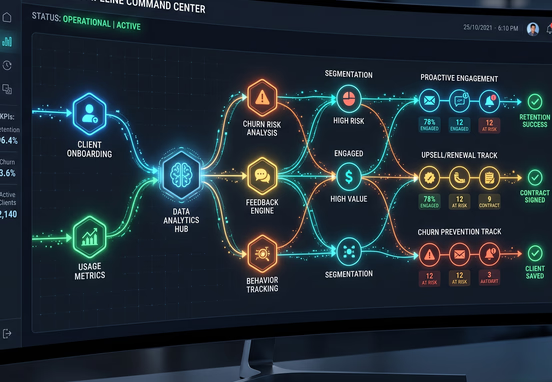
Client churn rarely happens overnight. It is the cumulative result of unaddressed friction, missed Service Level Agreements (SLAs), and critical support messages slipping through the cracks of manual organizational inboxes. When an expanding agency or enterprise relies on account managers to manually spot, evaluate, and assign incoming client complaints, response times inevitably suffer. Manual triage introduces human bias, execution delay, and catastrophic operational blind spots that modern web systems can completely eliminate. If a team member is out of the office or misinterprets a client's frustration level, a major contract renewal could be compromised before leadership even realizes an issue exists.
Replacing manual triage with strict, automated workflow pathways converts customer service from a reactive panic into a highly reliable data pipeline. By constructing custom web application logic that reads support inputs, checks live database realities, and routes tickets dynamically, organizations can defend their contract margins with absolute certainty. This shift transforms client relationship preservation from a subjective art form into a deterministic engineering discipline. This article explores the precise architecture required to automate ticket ingestion, enforce escalating safety nets, and dynamically isolate premium accounts before churn risks materialize.
Operational friction scales exponentially as a company grows its client roster. In the early stages, an agency can manage retention through raw human effort and frequent team alignments. However, once an organization handles dozens of high-value client portals across various time zones, that manual model breaks down entirely. Automated client retention loops remove the dependency on flawless human recall, establishing automated logic fences that catch administrative anomalies instantly.
Furthermore, prioritizing customer satisfaction requires a system that treats different accounts with appropriate operational urgency. While every customer deserves a functioning product or service, enterprise clients with strict SLAs require immediate, zero-latency troubleshooting. Failing to differentiate these accounts inside your communication infrastructure leads to high-value tickets getting stuck behind low-tier, non-urgent support requests, creating an unnecessary churn risk.
Ingestion Logic and Webhook Parsing
Every automated customer retention pipeline begins at the exact point of data capture. Whether a client submits a negative feedback form on a custom administrative dashboard, flags a portal transaction issue, or sends an email to an inbound ticketing alias, the metadata must be parsed immediately. Relying on standard web forms that merely trigger general notification emails creates dark data that cannot be cleanly tracked, queried, or actioned by automated routing logic downstream.
Instead, your customer portal or front-end system must transform user submissions into a structured JSON payload via programmatic webhooks. This payload serves as the single source of truth for downstream automation engines, delivering core fields like user IDs, subscription tiers, sentiment triggers, and system categories instantly. Managing these payloads at scale requires dedicated event receivers that isolate ingestion from database writing tasks, preventing lost messages during high-traffic customer events. By decoupling the reception layer from the processing engine, your platform guarantees that no customer communication is dropped, even if your main operational database experiences temporary latency or maintenance windows.
To secure these endpoints, the ingestion layer should validate payload signature headers using a shared secret hash, ensuring that malicious third-party scripts cannot inject fake support tickets into your internal management loops. Once verified, the payload format must strictly adhere to a standardized schema to ensure downstream microservices read the parameters flawlessly.
[Client Submission / Inbound Portal]
                │
                ▼
   [Webhook Ingestion Receiver]  ◄── (Decoupled Layer)
                │
                ▼
  [Validate Payload Signature]   ◄── (Shared Secret Hash)
                │
                ▼
 [Enforce Standard JSON Schema]
                │
                ▼
   [Asynchronous Background]  ───► [Downstream Microservices]
Parsing this structural footprint immediately allows backend workflows to read the payload fields asynchronously. By executing this logic within an isolated runtime environment, the system can evaluate data fields without introducing visual lag to the client interface, ensuring the customer portal remains responsive even while complex operational handling runs in the background.

Dynamic Verification and VIP Tagging Protocols
Once the raw payload lands securely at your application endpoint, the system must validate who sent it before deciding where it goes. This requires an instantaneous lookup against your central database or customer relationship management system. Hardcoding VIP routing based on a user's company domain or individual email address is a brittle approach that falls apart as organizations scale, merge, or change names over time.
A sustainable system architecture queries live database metrics to append operational context directly onto the incoming payload. To avoid bottlenecks, this lookup must fetch cached relational variables rather than executing heavy, long-running relational queries against historical transaction logs. The system checks specific transactional values to determine if the customer meets your premium tier threshold:
- Lifetime Value (LTV): Is the total historical billing greater than a preset enterprise baseline?
- Monthly Recurring Revenue (MRR): Does the active monthly retainer cross into tier-one support parameters?
- Strategic Value: Is the client flagged internally as a key account or alpha partner?
When any of these conditions return a true value, the system immediately alters the ticket metadata, injecting a high-priority flag. This automated classification bypasses the standard support queue entirely, moving the ticket straight to dedicated enterprise account teams or senior technical resources. If you are building out these ingestion paths, implementing the automated lead engine how to enrich route and onboard web leads via dynamic form logic principles can provide an excellent architectural foundation for data enrichment and structural validation.
Intent Mapping and Keyword Triage
Beyond identifying who sent the ticket, the logic must evaluate what the ticket is about without human intervention. Standard tag management models usually fail because customers rarely choose the correct dropdown category when they are upset. A user facing a severe integration block might label their problem as a "general query" simply because it was the first option visible in the form menu.
To resolve this discrepancy, custom application code should scan the raw text string for specific high-risk, churn-predictive keywords. These keywords represent immediate operational vulnerabilities that require rapid intervention from specialist teams before a minor misunderstanding turns into a canceled contract.
- Technical system failure: "downtime," "broken link," "error 500," "API failure," "data loss."
- Financial discrepancy: "double charge," "overbilled," "refund," "fraudulent," "billing error."
- Contractual risk: "cancel," "terminate," "legal," "breach," "competitor," "switching providers."
When the text processing engine registers a match on these specific arrays, it overrides the user-selected dropdown category. A ticket marked "General question" containing the text "cancel my contract" is instantly upgraded to a critical retention risk status. This deep analysis occurs within milliseconds of ingestion, completely removing human hesitation from the initial triage process.
The Risk Mitigation Routing Workflow
Once processing completes, the platform initiates structured routing pathways based on the updated classifications. The orchestration matrix directs the communication across internal messaging systems, project management boards, and support dashboards simultaneously.
- Financial irregularities route immediately to the billing department with a read-write link to the transactional log.
- System blackouts or code-level bugs trigger automated SMS alerts to on-call engineering squads to limit platform damage.
- Expressed intent to cancel initiates an urgent task creation inside the designated customer success representative's CRM queue.
Building the Automated Escalation Matrix
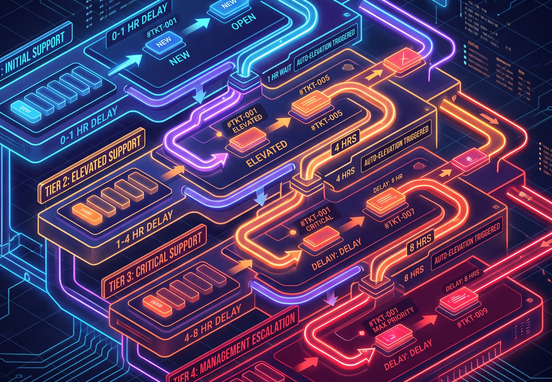
Assigning a ticket to the correct department is only half the battle. If that department is buried under a high volume of work, a critical retention ticket can still sit unaddressed until it passes the client's tolerance threshold. To stop this from happening, companies must build rigid automated escalation matrices directly into their operational systems.
This matrix uses time-delayed programmatic hooks to verify whether an internal agent has opened, claimed, or resolved the high-priority item within a predetermined timeframe. If the application detects no status change when the timer expires, the ticket moves to the next tier of leadership automatically without waiting for manual oversight.
| Priority Level | Baseline Target | First Escalation Threshold | Target Backup Action |
|---|---|---|---|
| Tier 1 VIP Risk | 15 Minutes | 30 Minutes No-Response | Push Slack alert to Director of Operations and reassign ticket owner |
| Billing & SLA Discrepancies | 60 Minutes | 2 Hours Idle | Trigger fallback webhook to create high-priority task in general manager dashboard |
| Standard System Inquiries | 4 Hours | 24 Hours Unresolved | Email automated update to user and move ticket to active triage pool |
This structure ensures no high-priority issue remains stagnant. The time delays must run on secure background worker environments to avoid locking your web servers or causing system bottlenecks during high-traffic incidents. Managing these delayed processes without breaking your core application requires an intimate understanding of background queuing mechanisms. If you are configuring these system mechanics, review our technical guide on how to add time delays to automated workflows without breaking code to maintain clean execution loops.
Scripting the Automatic SLA Recovery Protocol
When a critical system error threatens to damage a client relationship, the mitigation logic must act on multiple fronts. It should alert the internal team while simultaneously keeping the client informed to minimize friction. A silent support desk breeds client anxiety, which rapidly accelerates the decision to move to a competitor.
Using custom system scripting, you can establish automated communication nodes that trigger immediate transparent notifications. This keeps the client informed while backend teams isolate the core defect. Below is an administrative code pattern illustrating how an application evaluates incoming ticket urgency and fires off targeted API requests to update external communications.
[Incoming Ticket Data Input]
             │
             ▼
┎───────────────────────────────┒
│   Is VIP Tier AND Contains    |
|   Risk-Predictive Keywords?   |
┖───────────────────────────────┚
             │
             ├─► [YES] ──► Set Priority = 100
             │             Route to 'Executive_Retention'
             │             Execute Internal Alerts (Slack/SMS)
             │             Dispatch Client Reassurance Email
             │
             ├──► [NO]  ──► Set Priority = 50
             │             Route to 'Standard_Support'
             │
             ▼
[Return Processed Ticket Output]
By deploying automated confirmation webhooks, your application assures the enterprise client that their issue has bypassed the standard queue and is already undergoing active engineering review. This upfront communication buys your support team valuable technical execution time without aggravating the relationship further.

Mitigating System Failures and Data Losses
An automated tracking environment is only as reliable as the web architecture backing it up. If your retention pipeline relies on a chain of fragile third-party connections without built-in error containment, a single API failure can silently destroy your client retention efforts. If a key connection goes down during an active outage, critical escalation tickets can disappear entirely.
To defend your operational workflow from these scenarios, you must build explicit fallback routines. Every outbound webhook and internal API push must be designed to store data locally if the primary endpoint fails to return a clean status code. Implementing these architectural protections is detailed extensively in our review of the bulletproof web pipeline how custom error controls and smart fallbacks prevent system blackouts, which explains how to isolate integration failures before they interrupt your core operations.
Database Hardening and Long-Term Syncing
Beyond immediate error handling, your long-term retention data must integrate deeply with your broader technical systems. This prevents data silos from forming between front-of-house customer success agents and back-office engineering infrastructure.
- Maintain clear audit logs that capture every automated escalation, reassignment, and communication timestamp.
- Sync system performance issues back to your master account records so your sales teams never pitch renewals to a client dealing with active platform instability.
- Build secure, localized storage policies to archive resolved tickets without bloating active production application databases.
Deploying Custom Retention Architecture Securely
Transitioning away from manual, reactive support queues requires a deliberate overhaul of your web integrations and underlying database structures. For growing companies, relying on basic out-of-the-box support software plugins frequently results in subscription sprawl, data formatting conflicts, and a total lack of control over the customer experience data engine.
Building tailor-made automation paths gives your business full ownership over its operational data. This data can then be leveraged to train predictive retention algorithms, streamline employee resource allocation, and optimize overall customer lifetimes. If your company is currently evaluating its underlying architecture to prepare for automated scaling, selecting a high-performing workflow and systems automation service is the most efficient path to designing custom, robust business logic pipelines that protect your bottom line.
If your current systems feel fragmented, or if you are worried that your tech stack cannot support complex conditional workflows, you should perform an extensive systems diagnostic. Taking the time to execute a deep internal review using a structured software auditing 101 how to review your tech stack before hiring an agency roadmap will ensure your data structure is ready to support advanced internal routing engines.
Tip: Always run automated client retention workflows in a staging environment with simulated high-volume stress tests. This step ensures your time-delayed escalations, Slack triggers, and emergency alert channels execute reliably before exposing the logic to live production communication channels with your most valuable clients.
By combining accurate database verification, automated text parsing, and foolproof background escalation matrices, your business can build a system that actively prevents client churn. This architectural shift ensures that your most vital accounts receive high-touch care right when they need it most, completely independent of manual monitoring.