

The Lean Database: How Auto-Archiving and Clean Automation Logic Prevent Storage Overages
Unchecked data accumulation represents a silent, systemic tax on modern enterprise web applications. When production databases are treated as permanent dumping grounds for every user click, session log, and transactional line item, application efficiency deteriorates exponentially. Over time, bloated storage layers inflate infrastructure overhead, degrade index performance, and trigger massive hosting cost penalties that directly erode bottom-line profitability.
Maintaining a highly performant application layer requires a fundamental shift from static data accumulation to dynamic lifecycle management. Enterprise applications require lightweight, high-velocity operational engines rather than unwieldy storage warehouses. By implementing programmatic data tiering and automated archival workflows, businesses can enforce a lean database architecture that caps infrastructure expenses while preserving historical data availability.
Building these resilient frameworks involves configuring background optimization systems that continuously classify, migrate, and sanitize records without manual database administrator intervention. To prevent performance degradation, engineering teams frequently implement advanced workflow and systems automation services to handle data lifecycle management programmatically. This approach ensures that core production tables contain only the critical datasets necessary for immediate operational execution.
The Hidden Multi-Tier Costs of Data Bloat
Database storage overages are rarely limited to the direct fees itemized on a monthly cloud infrastructure invoice. As a relational database scales past historical performance thresholds, the sheer volume of records introduces severe computational drag. High row counts expand the depth of B-tree indexes, forcing the CPU to execute more read operations for every single lookup request.
This index degradation directly translates into increased query latency across consumer-facing web applications. When standard checkout routines or customer dashboard lookups take seconds instead of milliseconds, conversion rates drop and user frustration increases. Proactively managing these operational limits helps organizations mitigate the true cost of technical debt when to patch your website architecture vs when to rebuild before application performance craters completely.
Furthermore, bloated databases place an immense strain on RAM and system memory allocation. Production database engines rely heavily on caching mechanisms to store frequently accessed data rows directly in memory for rapid retrieval. When low-value historical data routinely pushes active operational records out of the memory cache, the engine must constantly fall back to slower disk-read operations, crippling throughput across the entire platform.
Defining the Three-Tier Enterprise Storage Matrix
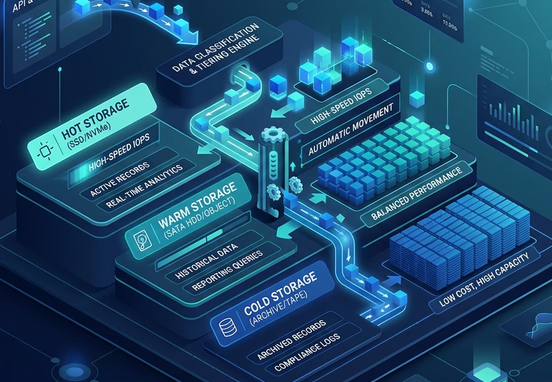
Executing a clean auto-archiving strategy requires a precise data classification matrix that evaluates records based on their operational utility and age. Treating all data points with uniform structural priority leads to resource waste and inflated hosting fees. Organizations must segregate records into hot, warm, and cold storage tiers based on real-time business needs.
| Data Tier | Operational Definition | Target Infrastructure | Target Retrieval Latency |
|---|---|---|---|
| Hot Storage | Active operational records required for immediate daily applications and checkout flows. | High-performance SSDs / NVMe arrays with maximum IOPS. | Less than 10 milliseconds. |
| Warm Storage | Historical operational records required for occasional administrative review or client reporting. | Standard cloud databases or lower-cost managed storage read-replicas. | Under 2 seconds. |
| Cold Storage | Inactive compliant records preserved solely for regulatory audits or long-term analytics. | Highly compressed object storage buckets (e.g., AWS S3 Glacier). | Minutes to hours depending on query depth. |
By maintaining this rigid separation, the high-cost production environment stays light, secure, and hyper-responsive. Data migration between these environments must be handled by event-driven logic gates that evaluate rows continuously against pre-established corporate lifecycle metrics.
Engineering the Automated Archival Logic Pipeline
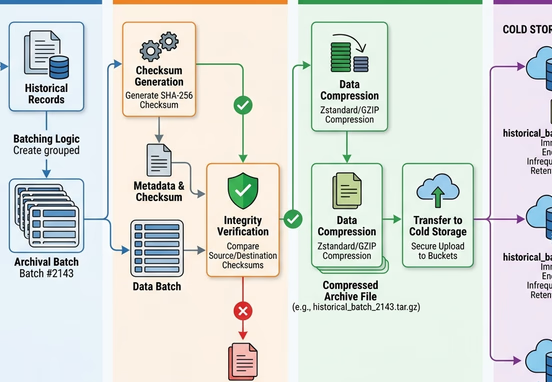
The core mechanism of a lean database architecture is an event-driven archival pipeline that safely offloads stale data rows without breaking application continuity. Hardcoding manual truncation scripts or running large, unmetered delete operations during business hours can lock up database tables, resulting in severe system outages. The archival pipeline must operate incrementally, transparently, and asynchronously in the background.
To prevent table locks and transaction timeouts, the automation script processes data in tightly controlled batches. The pipeline isolates target rows using non-blocking index scans, replicates those rows inside the designated warm or cold storage destination, verifies transmission integrity via cryptographic checksums, and then purges the original production row. This decoupled loop guarantees that active web checkout operations experience zero performance interference.
Here is the architectural data flow showing how automated logic systematically identifies, migrates, and deletes aged records from primary application tables:
[ Production DB: Hot Storage ]
              │
              ▼
   [ Automated Cron Trigger ]
              │
              ▼
  [ Batch Identification Scan ] ──► (Filter: Created At > 90 Days)
              │
              ▼
    [ Transaction Isolation ] ────► (Prevents Table Lockouts)
              │
              ▼
    [ Target Data Export ] ───────► [ Compressed Cold Storage Bucket ]
              │                                      │
              ▼                                      ▼
  [ Cryptographic Checksum ] ◄──────────────── [ Match Verification ]
              │
              ├─► SUCCESS ──► [ Purge Production Rows via Primary Key ]
              │
              └─► FAILURE ──► [ Halt Pipeline & Log System Alert ]
Implementing Clean Automation Logic for Data Sanitization
Beyond moving old records to secondary storage arrays, a lean database strategy requires continuous sanitization of ephemeral system telemetry. Web applications naturally generate massive volumes of temporary data, including transient user sessions, system error logs, tracking tokens, and raw form imports that lose all business value within days. Left unchecked, this digital exhaust can quickly outgrow actual transactional business data.
System developers must implement strict automated pruning routines that target these short-lived tables on a daily cycle. Automatically clearing out these non-essential rows prevents system error tracking tools from overwhelming storage capacity. Integrating automatic sanitization prevents bad data loops, a challenge detailed in our manual on the multi-million dollar leak how to detect system errors and automate data validation before it impacts storage.
Furthermore, clean automation logic must be applied to user-uploaded assets and attachments. Invoices, temporary calculation spreadsheets, and system-generated PDF reports should be automatically compressed and moved to low-cost asset storage layers immediately after creation. Keeping these binary large objects (BLOBs) entirely out of the primary relational database schema is a critical requirement for maintaining high-speed indexing.
Preserving Relational Integrity Across Distributed Tiers
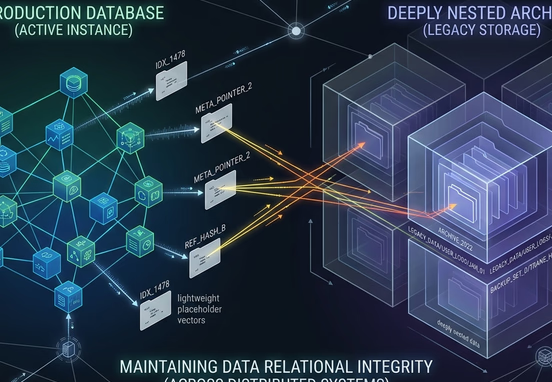
The primary engineering obstacle when implementing an auto-archiving pipeline is maintaining absolute relational integrity across the entire application ecosystem. In a highly normalized relational database, rows inside the primary order table are deeply intertwined with customer profiles, inventory tracking ledgers, and shipping logs. Blindly deleting an old order row will trigger catastrophic foreign key constraint violations, breaking downstream application logic.
To bypass this issue without leaving bloated records inside the production database, engineering teams must implement soft-archival schemas or polymorphic data references. When a hot record transitions to a cold state, the automation engine can replace the highly detailed relational row with a lightweight placeholder vector. This vector points directly to the external compressed archive file, allowing the application to locate historical context on the rare occasion a user requests it.
Database Integrity Tip: Always decouple foreign key constraints between primary operational assets and volatile log tables. If a log table relies on a hard foreign key constraint tied directly to the main customer table, you will be blocked from archiving old log files without also deleting the entire customer account record.
Backup Optimization and Disaster Recovery Alignment
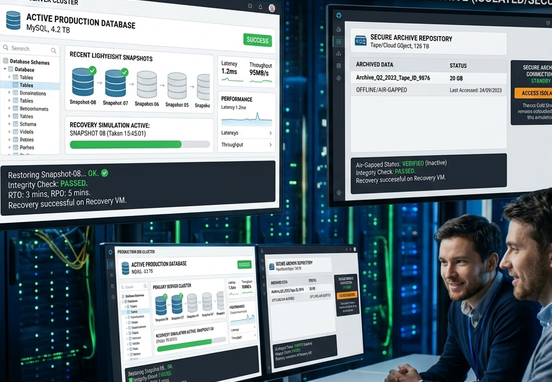
A massive, bloated database introduces severe risks into an organization’s disaster recovery planning. As data size expands, the time window required to complete a full snapshot backup extends from minutes to hours. In the event of a critical server failure, restoring a multi-terabyte production database from raw backup files can cause prolonged system downtime that costs the business thousands of dollars per hour.
Maintaining a lean data layer naturally reduces backup window duration, aligning perfectly with systems designed to how to automatically back up business data and system logs every night without degrading system performance. Because the cold storage tier is inherently static and securely isolated, it does not need to be repeatedly backed up during daily incremental cycles. The active production backup remains incredibly small, allowing for near-instantaneous recovery speeds during an emergency event.
Additionally, this tiering model dramatically lowers the cost of maintaining high-availability database mirrors. Multi-region replica servers can be provisioned with significantly smaller disk sizes, as they only need to synchronize the active hot data tier. This optimization slashes infrastructure multiplication costs across global cloud deployments while reinforcing overall network resilience.
Operational Monitoring and Long-Term Capacity Planning
Enforcing a permanently lean database environment requires continuous visualization of storage growth patterns across all active application tables. Without real-time alerting mechanisms, a sudden influx of automated web bot traffic or an unthrottled loop within a legacy application can completely fill available disk space in a matter of hours, causing immediate database crashes.
- Configure Automated Disk Space Alerts: Establish threshold notifications that trigger when active production storage utilization passes 75% capacity, allowing for preemptive scaling or archiving.
- Monitor Index-to-Data Space Ratios: Track the physical disk footprint of application indexes relative to raw data rows to quickly identify when indexes require defragmentation.
- Execute Automated Table Space Audits: Schedule weekly system scripts to calculate which specific tables are expanding at the fastest velocity, catching optimization anomalies early.
- Track Archive Pipeline Success Rates: Monitor the automated background logs to confirm that batch archiving sequences are completing successfully within their allocated time windows.
- Simulate Historical Data Restoration: Periodically test the pipeline’s ability to pull archived records out of cold storage object buckets and display them inside the administrative portal to ensure historical availability remains fully functional.
Achieving Perpetual Data Efficiency
Transitioning to a lean database model safeguards an enterprise application against performance degradation and unpredictable operational expenses. By enforcing automated data tiering, programmatic pruning, and strict index optimization, engineering teams transform their storage infrastructure from a liability into a highly efficient asset.
Ultimately, keeping a database lean is an ongoing operational commitment that pays massive dividends in application speed, security, and financial efficiency. Organizations that prioritize clean data lifecycle automation ensure their digital platforms remain fast, agile, and fully optimized to support continuous corporate expansion.